Unlock a world of possibilities! Login now and discover the exclusive benefits awaiting you.

Analytics & AI
Forums for Qlik Analytic solutions. Ask questions, join discussions, find solutions, and access documentation and resources.
Data Integration & Quality
Forums for Qlik Data Integration solutions. Ask questions, join discussions, find solutions, and access documentation and resources
Explore Qlik Gallery
Qlik Gallery is meant to encourage Qlikkies everywhere to share their progress – from a first Qlik app – to a favorite Qlik app – and everything in-between.
Qlik Community
Get started on Qlik Community, find How-To documents, and join general non-product related discussions.
Qlik Resources
Direct links to other resources within the Qlik ecosystem. We suggest you bookmark this page.
Qlik Academic Program
Qlik gives qualified university students, educators, and researchers free Qlik software and resources to prepare students for the data-driven workplace.
Recent Blog Posts
-
July Qlik Digest
Welcome to the July Qlik Digest, where you can find all of Qlik’s latest updates. This month, Gartner Magic Quadrant for Analytics & BI Platforms is ... Show MoreWelcome to the July Qlik Digest, where you can find all of Qlik’s latest updates. This month, Gartner Magic Quadrant for Analytics & BI Platforms is out, Qlik Talend Cloud is finally generally available (GA), and more!
It Never Gets Old. Qlik is 14 Years a Leader.
By teaming up with Qlik for all your data analytics needs we hope you can make better decisions to drive your business forward. Download this year’s Gartner Magic Quadrant report to learn why Qlik was recognized as a leader for the 14th year in a row.
Qlik Talend Cloud is Now Generally Available!
Qlik Talend Cloud is built on Qlik’s cloud infrastructure platform with the focus on managing the data integrity of your AI, analytics, and business operational projects. It offers a unified package of data integration and quality capabilities that enable data engineers and scientists deploy AI-augmented data pipelines that deliver trusted data wherever it’s needed.
Qlik’s new blog highlights how we are bringing a new wave of innovation to the market. Read The Blog
Move to Cloud Program for On-Prem Customers
Still using Qlik on-prem? Now is your chance to migrate to Qlik Cloud Analytics with this limited time ‘Move to Cloud’ program for customers on maintenance.
Contact your account manager to hear more about this exclusive program today.
Learn more about the benefits of Qlik Cloud Analytics here.
Connect with Fellow Qlik Users at Meetups!
Qlik Meetups are informal gatherings created by Qlik users for Qlik users to connect, share ideas, and learn new skills. Expand your network, discover best practices, and get inspired to take your Qlik skills to the next level. Find a Meetup today
No local Meetup? Let's change that! Create a Meetup group – we'll provide the tools and funding to get you started. Contact QlikMeetups@qlik.com
Summer is best time to LEARN!!
We are making it easy for you to catch up and learn what you need to improve your Qlik skills easier in the summer. Join any of our public courses and enjoy a 30% discount or get a fabulous 20% discount on your Qlik Continuous Classroom subscription by booking your spot on our website.
Don't miss this chance to learn and save!
-
【9/18(水)- 20(金)開催】オンラインイベント - IT トレンド EXPO 2024 Summer
Qlik は、「IT トレンド EXPO 2024 Summer」の「AI・業務自動化」エリアに、バーチャルブースを出展します。 年間約 2,000 万人に活用されている IT 製品の比較サイトの IT トレンドは、3 日間の日程で「IT トレンド EXPO 2024 Summer」を開催します。著... Show MoreQlik は、「IT トレンド EXPO 2024 Summer」の「AI・業務自動化」エリアに、バーチャルブースを出展します。
年間約 2,000 万人に活用されている IT 製品の比較サイトの IT トレンドは、3 日間の日程で「IT トレンド EXPO 2024 Summer」を開催します。著名な特別ゲストによる基調講演をはじめ、エリア別に多数の企業のバーチャルブースを展開する国内最大級のオンラインイベントに、ぜひご参加ください。
Qlik は、AI 戦略をサポートするデータ統合・データ品質・分析ソリューションのリーダー企業として、「AI・業務自動化」エリアにバーチャルブースを出展します。ぜひ、Qlik バーチャルブースにお越しください!
Qlik は、Gartner® Magic Quadrant のデータ統合ツール・アナリティクス / BI プラットフォームの分野で、リーダーの 1 社に評価されました。
【開催概要】
日時:2024年 9月 18日(水)– 20日(金)
会場:オンライン
参加費:無料
主催:株式会社 Innovation & Co. -
Take control of your App versions using Qlik Application Automation and GitHub
On a previous blog post, I shared a nifty tool that helps you introduce version control into your development workflow. I invite you to read about tha... Show MoreOn a previous blog post, I shared a nifty tool that helps you introduce version control into your development workflow. I invite you to read about that and follow the gitoqlok and its latest updates.
In this post we are going to talk about a simpler, less cumbersome way to implement a simple version control system using Qlik Application Automation and the Github connector blocks. So, if you are someone who ends up with dozens of apps named v1, v2, v3, etc... then we're about to end that.
The setup is pretty simple, a Qlik Application Automation, a Github account, and we connect the two!
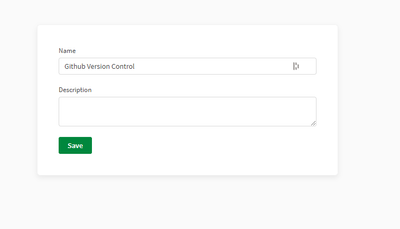
Let's start with with creating the Qlik Application Automation on your Qlik Cloud tenant. Head over to the Add New, then create a new Blank automation,
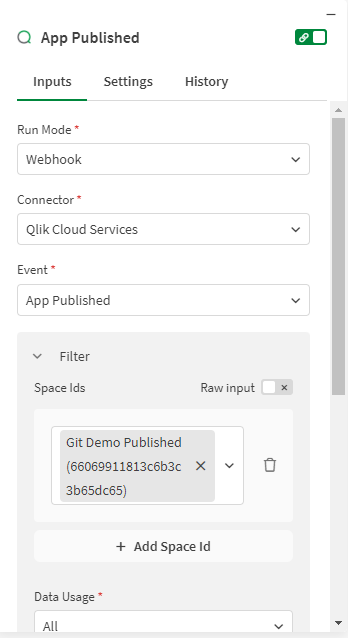
Once created, you'll be able to configure the Start block. Here, we are offered different ways to kick off the automation and in our case, we will use the WebHook run mode in order to hook into the Qlik Cloud Services.
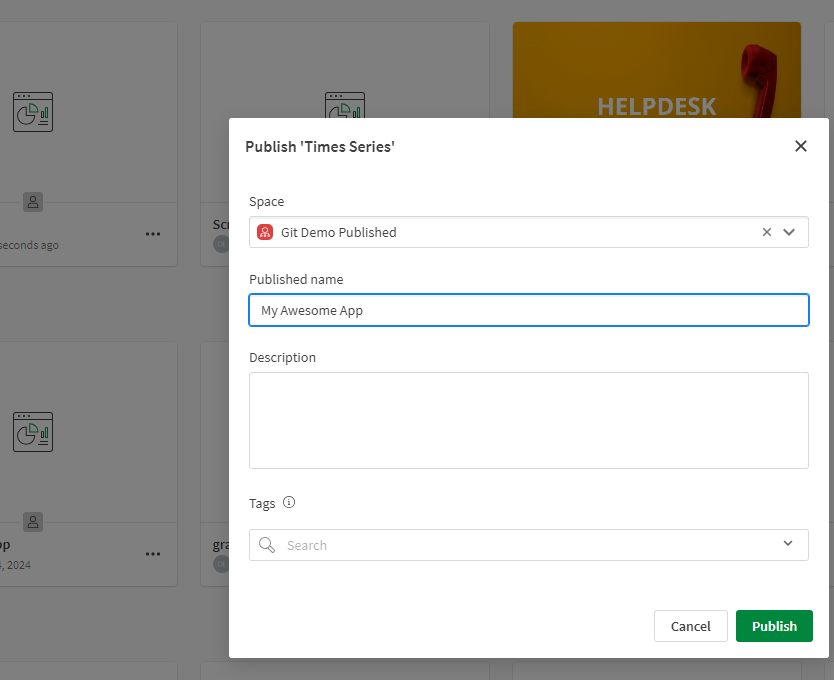
We would like to run the automation once an App is published in our managed space. Take a look at the image below and change it to suit your needs.
Our next block is the Get Space block, you will find it under the Qlik Cloud Services section. This will allow us to find our "Git Demo Published" space and grab its ID. This is easy to do using the Do Lookup function.
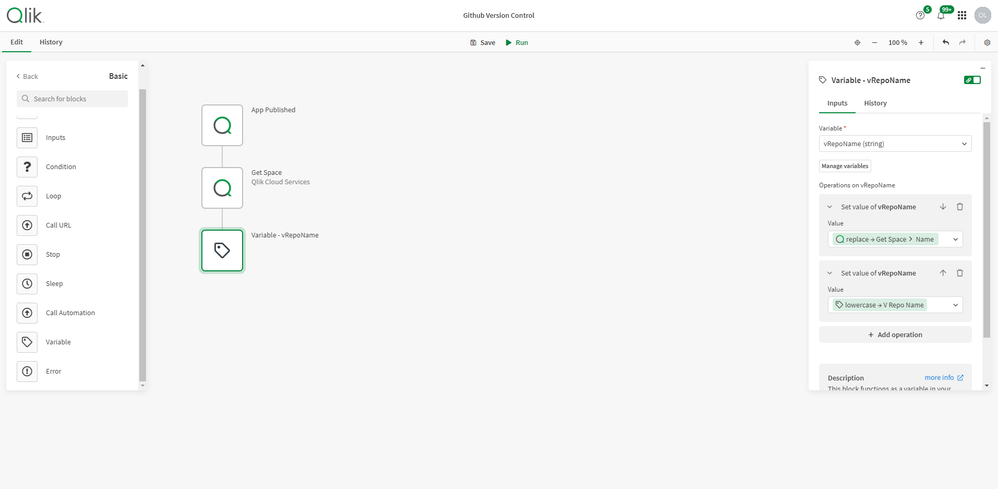
Since Github doesn't allow space characters in Repository names, we will mitigate that by creating a variable which we will use to format the Space name into "git-demo-published". Notice on the image below that we use the Replace and Lowercase text functions.
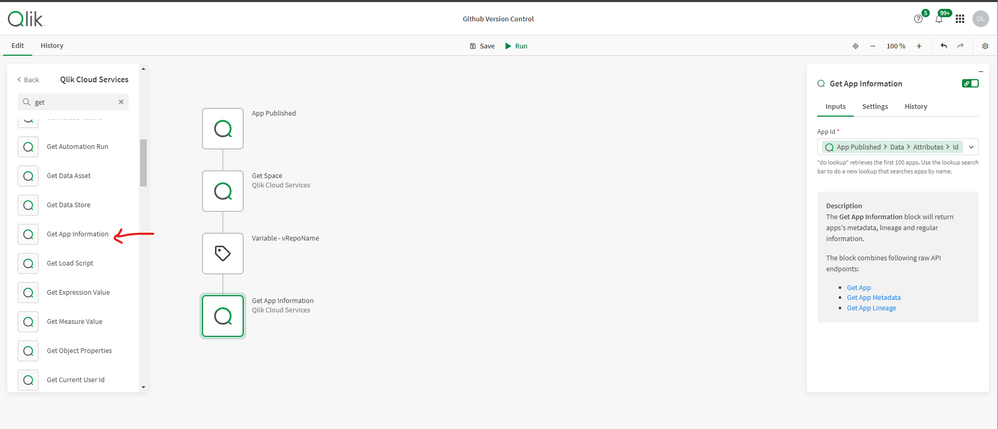
Great, we now have our space information. Next, let's use the Get App Information block to grab the published app's id as shown below.
Our next step is to actually Export the App (think of this as right clicking on the app in the hub and exporting it).
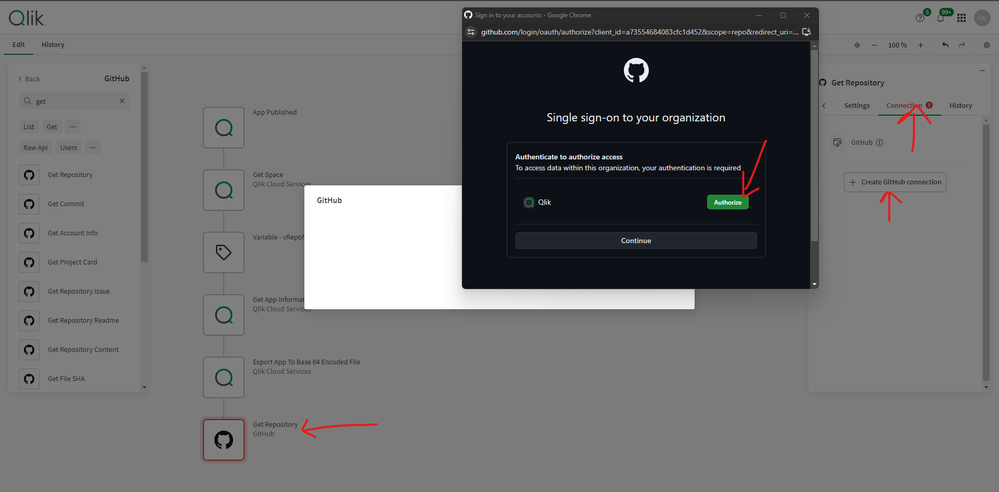
Alright, we now have a nicely formatted space name that will be used as our Repository name, and we have our "published" app exported and ready to go.Our final step is to connect to Github. Qlik Application Automation makes this easy, just grab the Get Repository block under the Github section and drop it in. You will need to first authorize Qlik, so do this under the connection tab.
In the Inputs tab, enter your username and drop in the Variable we previously created as the name of the Repo.
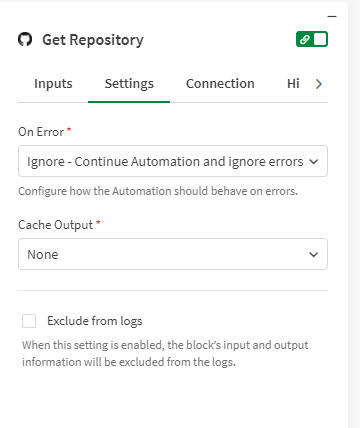
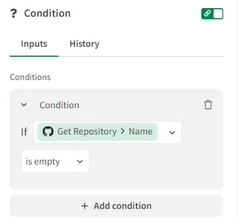
Under Settings, make sure to change the On Error dropdown to "Ignore - Continue Automation and ignore errors". This will allow us to bypass a limitation set by Github for when a Repository is not yet created.Next, using the convenient Condition Block, we will check to see if the returned value from the Get Repository block is empty (i.e, there is No repository under that name). If YES, we create it using the Add Repository block
After the condition is met (or if we already have the existing repo), we can now push our App to github.
We will use the Create of Update File content Block to push the App qvf into the main branch. Take a look at the screenshot below to review the settings. Notice that we used the App name from the previous Get App Information block and appended it with the .qvf extension.We're all done with the Automation. You can save it now and head over to your App to publish it and test.
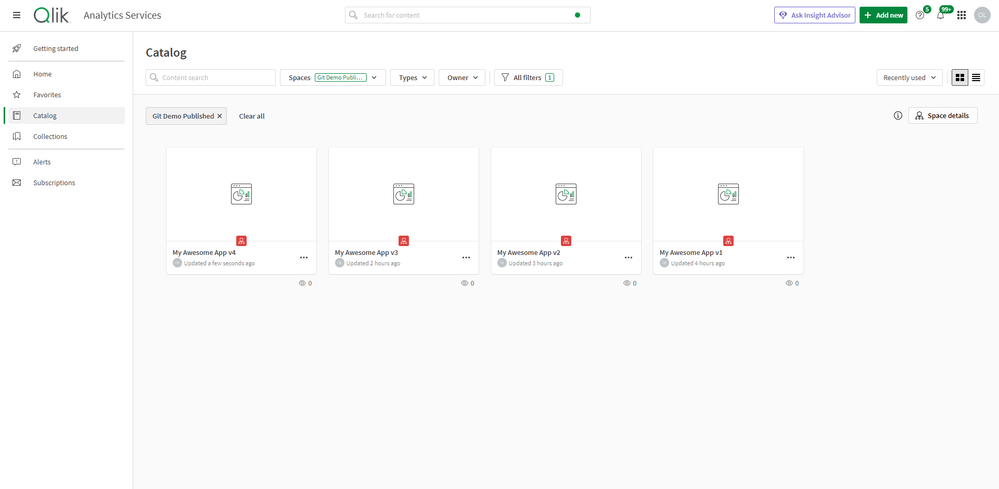
Publishing the app will trigger the automation to run, and if we now head over to Github, we can see that a new Repository names "git-demo-published" (our formatted Space name) has been created, and a new commit was added with our first version of the App as a qvf.
After publishing a second time, we notice a new commit with the second version of the App.
By using this workflow, we can guarantee that our app versions are automatically stored for us to got back to if needed or to collaborate with other team members in a more efficient way.
I hope you found this blog post helpful, let me know if the comments below if you have any questions!
Ouadie
-
【開催レポート】 第4回 Qlikデータソン @ 日比谷国際ビル
【開催レポート】 第4回 Qlikデータソン 7月18日、第4回Qlikデータソンを開催しました。今年も日比谷国際ビルに朝から約60名のQlikアプリ開発者が集まり、そのQlikスキルを競いました。このブログでは、第4回Qlikデータソンの様子をお届けします。 なお、受賞者のQlik Sens... Show More【開催レポート】 第4回 Qlikデータソン
7月18日、第4回Qlikデータソンを開催しました。
今年も日比谷国際ビルに朝から約60名のQlikアプリ開発者が集まり、そのQlikスキルを競いました。
このブログでは、第4回Qlikデータソンの様子をお届けします。
なお、受賞者のQlik Senseアプリは、日本語デモアプリサイト「Qlik Showcase」に一般公開されています。
また、7月30日(火曜) 14時より「Qlikデータソンアフター配信(視聴申込はコチラ)」と題して、アワード受賞アプリのご紹介などデータソンの様子をライブ配信でお届けさせていただきます!
■朝10時、日比谷に集合!そしてデータソンスタート!まず、Qlikの中嶋よりご挨拶とデータソンの課題やデータに関する説明がありました。昨年同様、参加者には課題やデータに関する情報は一切事前に告げられておらず、このとき初めて課題とデータが提供されました。
また、今回は前回とは異なる審査方法を用いました。
まず、一次審査としてQlikメンバーが成果物の机上評価を行い、ファイナリストを選出しました。
その後、ファイナリストが最終プレゼンテーションを行い、それを見た会場の参加者投票によりアワード受賞者を決めました。
データソン課題参加者は「イギリスに300以上の店舗を持つ食品小売企業のデータアナリスト」という設定で、自社の在庫と販売データの実績値と予測値を渡されて、それらを分析をすることになりました。
これまでデータソンでは主に販売系のデータのみを取り扱ってきましたが、今回は在庫のデータもあったためユニークかつ新鮮味がありました。
普段在庫データを取り扱う機会がない参加者は、課題とデータの読み取りに苦戦している様子も見受けられました。要件の一例:
"売上金額、売上損失、有効在庫比率、在庫高、手持ち在庫日数について、今週(第23週)の状況と前週(第22週)の状況を比較する。"
"店舗ごとの在庫状況(不足または過剰)を分析したい。"
"第24週に在庫が不足しそうな店舗とその商品について、店舗間で商品の移動を行うことで売上損失を削減できるか検討したい。"難しい課題やデータに対してたった4時間半の作業時間しか取れないにもかかわらず、皆さん素晴らしいQlikアプリを開発しました。
■Qlik Analytics責任者Brendan GradyによるQlik最新情報データソンの成果物を提出した後は、Qlik社のAnalytics部門責任者Brendan Gradyによる最新情報のプレゼンテーションがありました。
非構造化データを分析し、生成AI(人工知能)で回答を作成する新製品「Qlik Answers」など、従来のBIに囚われないQlikの進化を参加者へお届けしました。
また、参加者からは活発に質問が寄せられました。新生Qlikへの期待と受け止めます!■一次審査結果発表!
Brendanの発表中、Qlikメンバーによる一次審査が終わりました。
厳正なる審査のうえ、選ばれた11組のファイナリストです。・ユーザー部門
A-53 大桃 慶之
A-54 cat’s hands
A-03 Team Asagao
A-47 宮﨑 卓矢
A-12 谷町ジャンクション・パートナー部門
A-24 さわやか
A-16 島嵜 雄志
A-15 インサイトクラン
A-59 吉野 智士
A-20 チーム同期
A-39 ISL■いよいよファイナリストによるプレゼンテーション発表!
16時からは、ファイナリスト11組によるプレゼンテーションが行われました。持ち時間は1チーム7分間!
全11組の発表が終わった後、参加者の皆さんによる投票が行われました。
■緊張の瞬間!アワード授賞式!そして懇親会へ...長い一日が終わり、懇親会がスタート!乾杯の挨拶は、プリセールスチームのAPACディレクター 「アームス」ことArmstrong Mejillaが日本語で行いました。
そしてしばし歓談の後、いよいよアワード発表の時間がやってきました!Qlikの濱野と中嶋が壇上にあがり、パートナー部門、ユーザー部門それぞれの賞を発表しました。
アワード受賞者は以下の通りです。
*チーム参加の場合はチーム名を、個人参加の場合は個人名を記載しています。パートナー部門
・審査員特別賞: 吉野 智士様(アシスト)
・優秀賞: 島嵜 雄志(ビジネスブレイン太田昭和)
・最優秀賞: インサイトクラン(日立社会情報サービス)
ユーザー部門
・審査員特別賞: cat’s hands(富士通)
・優秀賞: 宮﨑 卓矢 様
・最優秀賞: Team Asagao(アステラス製薬)
受賞されたみなさま、おめでとうございます!
受賞者のQlik Senseアプリは、日本語デモアプリサイト「Qlik Showcase」に一般公開されています。ぜひ一度覗いてみてください!また、7月30日(火曜) 14時より、「Qlikデータソンアフター配信(視聴申込はコチラ)」と題して、アワード受賞アプリのご紹介など、データソンの様子をお届けさせていただきます!
■さいごに
昨年の第3回に引き続き、第4回Qlikデータソンも、参加者の皆さまのQlik LOVEがあふれた素晴らしい会となりました。
ご参加いただいた皆様、本当にありがとうございました。
今後ともQlikをどうぞよろしくお願いいたします。 -
Qlik ユーザーミートアップ開催報告
当日は、用意していたお席・お水が途中で足りなくなるほど多くの方にお越しいただきました。また一番乗りの方は島根からお越しいただきました。 Qlik アドボケイト渕様の司会進行のもと、Qlik Luminary 萬様のご挨拶で始まりました。続いて、Qlik アドボケイトの中西様からの Qlik Co... Show More当日は、用意していたお席・お水が途中で足りなくなるほど多くの方にお越しいただきました。また一番乗りの方は島根からお越しいただきました。
Qlik アドボケイト渕様の司会進行のもと、Qlik Luminary 萬様のご挨拶で始まりました。続いて、Qlik アドボケイトの中西様からの Qlik Connect 参加報告です。「そもそもオーランドってどこにあるの?」「Qlik Connect とは?」というところから始まり、このためにご用意いただいた写真やスライドを使って、現地で受けた様々な刺激や体験を交えながら Qlik Connect の全体像をご紹介いただき、最後は「来年は皆さんもご一緒に!」という呼びかけで締めくくっていただきました。
続いて Qlik から「Qlik Talend 最新情報アップデート」として、新しく Qlik ファミリーに統合された Talend 製品の紹介を中心に「質の高い分析のためには、安全に使える質の高いデータが必要」という考えから Qlik がデータ統合までポートフォリオを広げていることをあらためてご説明しました。多くの参加者の方はQlik Sense ユーザーということもあり、Talend やデータ統合製品にあまり馴染みのない方もいらっしゃいましたが、「新生 Qlik」をあらためてご認識いただけたかと思います。
今回の事例発表は株式会社イノベーション吉河様から「25年の Excel 体制から脱却なるか!?BI ツール導入奮闘記」と題して、Qlik アドボケイトの福田様と横尾様の強力なサポートのもと、わずか半年で Qlik Sense をロールアウトしたノウハウを共有いただきました。
最後のパートは、萬様と Qlik アドボケイト&幹事メンバー荻本様より、4つの課題を共有いただきました。これらはミートアップやアンケートを通じて集められたユーザーの声であり、「データエンジニアリング」「SaaS マイグレーション」「Qlik の機能」「組織と環境」という課題があるとのことです。今後はそれぞれの課題を深掘りしていく分科会を発足させてよりユーザーの皆さんと議論を深めていきたいとのことでした。
その後の懇親会では今日の内容を肴にユーザー様同士の親交を深めていただきました。また、会の最後には「弊社濱野による一本締め」という(社員にとっても)貴重な場面を目撃いただきました。
ユーザーミートアップ大阪
初の大阪開催は参加率9割近くと、皆様の大きな期待を感じられました。
司会進行は、Qlik アドボケイト松田様です。なんとこのためにわざわざ九州からお越しいただきました。松田様からは「ぜひ九州でも開催を!」とのリクエストをいただきました。前向きに検討します!
そして、東京から萬様、中西様にお越しいただき、関西のユーザー様へのご挨拶と Qlik Connect 参加報告をいただきました。もちろん Qlik も東京から参加の中嶋が鈴木と一緒に Qlik アップデートをご紹介しました。
大阪での事例発表は2社の登壇となりました。関電サービス株式会社の Qlik アドボケイトの田村様と服部様からは実際の画面を見せていただきながらのご紹介をいただきました。そしてこちらも東京からお越しいただいた Qilk アドボケイト土井様が、富士通の「One Data」の取り組みをご紹介されました。
その後の懇親会では、ユーザー様同士の活発な意見交換が行われ、語り足りない有志による2次会、3次会も開催されたとのことです。
あらためて今回ご参加いただいた皆様、発表いただいた皆様、ありがとうございました!Qlik としてもぜひこの盛り上がりを加速させていきます。次回のミートアップは 12月を予定していますが、まずは 10月2日 Qlik AI Reality Tour でお会いしましょう!
-
From A to Z – 100 new Qlik Talend Cloud connectors
Just a reminder that you can find a complete list of every source, target and application that any Qlik product or service currently supports on the C... Show MoreJust a reminder that you can find a complete list of every source, target and application that any Qlik product or service currently supports on the Connector Factory page.
Qlik Data Integration
Qlik Talend Cloud
In conjunction with the release of additional data loading capabilities and a simplified user experience for the new Starter Edition of Qlik Talend Cloud, we’ve doubled the number of SaaS application connectors for Qlik Talend Cloud to over 200. With business users demanding data from more and more sources, having so many off-the shelf Qlik Talend Cloud connectors eases the burden on the Data Engineer as there is less need for custom, manually developed connectors.
From Accelo (Professional Services Automation) to Zift (channel marketing & management), Qlik Talend Cloud can now access data in a variety of new applications that are focused on CRM & Sales, Communication & Messaging, E-Commerce, Finance & Accounting, Marketing & Advertising, Project Management & Collaboration, Social Media and more.
You can find the complete list of every SaaS application that Qlik Talend Cloud now supports here
Qlik Data Analytics
Updated Marketo Connector
This connector has been updated to be based on ODBC instead of JBDC. It also now supports authentication using either username/password or OAuth.
NOTE: The previous JDBC-based Qlik Marketo connector will continue to be supported until end of July 2024.
New version of Direct Access gateway
The Qlik Data Gateway - Direct Access allows Qlik Sense SaaS applications to securely access behind-the-firewall data, over a strictly outbound, encrypted, and mutually authenticated connection.
We just released Direct Access gateway 1.6.7 which, in addition to several bug fixes to improve stability and security, introduced the following enhancements:
- Automatic allocation of ports used for process isolation.
- Enhanced metadata paging in the select dialog for large schemas when using the SAP SQL connector.
- A mechanism for recovery of missing or corrupt data chunks, including new configuration parameter for the size of the encrypted reload cache.
Qlik Application Automation
We continue to add more connectors and capabilities to our no-code cloud service that streamlines workflows between SaaS applications and Qlik Cloud.
New Connectors
Amazon DynamoDB - This connector enables your automation to interact with the fully managed proprietary NoSQL database that’s offered as part of the Amazon Web Services portfolio. You can find out more about the connector in this blog.
Updated Connectors
Microsoft Teams - it is now easier to use the Send Message block to direct messages.
Salesforce - New blocks have been added to this connector to perform incremental custom queries.
Qlik Cloud - The List Stories and Replace Bookmark blocks have been added to this connector along with a block to update the Bookmark properties.
Qlik Platform Operations - The Get Analytics and List Analytics blocks have been added to this connector along with an update to the space description.
-
SDG Dashboard Public Health
SDG Dashboard Public Health Bitmetric After winning the Qlik Academic Program datathon by Jesse van Haasteren, we were excited to continue and w... Show MoreSDG Dashboard Public HealthBitmetric After winning the Qlik Academic Program datathon by Jesse van Haasteren, we were excited to continue and work on the SDG insights. Because we had a fantastic dataset we could continue building apps around several topics. This one is about “Public health” and we shared it with the platform "data on the earth" but we would like to present is as well here in the Qlik Gallery (we also will publish the winning app from the datathon).
Discoveries
Overall conclusion: Discussing public health involves a great amount of factors. As seen in this application many countries are affected by disease(s), food shortages, food overconsumption, alcohol consumption, mental state, water and sanitation and energy consumption. With this dashboard we hope to give more insight in problems evolving around public health over different countries and time periods. We can see for example that there are still a lot of cases of overweighted people but also cases of undernourishment, shifting this to the center of a balanced state would be the ultimate challenge but also a great goal to achieve in the future. Also the occurence of different diseases could be lowered. To our biggest surprise we saw that the amount of tuberculosis cases is overwhelmingly large.
Impact
It made us realize that we must protect the world, our children and be careful with our beautiful earth!
Audience
For any person that is interested in the SDG goals.
Data and advanced analytics
We got strong insights of things we didnt know, like the effect of safe water supplies, or HIV, and Malaria but also that tubercolosis is on the rise. It made us aware of things we didnt know. But also think of the problem about alcohol consumption. We loved working it and Jesse and I learned a lot from this work.
-
Leadership Standards Automated Reporting
Leadership Standards Automated ReportingC40 CitiesProvides a two-page personalized compliance report for each member city which can be sent to city of... Show MoreLeadership Standards Automated ReportingC40 CitiesProvides a two-page personalized compliance report for each member city which can be sent to city officials. Compliance data is taken from our database and the report is assembled by an automation.
Discoveries
Qlik Sense can handle our compliance rules easily. They are applied as a color code for every item.
Impact
Compliance reports are a easily generated. We were able to substitute NPrinting with Qlik Cloud Reporting.
Audience
Business Planning & Reporting, City Liaisons. Almost 100 distinct reports are generated in five different languages.
Data and advanced analytics
Reports can be generated in minutes and as often as needed from our Salesforce data.
-
Another successful Datathon by Anurag University
Anurag University's Data Analytics Club organized a Data Hackathon as part of Tech Hack #3. This event aimed at enhancing students' technical skills i... Show MoreAnurag University's Data Analytics Club organized a Data Hackathon as part of Tech Hack #3. This event aimed at enhancing students' technical skills in Data Analytics. The hackathon commenced on 28th June till 30th June 2024.
Total number of participants in this hackathon were around 600 and from Anurag University, 7 clubs were actively involved including DAC, IoT, Web Club, Android Club, Drone Club, ML & AI Club. Under the data analytics theme, the name of the competition was called " Data Hack" and 25 teams participated under this theme. Around 90 participants worked on Qlik Sense under the data analytics theme.
Prior to the event, the bootcamp on Qlik Sense was led by Prof. Sumitra Pundlik, Qlik Academic Program Educator Ambassador for 2024. The session covered essential topics designed to equip participants with foundational knowledge and practical skills in data analytics, focusing on the utilization of Qlik Sense.
Throughout the day, participants engaged in collaborative efforts to brainstorm ideas, develop prototypes, and implement solutions. Mentors, seasoned professionals from diverse backgrounds, provided invaluable guidance and support to the teams. Their expertise spanned various fields including data analytics, software development, and project management, ensuring that teams received comprehensive assistance tailored to their specific needs.
The hackathon progressed with multiple evaluation rounds designed to assess the progress and viability of the solutions being developed. Judges evaluated teams based on criteria such as innovation, feasibility, scalability, and technical execution. Participants received constructive feedback aimed at refining their approaches and enhancing the quality of their solutions.
-
Qlik Cloud 6月の新機能
プラットフォームナビゲーションの変更 画面左上の新しいナビゲーションメニューをクリックすると、どこからでもアクティビティセンターにアクセスでき、スムーズに画面移動ができるようになりました。 あらかじめ管理コンソール>設定>機能コントロールの「新しいプラットフォームナビゲーション」をオンにする必要があ... Show Moreプラットフォームナビゲーションの変更
画面左上の新しいナビゲーションメニューをクリックすると、どこからでもアクティビティセンターにアクセスでき、スムーズに画面移動ができるようになりました。
あらかじめ管理コンソール>設定>機能コントロールの「新しいプラットフォームナビゲーション」をオンにする必要があります。
画面左上のナビゲーションメニューをクリックするとアクティビティセンターが開き、移動先を選択できます。アプリを開いている時も同様です。
分析の新機能
新しいアプリケーションバー
アプリケーションバーが新しくなり、アプリに関する各種操作とシートに関する各種操作の指定が変わりました。バーにあったブックマークはアセットパネルに移動しました。
チャートのメニューの非表示
チャートを右クリックして表示されるメニューを、非表示とすることができるようになりました。
オンデマンド表形式レポート
アプリの分析画面で、Web ブラウザから直接レポートをダウンロードすることができるようになりました。アプリの現在の選択状態と、ユーザーのアクセスレベルを引き継いだデータでレポートが作成されます。レポートフィルターは適用されません。
- あらかじめレポートのテンプレートをオンデマンド用にアクティブにしておく必要があります。共有スペースの編集可能、管理スペースでの所有者、管理可能、操作可能の権限が必要です。
- レポートの生成には、共有スペースで閲覧可能以上、管理スペースでビューの制限以上の権限が必要です。
- レポートサービスのサブスクリプションを消費します。
その他
- Visualization bundle のピボットテーブルでセルの値をコピーできるようになりました。
- アプリの自動化に Amazon DynamoDB コネクタが追加されました。
- Marketo コネクタ(ODBCベース)が追加されました。
データ統合の新機能
Qlik データゲートウェイーデータ移動 新バージョン(2023.11.23)
Snowflake にメタデータスキーマがない場合、作成されます。
その他、いくつかの問題が解決されています。
プロジェクト レベルのデータ ビュー
プロジェクトパイプラインの画面から、各タスクのメタデータとデータサンプルを表示できるようになりました。複雑なデータ パイプラインのトラブルシューティングが効率化することができます。
この機能を使用するユーザーには、データ接続が存在するスペースで [データ表示可能] 、データ プロジェクトが存在するスペースで [表示可能] の役割が割り当てられている必要があります。
レプリケーションプロジェクトの新しいターゲット
データレプリケーションタスクを作成する際に、Snowflake、Databricks、Microsoft Fabric、Google BigQuery、Amazon Redshift、Azuzre Synapse Analytics のクラウドデータウェアハウスターゲットを選択できるようになりました。
AI によるSQL アシスタント
SQL アシスタントが Qlik Cloud Data Integration のデータ変換機能の一部として利用可能になりました。SQL アシスタントは、SQLクエリをより簡単に記述できるco-pilot機能です。実施したい変換を事前言語で記述すると、AI SQLアシスタントがSQLクエリを作成します。
初期リリースはアメリカ、アイルランド、フランクフルト、シドニーで利用可能です。

-
Bookmarks
Bookmarks allow users or developers to save a selection state in an app. They are useful when a user would like to save their selections in an app to ... Show MoreBookmarks allow users or developers to save a selection state in an app. They are useful when a user would like to save their selections in an app to view later or to share with others. For developers, bookmarks are useful if you would like to redirect a user to a specific sheet, with selections, when they open an app.
Let's begin by looking at how to create a bookmark. First, go to the sheet that you would like to bookmark and make sure your selections are already made. Then click on Bookmarks in the toolbar.
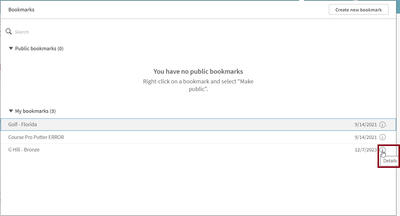
The Bookmarks window will open showing any bookmarks that have already been created. There is also a Create new bookmark button that can be clicked to create a new bookmark. After clicking the Create new bookmark button, the Create bookmark dialog window opens.
Here is where you can give the bookmark a name, add a description, and set some optional settings. By default, the Save sheet location is checked. This will save the sheet you are on when you created the bookmark and will navigate the user to this sheet when the bookmark is applied. The Save layout option will save the layout of the sheet and will apply that layout when the bookmark is applied. This is useful if you have made any layout changes on the sheet, such as expanding a pivot table or sorting a chart and want the bookmark to maintain the layout. The last option is to Save variable state in bookmarks. This option will save the current state of any variables when this bookmark is created. Once the bookmark is created, the user can use it at any time to return to the bookmarked state.
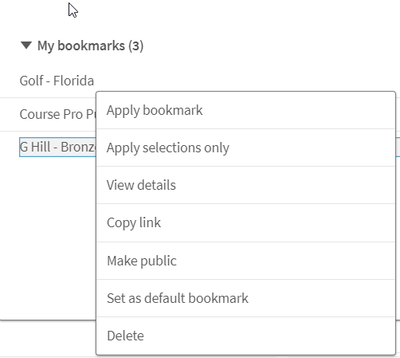
Let’s look at some other options that are available when you right click on the name of a bookmark.
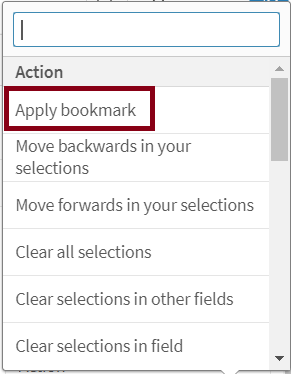
- Apply bookmark – will apply bookmark selections and layout and clear any previous selections.
- Apply selections only - will just apply the selections of the bookmark to the app, clearing any previous selections. It will not apply any layout settings if they were saved with the bookmark.
- View details – will show the details of the bookmark.
- Copy link - will copy the URL for the bookmark so that it can be shared with others. Note, the bookmark will need to be made public before it can be shared. If you make a bookmark public, anyone can see and use it and you are no longer the owner, unless it is made private again.
- Set as default bookmark - will redirect users to the sheet, layout and selections that are saved in the bookmark when the app is opened (instead of the app overview).
- Delete – will delete the bookmark.
There are also many ways to apply a bookmark. A bookmark can be applied from the app overview by clicking Bookmarks or the toolbar of a sheet. A bookmark can be indirectly applied by using a button, for instance, and setting the action to apply the bookmark.
Bookmarks can also be used in set analysis expressions and applied to a visualization. In the expression editor, the bookmark can be inserted as seen below or can be used by name.
Example expressions using the bookmark name:
These expressions will apply the bookmark to the chart, much like when you use set analysis.
A bookmark can be edited if the name, description, or selections in the bookmark need to change. There is no longer the need to delete and create a bookmark if a change needs to be made to the selections. To edit a bookmark, click on the Bookmarks button in the toolbar and then click the Details icon next to the bookmark you would like to edit or right click on the bookmark and select View details.
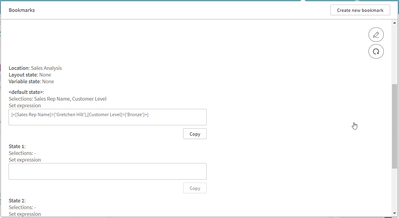
From the details view, you can select the edit icon to make changes to the name or description of the bookmark. Once done, you can click the check mark to stop editing or the update icon to also update the bookmark with the current selections.
Also note that possible alternate states are visible when editing a bookmark. If there were selections made in these states when the bookmark was created, they will be visible here as well. Users have the option to copy the set expression for the bookmark if they would like to use it elsewhere in the app.
Bookmarks are a great tool for your own personal use but also for collaboration. They are easy to create and edit and take the legwork out of remembering what selections were applied when you want to return to a previous viewed state or share an insight with a colleague. Check out Qlik Help to learn more.
Thanks,
Jennell
-
映えるダッシュボードを作っていますか?
Qlik のビジュアライゼーションはここ最近大きな進化を遂げました。Qlik Senseの最新機能を使えばユーザーをぐぐっとひきつける魅力的なダッシュボードを作り出すことができます。もちろん、エクステンション開発やHTML/CSS/JavaScripptの記述は不要!すべてQlik Senseの標準... Show MoreQlik のビジュアライゼーションはここ最近大きな進化を遂げました。Qlik Senseの最新機能を使えばユーザーをぐぐっとひきつける魅力的なダッシュボードを作り出すことができます。もちろん、エクステンション開発やHTML/CSS/JavaScripptの記述は不要!すべてQlik Senseの標準機能だけで実現できます。
下記のアプリケーションは標準機能100%で開発しています。
エクステンションなど使用しなくても、ご覧の機能で、自由なデザインのダッシュボードを作ることができます。今回のWebセミナーではこのようなアプリを作成するための映える機能とテクニックを一気にご紹介しました。
特にレイアウトコンテナーを使用すると自由でおしゃれなシートデザインが可能となります。
- グリッドにかかわらず、オブジェクトを自由形式で配置できます。
- オブジェクトは、重ねたり、積み上げたりできます。
- オブジェクトは条件によって、表示・非表示を切り替えることができます。
Webセミナーではさまざまなデザインのアプリケーションの例もご紹介しています。
セミナーの動画・資料はこちらからご覧いただけます。
【緊急企画】映えるダッシュボードを作ってますか?~ Qlik で作成する驚くほど美しいデータ分析~
冒頭の動画でご紹介しているアプリのメニューによる画面切り替え部分のみ含んだサンプルアプリを添付します。ご参考にしてください。
-
Summer is the best time to... LEARN!
Discount inside Catching up and learning what you need to improve your Qlik Sense skills is always easier in the summer. Our course catalog is evolvin... Show MoreDiscount inside
Catching up and learning what you need to improve your Qlik Sense skills is always easier in the summer.
Our course catalog is evolving, and we will stop offering some of our courses that will only be available for private training. If you are interested in any of these courses, I recommend you book your spot today because you won’t see them again:
- QlikView Designer
- QlikView Developer
- Qlik Sense for QlikView Developers
- Big Data Solutions with Qlik Sense
- Qlik Geoanalytics
- Embed Analytics with Qlik Sense APIs
- Foundations of Qlik Data Integration
Plus, if you join any of our public courses during July and/or August, this year comes with a reward! You can enjoy a 30% discount by booking your spot on our website and using the code CLASSROOM30 at checkout.
Don't miss this chance to learn and save!
-
Goodbye Qlik Continuous Classroom, hello Qlik Learning!
Discount inside Not everything good has to end—it can transform! We’re saying farewell to Qlik Continuous Classroom and welcoming Qlik Learning, the n... Show MoreDiscount inside
Not everything good has to end—it can transform! We’re saying farewell to Qlik Continuous Classroom and welcoming Qlik Learning, the new self-paced learning platform from Qlik that combines content from Qlik and Talend to give you the best learning experience possible.
But Qlik Continuous Classroom isn’t leaving without a special farewell offer: get a fabulous 20% discount on your subscription if you purchase it before August 30th. Search your subscription and use the coupon discount code SELFPACED20 at checkout.
The best part? When it’s time to say goodbye to Qlik Continuous Classroom, your subscription will automatically transfer to the new platform, letting you enjoy all its benefits without interruption.
Decide now and save.
Don’t miss out on this opportunity!
-
June Qlik Digest
Welcome to the June Qlik Digest, where you can find all Qlik’s lates updates. Qlik Connect took place this month, we announced two exciting new solut... Show MoreWelcome to the June Qlik Digest, where you can find all Qlik’s lates updates. Qlik Connect took place this month, we announced two exciting new solutions, and much more!
Qlik Announces Qlik Talend Cloud and Qlik Answers!
We recently announced two new groundbreaking solutions at Qlik Connect!
- Qlik Talend Cloud delivers AI-ready data seamlessly. It is our new flagship offering, combining the best functionality of Qlik Cloud Data Integration, Talend Cloud, and Stitch Data.
- Qlik Answers is a plug-and-play, Generative AI-powered Knowledge Assistant that provides business users with personalized, contextually relevant answers to questions sourced from carefully curated unstructured content.
Check out what Tech leaders have to say about these new releases: Read The Press Release
Trusted Data: The Foundation of AI
On June 26h, join Qlik and Tim Zhou, Managing Director of AI at Accenture for a no-nonsense discussion about how to ensure you have the proper data foundation to put AI into practice. Alongside our host, renowned AI expert Ronald van Loon, we will discuss:
- The critical role of trusted data in AI success
- Practical strategies to build and maintain a solid data foundation
- Real-world examples of organizations driving AI with trusted data
Don't miss this opportunity to accelerate your AI journey by building the data foundations for success.
View The Qlik Connect Live Stream
Qlik Connect has officially come to an end, but you and your colleagues still have the chance to watch the livestream on-demand.
Curious what to expect while watching? First, you’ll get the inside scoop on Qlik’s vision, product roadmap, and outlook. Then, Qlik Executives, partners, customers, and industry insiders will dive into the best practices and applications for data, analytics, and AI that will make you a data dynamo. Finally, you’ll explore out-of-this-world insights with the former director of the James Webb Space Telescope.
The opportunities for excitement are endless, you won’t want to miss this!
Have you heard the news?
Qlik Learning has launched a super exciting deal for you:
30% discount on public training courses (discount coupon: CLASSROOM30)
20% off on Qlik Continuous Classroom subscriptions (discount coupon: SELFPACED20)
We've made it super easy for you to grab these amazing deals - just use the discount coupons on our website
-
Talend Data Fabric - Upgrade Notification, Java 17 compatibility for Talend 8 R2...
To our Talend 8 Customers, To enhance both your security and Talend experience, Java 17 will be the only supported Java version for future updates to ... Show MoreTo our Talend 8 Customers,
To enhance both your security and Talend experience, Java 17 will be the only supported Java version for future updates to Talend Studio and the following supported applications.
- Talend Studio
- Talend Administration Center
- Talend Data Preparation - (client managed installation)
- Talend Data Stewardship - (client managed installation)
- Talend SAP RFC Server
- Talend Semantic Dictionary
- Talend Identity and Access Management
Note: this upgrade does not impact execution of your artifacts that continue to support Java 8 or 11.
Previous versions of Java will no longer be supported by the above application when electing to upgrade to R2024-05. We are giving you this advanced notice to ensure you can plan this upgrade and take time to review your current Java environment. Java 17 support was first introduced with the R2023-10 release.
By giving this advanced notification, we are delighted to be able to reach a point of maturity where we can fully support best practices with dependencies and third-party libraries and be proactive in addressing CVEs to deliver constant improvement to the Talend Studio platform.
Compatibility Documentation:
For further questions please contact Qlik Talend Support and subscribe to the Support Blog for future updates.
Thank you for choosing Qlik,
Qlik Talend Customer Success
-
Get ready for the Simplified Authoring Experience in Qlik Sense SaaS
BackgroundAt Qlik, we continuously conduct user studies and interviews in order to improve our products. As a result, we took the initiative to build ... Show MoreBackground
At Qlik, we continuously conduct user studies and interviews in order to improve our products. As a result, we took the initiative to build out a fresh new authoring experience. As a Qlik Sense SaaS user, this may be no surprise, as you’ve likely seen announcements on the new features and improvements.
With Simplified Authoring, we set out to improve the first-time user experience, but as you’ll see, it also offers tremendous value for more experienced users. Enhancements are specifically targeted around creation of charts, exploring data, defining properties, and filtering.
You may recognize some of the concepts within Simplified Authoring from Knarr Analytics, which was acquired by Qlik in 2020, with mastermind Speros Kokenes leading R&D efforts. Knarr technology was also utilized to deliver Collaborative Notes, released in Qlik Sense SaaS last year.
The Simplified Authoring experience provides fast access of the most common creation elements, including properties, so all components will not be visible by default. However, the Advanced Authoring experience is just a click away for those who prefer the classic look and feel or need the full set of properties.
Fields and selection
Through the field panel, it’s now possible to expand and see the individual field values. Along with the values, you’ll also see a frequency count and a nice histogram. The fields include a symbol indicating whether it consists of strings, numbers, dates, or geographic values.
Based on customer feedback , we’ve changed the behavior of values, so you can now make selections while editing. You no longer have to switch back and forth to view mode to set the selection. The selection is indicated in the fields panel (note the indicator showing the selection when the field is collapsed) as well as the selection bar.
Data Properties
We’ve moved the data panel to the left, making it closer to the fields and charts. There are also multiple drop zones for dimensions and measures. You can decide whether to use the field as dimension, as a measure, or let Qlik Sense suggest on best use.
Visualization Properties
For your convenience, an auto chart is created by default upon entering the Simplified Authoring experience. The Autochart changes as you drop measures and dimensions as it chooses the most suitable visualization. If preferred, you can use the visualization properties to override and pick another chart. The panel holds a subset of all the most commonly used charts.
Note: Charts have different characteristics, so when switching between charts, different property options will be available.
Filters
The filter section is completely new. It provides chart-level filtering, which is practical, for instance, when you want to exclude a single dimension value. Chart filtering can also be done with set analysis, which very is powerful but may be too complicated for the casual user.
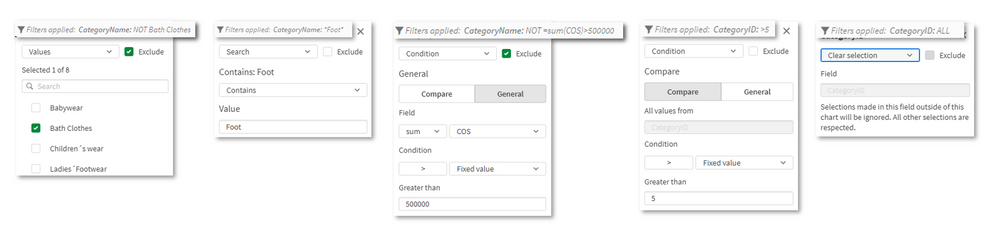
When a filter is applied, the footnote automatically shows a description of the filter. There are five types of filtering, which can be used to include or exclude field values:
- Pick dimension values
- String search for values
- Numeric comparison of values
- Numeric comparison based on an expression on another field
- Clear selection, where the chart ignores the current selection
The filters are only visible in Simplified Authoring and not Advanced Authoring. Under the hood the filtering is applied directly on the hypercube. We recommend you use either chart filtering or set analysis, but not both at same time.
Presentation Properties
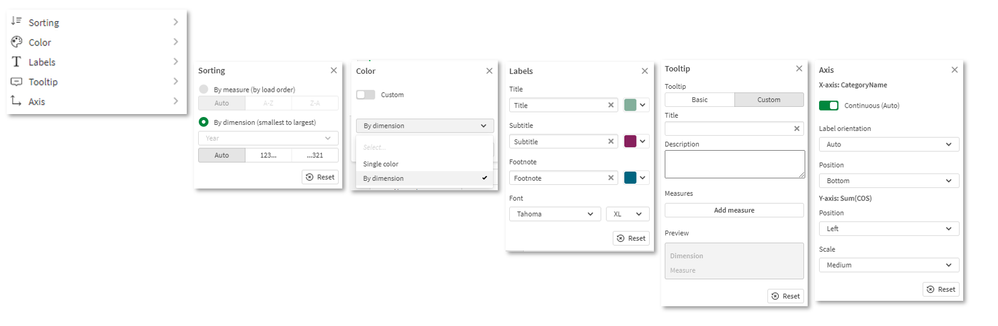
The final panel, presentation properties, provides fast access to the most common settings for sorting, coloring, labeling, tooltips, and axis. It’s worth mentioning that the label styling now includes font size, color, style, and also font family, which has been requested by users like you. Moving forward, we will expand labeling capabilities.
Data Table
When we studied Qlik Sense SaaS usage data, we noticed that most users created a table with many fields, then after some time, removed that table. We understand the table was most likely used to inspect data. Therefore, when developing Simplified Authoring, we incorporated a data table with all fields to the bottom of the interface. Because it is not part of the canvas, the data table can be used as an aid in data discovery and as a reference when building out the dashboard. The table can be sorted, and yes, you can make selections on field values.
Smart Grid
We have also upgraded the grid. You’ll notice the “+” buttons to right and bottom, which allow users to create new objects with a single click. You can drag the borders to resize two charts simultaneously. On the top left, you can use the handle to drag objects into new positions, maintaining the size when possible.
Feedback
We had customers and partners trying out the new authoring experience during development and the response has been great so far. Here are some comments from participants in our early access program:
- Finance customer: “It's easy to understand and I really like the filter chart part. Toggling between charts to quickly test visualizations. The data preview is awesome!”
- Large retail customer: “The experience is very good, it will really help less experienced users a lot.”
- Partner: “Love the new layout, especially removing the complexity of set analysis. Nice job R&D”
What's next
As of July 5th, you can ask your tenant admin to turn on Simplified Authoring in the management console. In mid-August, the new authoring will go-live as the default experience for everyone using Qlik Sense SaaS. Simplified Authoring will be enhanced over time with additional improvements. We will continue to measure success and perform user studies to guide the development.
Available resources:
-
Qlik、14 年連続でリーダーの 1 社に!「2024年 Gartner® アナリティクス / BI プラットフォームの Magic Quadrant™」(Q...
ブログ著者:Chris Powell 本ブログは「Being a Leader Never Gets Old: Qlik is named a Leader in the 2024 Gartner Magic Quadrant for Data Analytics and Business Inte... Show Moreブログ著者:Chris Powell
本ブログは「Being a Leader Never Gets Old: Qlik is named a Leader in the 2024 Gartner Magic Quadrant for Data Analytics and Business Intelligence」の翻訳になります。太陽が降り注ぐ米国フロリダ州オーランドで開催した Qlik Connect での素晴らしい体験を振り返ると(もっと適切な言葉があるかもしれませんが)、興奮と誇りに満ちています。
今年の Qlik Connect は、格別なイベントとなりました。当社の強固なデータ基盤である Qlik Talend Cloud や、多種の非構造化データソースから生成された質問にパーソナライズされた適切な回答を提供する新しい知的アシスタントの Qlik Answers など、強化された Qlik の製品ポートフォリオをお披露目することができたからです。
この発表は、AWS および国連との新たなパートナーシップの発表との相乗効果で、この分野における当社の優位性を真に物語っています。こうしたエキサイティングな開発の詳細は、6月 4日のブログでご紹介しています。Qlik は、データサイエンスの統合における前進や大規模言語モデルの統合における先駆的な取り組みを結合し、企業の開発者やアナリストにとって非常に強力な AI を活用したデータから意思決定までのワークフローを提供します。
イベントが開催されたオーランドは、バスケットボールチームの「オーランド・マジック」を初め、Qlik の顧客でもあるディズニーの「マジック・キングダム」まで、“マジック”で知られる地です。そして、当社が別の“マジック”を祝うのに適した前兆とも思える地でした。Qlik は、「2024年 Gartner® アナリティクス / BI プラットフォームの Magic Quadrant™」で、リーダーの 1 社として位置づけられたのです。
「2023年 Gartner® データ統合ツールの Magic Quadrant™」でリーダーの 1 社として評価されましたが、これに続き、アナリティクス / BI プラットフォーム部門でもリーダーの 1 社に評価されたことは、大変喜ばしいことです。今回で 14 回目の快挙を達成することができました。詳細なレポートは、こちらからダウンロードできます。これは、当社のイノベーション、卓越性、そして顧客のビジネス成果の向上に対する当社の継続的な取り組みが評価された非常に意義深いものだと思います。
12 ヶ月にわたるイノベーション
この 12 ヶ月間、当社は Talend 社の買収を完結するなど、数々の重要な変化を経て、現在は分析 / BI プラットフォームとデータ統合ツールの両分野で、収益上位 5 社の 1 社となっています。この成果は、当社の揺るぎない市場での位置付けと成長を明確に示しています。
比類なき柔軟性が、Qlik の卓越した特長の 1 つだと個人的には思っています。これは、顧客からも頻繁に強調いただいている特長です。AWS / Google Cloud / Microsoft Azure / Alibaba Cloudでも、Qlik はすべての代表的なクラウドプラットフォームでシームレスに動作します。
Gartner 社の Magic Quadrant™ において、データ統合およびアナリティクス / BI プラットフォームの両分野でリーダーの 1 社として評価されたことは、当社の強力な機能と柔軟性を証明するものだと思います。
「2024年 Gartner® アナリティクス / BI プラットフォームの Magic Quadrant™」レポートを見る
Gartner, Magic Quadrant for Analytics and Business Intelligence Platforms, Kurt Schlegel, et al, 20 June 2024
GARTNER is a registered trademark and service mark of Gartner, Inc. and/or its affiliates in the U.S. and internationally, and MAGIC QUADRANT is a registered trademark of Gartner, Inc. and/or its affiliates and are used herein with permission. All rights reserved.
Gartner does not endorse any vendor, product or service depicted in its research publications, and does not advise technology users to select only those vendors with the highest ratings or other designation. Gartner research publications consist of the opinions of Gartner’s research organization and should not be construed as statements of fact. Gartner disclaims all warranties, expressed or implied, with respect to this research, including any warranties of merchantability or fitness for a particular purpose.
-
【新着レポート】Qlik、14 年連続で BI 市場のリーダーの 1 社に!
生成 AI がすべてを変えたこの年に、トレンドを先取りして先手を打つためにイノベーションを起こしてきた Qlik がリーダーの 1 社という地位を維持できたのは、大変光栄なことです。 Qlik の長期的ビジョン、強力な実行力、顧客中心の姿勢が、14 年連続でリーダーの 1 社に評価された理由です。本... Show More生成 AI がすべてを変えたこの年に、トレンドを先取りして先手を打つためにイノベーションを起こしてきた Qlik がリーダーの 1 社という地位を維持できたのは、大変光栄なことです。 Qlik の長期的ビジョン、強力な実行力、顧客中心の姿勢が、14 年連続でリーダーの 1 社に評価された理由です。本レポートでは、細部にわたる主要メーカーのレビューとともに、BI 市場全体の概要をご紹介しており、多くの企業から自社に適した BI ソリューションの比較検討に利用されています。ぜひ、本レポートをご確認ください。
- 市場における評価 - Qlik は AI 向けのデータと分析のみに注力し、高度に統合された最高水準のツールで、市場で新たな道を切り開いています。
- エンドツーエンドのデータおよび分析 - 分析と AI プロジェクトに対応するデータ基盤は、これまで以上に重要となっています。Gartner 社が評価したとおり、Qlik 製品は他社を圧倒する機能を提供しています。
- クラウドやアプリケーションに依存しない - 大手企業が独自のスタックやポイントソリューションを推進する中、Qlik はマルチクラウド / マルチデータ / マルチ AI で、貴社のハイブリッド戦略の促進をサポートします。
「Gartner® アナリティクス / BI プラットフォームの Magic Quadrant™」で、Qlik が 14 年連続でリーダーの 1 社に位置付けられている理由とは?無料のレポートで、その理由と BI 市場の全容をご確認ください。
今すぐレポートを見る -
Do More with Qlik - Art of the Possible, Embedding Qlik, Capabilities Recap and ...
Video Resources mentioned in video: Do More Previous Webinars:https://www.youtube.com/playlist?list=PLW1uf5CQ_gSo8GzlcFKAjIxLfFETDECcK Do More Tips ... Show MoreVideo
Resources mentioned in video:
Do More Previous Webinars:
https://www.youtube.com/playlist?list=PLW1uf5CQ_gSo8GzlcFKAjIxLfFETDECcKDo More Tips and Tricks Edition
https://www.youtube.com/playlist?list=PLW1uf5CQ_gSqF5bcmbBrk1q7Q4-h899V1** Embedding using qlik-embed **
Discovering the new qlik-embed library:
https://community.qlik.com/t5/Design/Discovering-qlik-embed-Qlik-s-new-library-for-Embedding-Qlik/ba-p/2141202Silent Auth using qlik-embed:
https://community.qlik.com/t5/Design/Silent-Auth-using-qlik-embed-and-OAuth/ba-p/2451292** Embedding other Qlik APIs **
Insight Advisor API integration:
https://community.qlik.com/t5/Design/Using-Insight-Advisor-API-in-your-Web-App/ba-p/2420280AutoML Real-Time API integration:
https://community.qlik.com/t5/Design/Exploring-Qlik-AutoML-Real-time-Predictions-API/ba-p/2128483** Creating extensions & Embedding using Qlik’s other libraries: Enigma, Nebula, Picasso **
Enigma Basics:
Part 1: https://community.qlik.com/t5/Design/Interacting-with-data-using-Enigma-js-Hypercubes-and-List/ba-p/1970913Nebula & D3.js to build a custom extension: https://community.qlik.com/t5/Design/Using-Nebula-js-amp-D3-js-to-build-a-visualization-extension-for/ba-p/2050662
Nebula.js to build a custom extension: https://community.qlik.com/t5/Design/Using-Nebula-js-to-build-a-visualization-extension-for-Qlik/ba-p/2003140