Unlock a world of possibilities! Login now and discover the exclusive benefits awaiting you.

Analytics & AI
Forums for Qlik Analytic solutions. Ask questions, join discussions, find solutions, and access documentation and resources.
Data Integration & Quality
Forums for Qlik Data Integration solutions. Ask questions, join discussions, find solutions, and access documentation and resources
Explore Qlik Gallery
Qlik Gallery is meant to encourage Qlikkies everywhere to share their progress – from a first Qlik app – to a favorite Qlik app – and everything in-between.
Qlik Community
Get started on Qlik Community, find How-To documents, and join general non-product related discussions.
Qlik Resources
Direct links to other resources within the Qlik ecosystem. We suggest you bookmark this page.
Qlik Academic Program
Qlik gives qualified university students, educators, and researchers free Qlik software and resources to prepare students for the data-driven workplace.
Recent Blog Posts
-
Write! Plan by Inform
Write! Plan by InformInform Data https://www.write.biFinancial planning extension with writeback capabilities in Qlik. Forecasting, Budgeting, What-... Show MoreFinancial planning extension with writeback capabilities in Qlik. Forecasting, Budgeting, What-If-Scenarios, Workflows, Approval processes. Costs-, Sales-, Financial-, Personnel planning, etc. Write! Plan allows financial planning in Qlik You can create budgets, scenarios, forecasts for different types of plans: costs-, sales-, financial-, personnel planning, etc. With a multitude of different distribution algorithms and calculation strategies, we fulfill your requirements in simple and effective planning! While many planners are still trying to master challenges arising from tedious Excel reports, this extension allows you to use all the relevant data for optimal planning in one click.
Discoveries
Write! allows for detailed planning on different levels, easy adaptation of reference data, rapid performance of top-down and bottom-up planning, seasonal arrangement according to reference levels, automatic rewriting of databases, effortless adding of new elements or weighting factors.
Impact
Quick and easy data entry, not bound to specific use cases. It can be used for costs-, sales-, personell-, fincancial planning, etc., full native integration in Qlik Sense, enterprise security and governance, no duplication of master data storage, no duplication of data maintenance, low cost.
Audience
Finance, Sales Operations, Marketing Operations managers, analysts
Data and advanced analytics
Write! Plan is a simple input option for planning data that contains complex planning functions. The high level of user-friendliness and intuitive operation enables enormous time savings in the manual consolidation of planning data and in the daily work. This allows you to completely eliminate the need for external tools, such as Excel, in the planning process, and makes planning, budgeting, and forecasting much easier, more accurate, and more flexible.
-
BOS Explorer™
BOS Explorer™Blue Orbit SolutionsBOS Explorer is a Self-Service Accelerator for Qlik Sense business users. It provides four powerful yet easy to use p... Show MoreBOS Explorer™Blue Orbit Solutions BOS Explorer is a Self-Service Accelerator for Qlik Sense business users. It provides four powerful yet easy to use pre-built dashboards to speed up the process of data discovery. It consists of following extensions to automate integration of BOS Explorer Analysis tools into any Qlik Sense application: BOSToolsConfiguration, BOSToolsIntegration, BOSListbox Features: Accelerator for Qlik Sense - Qlik Sense Accelerator for simplified self-service for non-technical users Integrates with any Qlik Sense Applications - Integrates with your Qlik Sense Applications in minutes to explore data Ready to use Visual Analysis tools - Suite of powerful and easy to use Visual Analysis tools to perform data discovery Enhances User Experience - Enhances Qlik Sense user experience and empowers users to intuitively interact with data
Discoveries
»Increased user adoption »Consistent user experience »Simplified data exploration »No development required
Impact
Significant development time savings (30%+) and Increased end user productivity.
Audience
Business managers, analysts within any line of business.
Data and advanced analytics
-
Line Charts and how they represent data
For my last blog entry, we went over bar Charts and how they are used to show data, that entry can be found here. Continuing our coverage of the diffe... Show MoreFor my last blog entry, we went over bar Charts and how they are used to show data, that entry can be found here. Continuing our coverage of the different charts available to showcase your data, today we will look at line charts.
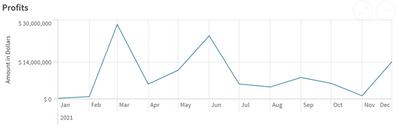
Line charts are composed of an X and Y axis, commonly the X axis displays time, with the Y axis representing an amount. Putting these two elements together, we can create a chart that shows how data has changed throughout time. Within this chart, points of data are connected to create the lines for the line chart. This chart can also be used to compare multiple sets of data, displaying two separate lines that can be shown alongside each other.So now that we know what a line chart is, how can we use line charts to visualize our data?
Above you’ll find a line chart that appears in one of our demo apps. This chart’s X axis displays time, and the Y axis provides a dollar amount. When our data is added, we are given points that are connected to show growth and loss of revenue throughout the year. This chart allows the audience to see the spikes or large growth months for this data. We can see that March and June were great months, where as the rest of the year was about the same.
How can we use this information in the real world? In a hypothetical scenario, a user could see this data and retroactively learn why March and June were such better months. What was done differently during these months, and how could we duplicate this success in the other months to raise them up? It could be that a promotion was run during this time, or maybe there was increased manager assistance. Whatever it was, this chart can provide the first clues to finding out and increasing profits.
Why would you want to use a line chart, instead of a bar chart, or a pie chart?
As we can see, we are missing a key element that the line chart provides, time comparison. In our bar chart, we have our amounts that can be compared, but we are not provided the change over time. We cannot easily see the spikes that a line chart would provide.
Our pie chart shows the time period of the year as a whole, and then the different months as segments of the whole. While, this does show that March and June are the biggest portions of the yearly sales, we’re unable to compare March to Feburary, or June to August easily. Additionally, a pie chart lacks the ‘linear’ aspect of the data, the order is gone.
When trying to decide if a line chart is the right visualization for your data, simply ask yourself what you are trying to show. Remember that line charts excell with two elements: amount and time.
Thank you again for taking the time to read this entry in our exploration of the different charts that Qlik provides. Please return next time when we take a look at pie charts.
-
Are you a new or trial Qlik Cloud user? Read this ↓↓↓
Register here Learn how easy is it to: Quickly load data from multiple sources Create powerful interactive visualizations Co-develop and collaborate ... Show MoreLearn how easy is it to:
- Quickly load data from multiple sources
- Create powerful interactive visualizations
- Co-develop and collaborate with other Qlik Sense users
- Create data alerts and
- Take your analytics on the go with Qlik Sense Mobile
Whether you are a new, trial, or beginner user - this webinar is the perfect way to make sure you get the most out of Qlik Cloud. Register now and prepare to be amazed.

-
test
testtesttestDiscoveriestestImpacttestAudiencetestData and advanced analyticstest -
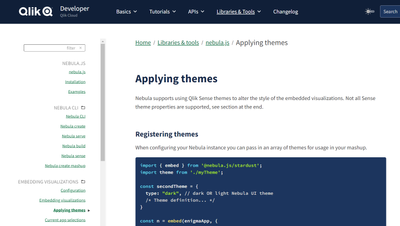
Using Qlik Sense Themes with nebula.js
Using Qlik Sense themes with nebula.js is easy. The basic idea is to get the theme, configure the theme to be loaded by nebula.js, and then tell nebul... Show MoreUsing Qlik Sense themes with nebula.js is easy. The basic idea is to get the theme, configure the theme to be loaded by nebula.js, and then tell nebula.js that's the theme you'd like to use. Let's take a look.
Loading a Qlik Sense Theme
There are 3 common scenarios here, either you load your theme locally into your project, you load your theme from Qlik Sense Enterprise, or you load your theme from Qlik Sense Enterprise Windows, or you load your theme from Qlik Sense Enterprise SaaS.
Loading your theme in your project is as simple as including it.
import myTheme from '{path-to-theme}/theme';Loading your theme from Qlik Sense Enterprise Windows looks like this
const myTheme = await fetch('{qlik-sense-enterprise}/resources/assets/external/sense-themes-default/{theme-name}/theme.json')
      .then((response) => response.json());
And loading your theme from Qlik Sense Enterprise SaaS looks like this
const myTheme = await fetch('https://your-tenant.us.qlikcloud.com/api/v1/themes', {
      headers: {
        'Authorization': `Bearer ${<API-key>}`
      }
    })
    .then((response) => response.json());
Configure nebula.js to load the theme
Next you need to configure nebula.js to load the theme. This is done in the embed function, similar to loading types. It looks like this.
const nebula = embed(app, {
      themes: [
        {
          id: 'myTheme',
          load: () => Promise.resolve(myTheme),
        },
      ],
      types: [],
    });
You can configure nebula.js to load multiple themes.
Tell nebula.js what theme to use
And finally, you need to tell nebula.js what theme to use. That's done by setting the theme property in the context. You can do this either in the embed function, or change it any other time using the context function. This is what it looks like doing it in the embed function.
const nebula = embed(app, {
      context: {
        theme: 'myTheme',
      },
      themes: [
        {
          id: 'myTheme',
          load: () => Promise.resolve(myTheme),
        },
      ],
      types: [],
    });
And this is what it looks like doing it later with the context function.
const nebula = embed(app, {
      themes: [
        {
          id: 'myTheme',
          load: () => Promise.resolve(myTheme),
        },
      ],
      types: [],
    });
    nebula.context({ theme: 'myTheme' });
And that's it! Now your theme will be applied to your nebula.js visualizations. Custom visualizations will need to be configured to consume the theme. And there are some differences between themes applied in nebula.js and themes applied in Qlik Sense. For that information, and more, please visit Applying Themes with nebula.js
-
Migrating to Qlik Cloud Learning Plans
We are excited to offer Migrating to Qlik Cloud Learning Plans within Qlik Continuous Classroom:Qlik Sense Client-Managed to Qlik CloudThis learning p... Show MoreWe are excited to offer Migrating to Qlik Cloud Learning Plans within Qlik Continuous Classroom:
- Qlik Sense Client-Managed to Qlik Cloud
This learning plan is designed for organizations that are migrating from Qlik Sense Enterprise Client-Managed to Qlik Cloud. These tools will assist migration efforts and create a successful transition plan.
- Moving from QlikView to Qlik Cloud
This plan is designed for experienced QlikView Business Analysts and Data Architects who need to learn about creating apps in Qlik Sense. Whether they are working with QlikView and Qlik Sense together or transitioning from QlikView to Qlik Sense, this learning plan will explore the similarities and differences between the software to jump start your adoption of Qlik Sense.
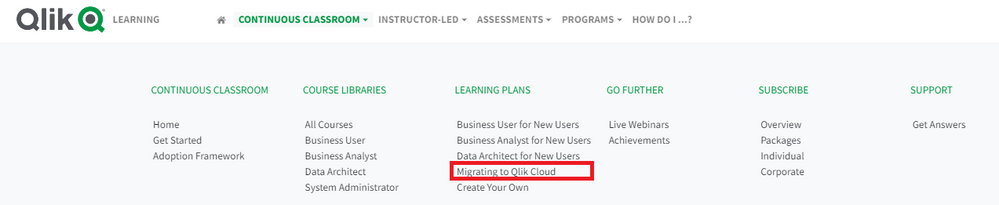
To access learning plans, Select Migrating to Qlik Cloud from Continuous Classroom → Learning Plan menu
In each plan, once you have completed the recommended courses, we have identified Next Steps you can take in your learning journey:
Visit Migrating to Qlik Cloud Learning Plans today. Happy Learning!

-
Qlik Compose or Qlik Cloud Transformation Service – which one should you choose?
Let us look at three broad areas of functionality to help us choose the correct option.Database Connectors:Qlik Compose is truly platform agnostic.Dat... Show MoreLet us look at three broad areas of functionality to help us choose the correct option.
Database Connectors:
Qlik Compose is truly platform agnostic.
- Data can be loaded with Qlik Replicate or Qlik Cloud Data Integration.
- A third-party application can load data if Qlik Compose is used to automate a data warehouse.
- Transformations can be performed on popular cloud analytic targets including Snowflake, Google BigQuery, Microsoft Azure Synapse, and Databricks.
- Transformations can also be performed on a whole range of on-premises data platforms.
Qlik Cloud Transformation service on the other hand focuses on cloud data stores.
- Transforms data loaded by Qlik Cloud Data Integration's data movement service.
- Transformations can be performed only on popular cloud analytic targets including Snowflake, Google BigQuery, Microsoft Azure Synapse, and Databricks.
- Currently does not transform data loaded by Qlik Replicate or other third-party applications.
Data Quality and Custom Transformation:
Qlik Compose performs a variety of transformations.
- It offers a mapping designer that can push down processing to the data store.
- It offers data validation and data quality rules routing rows that fail into an error mart.
- It offers global expressions on data that follow the data rules that can be customized with SQL
- Transformations cannot be performed without data models.
Qlik Cloud Transformation Services on the other hand complements.
- It offers a mapping designer as well that can push down transformations to the data warehouse or lake.
- It allows flexible data architectures and performs rule-based transformations that can be customized using SQL.
- However, data validation and data quality rules must be implemented elsewhere.
- Transformations can be performed without data models offering greater flexibility.
Data mart transformations:
Qlik Compose offers a far wider variety of data marts.
- While having low-code / no-code data modeling, these transformation patterns cannot be reused.
- A flexible data warehouse following data vault architecture can be created.
- A variety of data marts such as state-oriented, aggregated facts or conformed dimensions can be automatically generated.
Qlik Cloud Transformation Services on the other hand allows limited data mart flexibility.
- It offers low-code / no-code data modeling that can be reused multiple times.
- It offers automated data mart generation but does not offer data vault architecture, state-oriented facts, or aggregated facts.
So, which one should you choose?
If you want to transform data within a flexible data architecture without first creating data models, or if you want to create reusable, rule-based transformation patterns, and forego any choice of data mart transformations, then you should select Qlik Cloud Transformation service.
On the other hand, if your environment includes lakes in the cloud such as AWS EMR or object storage, you will want to go with Qlik Compose. Also, if you are looking for data vault architecture support or data marts with state-oriented or aggregated facts, Qlik Compose will be your choice.
Learn more about these architectures that combine Qlik’s traditional client-managed offerings with the new Qlik-managed offerings here.
-
Data Literacy for Everyone
In today’s world, data drives pretty much everything we do. There’s no question that, for tomorrow’s workforce to be successful, they will need excep... Show More
In today’s world, data drives pretty much everything we do. There’s no question that, for tomorrow’s workforce to be successful, they will need exceptionally strong analytical and data literacy skills, along with the tools and know-how to keep pace with rapid change. But here’s the twist: these skills are not just important for future business analysts anymore. It’s for everyone. Including – and I would say especially – our future leaders. Why? To quote a recent excellent article on this topic, “Data literacy is the new intellectual underpinning of every successful strategy going forward.”
To read the full article visit Data Literacy for Everyone | Qlik

-
Qlik Data Visualization Tip-a-Day Recap
Each tip below links to the post on LinkedIn, which provides you with additional details on how to create advanced visualizations using these tips. ... Show MoreEach tip below links to the post on LinkedIn, which provides you with additional details on how to create advanced visualizations using these tips. Spread the word, and share on your social feeds and also share your feedback - we want to hear from you!
1. Commonly known as 80/20 distribution, the Pareto chart surfaces representative data that makes up 80% of the total share. This percentage can, of course, be easily adjusted.
2. Need to count and show the frequency of combinations? For example: products sold together or components used together. Qlik Sense makes it easy.
3. The Sunburst chart looks nice and can be useful. It's basically a double pie chart with hierarchy. It’s also fun to create with the Qlik Sense map chart.
4. Most charts only show dimension values when the measure is not null. However, sometimes it's important to indicate a zero or null value.
5. Parallel coordinate plot shows distribution across many variables. Related to the Sankey chart, it’s most frequently used in life science, machine learning and other industries to analyze multivariate data.
6. When copying a chart to a slide deck, use the web browser zoom ctrl + to enable Qlik Sense to automatically adjust the graph and labels making it more audience-friendly.
7. The Arc chart, the linear sibling to the chord chart, shows connections between pairs of values. It works best if the number of values minimal. Also, the order matters to reduce clutter.
8. Control charts are popular for monitoring processes, detecting outliers, and keeping an eye on quality. Build it with the line chart (https://lnkd.in/eHWqaQ_U) or automate creation via Qlik Sense Insight Advisor.
9. Annotations turn data into knowledge by adding context to insights displayed. Annotations can be dynamic, so they adjust when data or selections change.
10. Using Inline SVG, you can add patterns to separate dimension values, making your charts stand out.
11. Pivot tables are typically sorted by dimensions; however, a new setting allows you to sort by measure.
12. The Chord chart, like the Arc chart, shows relationships between values. It’s a visually-appealing chart that is useful as long as there are not too many dimension values.
13. New settings for sheet backgrounds are now available in Qlik Sense SaaS (coming soon to Qlik Sense Client-Managed) enhancing the style of your dashboards.
14. KPI cards enable you to mix a set of KPIs and graphs into a single visualization by spawning a combo chart across a dimension to provide a better understanding of multiple data points.
15. To track key metrics, the Bulls eye chart provides an overview of categories and priority order. It’s basically a scatter plot with a background, and you can include a custom tooltip for additional context.
16. Color per measure are dynamic by default. You can customize color per measure with fixed limits by converting select measures into master measures and using segment colors.
17. Need to display an unbalanced tree or ragged hierarchy? Use the Org chart or the Pivot table in Qlik Sense.
18. The improved Scatter plot in Qlik Sense SaaS provides greater flexibility and customization, including heatmap mode and extended threshold to show more points at a time. (coming soon to Qlik Sense Client-Managed)
19. The elegantly simple Slope chart is easy to interpret and create using the line chart in Qlik Sense.
20. Besides being great for exploring organizational structures, the Org chart is also well suited for decision trees, task and sub tasks or compositions of KPIs.
21. Custom tooltips provide an overview first then important details. You can add custom tooltips to bar, combo, map and KPI charts.
22. The Fine grid helps you quickly arrange and align objects on a sheet. For greater control, you can utilize custom grid spacing. (coming soon to Qlik Sense Client-Managed)
23. The Lexis chart is a nice variant for plotting duration against time, for instance call center data or service cases.
24. Innovate with Animations through by simulating activity or changes in values. Use the slider to manually choose the dimension values to display.
Check out our past data visualization tips on Qlik Community, here.
To continue exploring Qlik Sense data visualization innovations, you can check out the Qlik Visualization Showcase. There, you will be able to not only view, but also interact with our latest and greatest Qlik Sense visualizations. And, for tips on taking your visualization to the next level, check out this eBook.
-
Inline Load with Delimiter
I have done many inline loads before, but I was not aware of the delimiter option until recently so I thought I would share what I learned in my blog ... Show MoreI have done many inline loads before, but I was not aware of the delimiter option until recently so I thought I would share what I learned in my blog today. When loading data that is typed in the script or added manually via the Data Manager, an inline load is used. Below is an example - it is a simple load script that includes the Inline keyword as well as square brackets to load data directly from the script versus a file or external data source.
Looking at the data in the square brackets, the first line indicates the fields that will be loaded – in this case Name and Age. Each line after that and before the ending square bracket, is a new row of data. Each row is on its own line in the script. This example will load four rows of data with two fields: Name and Age.
By default, the field data is separated by commas in the load script – comma is the default delimiter. I recently ran into an issue where the data I needed to load via the inline load script included commas. For example, assume that Name needed to be loaded with the last name first like this:
This script would load the last name in the Name field and the first name in the Age field and the actual ages would not be loaded at all. This is because there are only two fields listed to be loaded Name and Age so the script ignores the second comma and the age because a third field was not defined (on the line after the open square bracket). There are a few ways to handle this as seen below: 1) “delimiter is” can be used to define a delimiter other than the default comma; 2) double quotes and 3) single quotes. My preference is to use the “delimiter is” option and to use a delimiter that is not part of the data I am loading. All three of these options load the data correctly. If changing the delimiter, be sure to change it on the row with the column names as well as the rows of data.
Using “delimiter is” with the inline load is not required but is useful in certain situations. The delimiter can be any character such as a comma, semi-colon or pipe. The key is to use a character that is not found in the data that is being loaded. Inline can be used to load data as seen in this blog but is can also be added to the script manually via Qlik Sense Data Manager. To learn more about using the Data Manager to load data manually, read my blog titled Manual Entry – Adding data manually in Qlik Sense.
Thanks,
Jennell
-
Data literacy principles that you can start practicing now
Looking at these guiding principles and how you can start to practice them could put you a step ahead of the rest when it comes to looking for that da... Show MoreLooking at these guiding principles and how you can start to practice them could put you a step ahead of the rest when it comes to looking for that data driven job role in the future. Check out the list below to learn how you can start to sharpen those workplace skills:
- Foster a culture of humility and curiosity
“Data literacy is not all about data. Yes, you need to analyze and work with the data at your disposal, but it also involves developing non-technical skills like curiosity, critical thinking, creativity, and collaboration to gain different perspectives and challenge your own assumptions about the data. “
This is not dissimilar to the lessons learnt through academic studies, curiosity and gaining different perspectives is required of all students and is a vital skill in the data driven workplace too. Start practicing this by asking more questions and interrogating the information you see, whether that be in the classroom or what you read about online.
- Encourage employees to put training into practice
“To really drive data literacy, employees can be empowered to consistently put their training into action and use their skills on a daily basis, no matter their level or role.”
Demonstrating a time when you did this during your studies is great practice for an interview and a future job. Did you study a course on building visualizations? Did you then use this knowledge for a project on a different module? Maybe you found a data set related to a hobby and practiced building visualizations that way.
- Focus on the desired outcomes
“The first step to effectively using data is understanding and being clear on the problem you want to solve.”
Its fantastic to have all the technical skills, but if you don’t know what the aim of a project is then these skills are irrelevant. If you do extra study on data skills in your free time, what do you want to learn? Do you want to learn to build an application or to tell a story with the data? Having a clear focus can save a lot of time.
- Measure the impact of your efforts!
Make sure to keep a note of your achievements and proud moments whether that be during your course, during work experience or an achievement on a sports team, for example. What did you do and what did you achieve? Was there a challenge you overcame to do this?
You can start to work on your data skills by signing up to the Free Qlik Academic Program, our program gives you access to data analytics software and a comprehensive library of training courses through the Qlik Continuous Classroom. Follow this link to learn more: qlik.com/academicprogram
- Foster a culture of humility and curiosity
-
HR Example
HR ExampleUnkwowA test to my workDiscoveriesNew usues to qlik and new things that i foundImpactCan have a more impartial seeing off the employersAudie... Show MoreHR ExampleUnkwowA test to my work
Discoveries
New usues to qlik and new things that i found
Impact
Can have a more impartial seeing off the employers
Audience
Ba
Data and advanced analytics
Get more consice
-
Moving from Client-Managed Qlik Sense to SaaS?
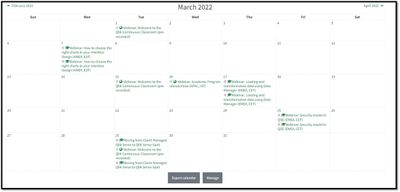
Qlik Education has added a new Live Instructor Webinar helping you learn topics moving from client-managed Qlik Sense to Qlik Sense SaaS.Dates of the ... Show MoreQlik Education has added a new Live Instructor Webinar helping you learn topics moving from client-managed Qlik Sense to Qlik Sense SaaS.
Dates of the upcoming webinar and Details:
- March 29 – For Business Users/Data Architects at 9 am and 6 pm CET
https://qlik.zoom.us/webinar/register/WN_pAzZuPfgR1K74J_aRhCzMw
https://qlik.zoom.us/webinar/register/WN_PFtrRoL2QxWxI_Ub3NPHzQ
- April 1 – For Admins at 9 am and 6 pm CET
https://qlik.zoom.us/webinar/register/WN_mI4q7Bc_TSmw7L71sdQhkg
https://qlik.zoom.us/webinar/register/WN_SBAtksZXQVCQmxhJRMBRJg
In these webinars,
- Business Users/Data Architects will learn how customize your own page, use spaces, connecting to data sources and much more!
- Admins will learn everything they need to manage the SaaS architecture, starting from setting up a tenant to new security model and IDPs.
Get more details and register for these webinars via Qlik Learning Portal Calendar.
As a part of a Qlik Continuous Classroom subscription, Live Instructor Webinars are delivered on a regular basis by our expert instructors on a variety of topics above and beyond content offered in our self-paced learning. These are 1-hour sessions and will be recorded.
Happy Learning!
-
Data Trends for 2023!
Find out what are the top 10 #BI and #datatrends for 2023, register to join us on Jan. 11, register today!
-
New Year, New Chance to Join the Qlik Academic Program!
Happy New Year! If you haven't made a resolution, now is the time! And if your resolution happens to involve learning data analytics and data literac... Show MoreHappy New Year! If you haven't made a resolution, now is the time! And if your resolution happens to involve learning data analytics and data literacy then you have come to the right place! As a university student and or educator you can apply to the @Anonymous #AcademicProgram for a year of FREE resources which include software and data literacy training! All of which will get you ready to begin your analytics careers and or boost course interest from students
But first, join us for a free webinar to learn more about our amazing program! Register today, https://learning.qlik.com/calendar/view.php?id=8609
-
Quran in Qlikview
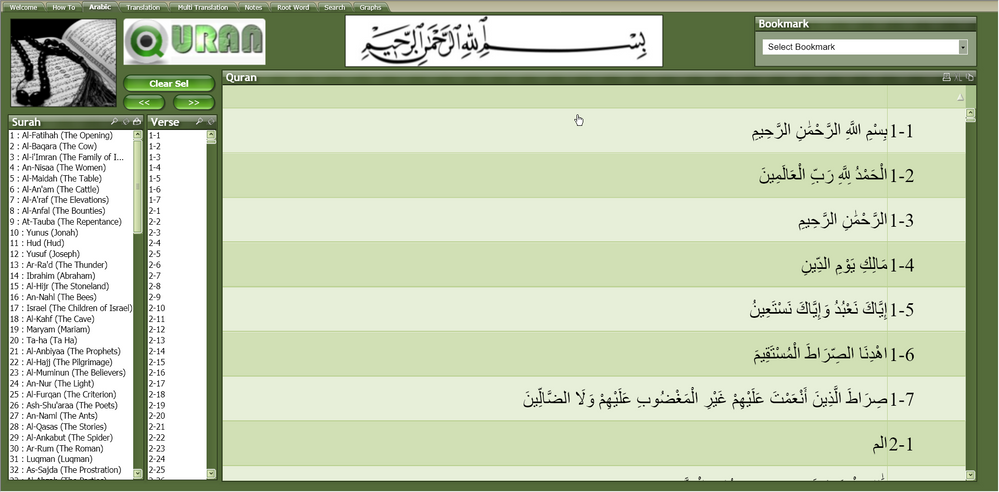
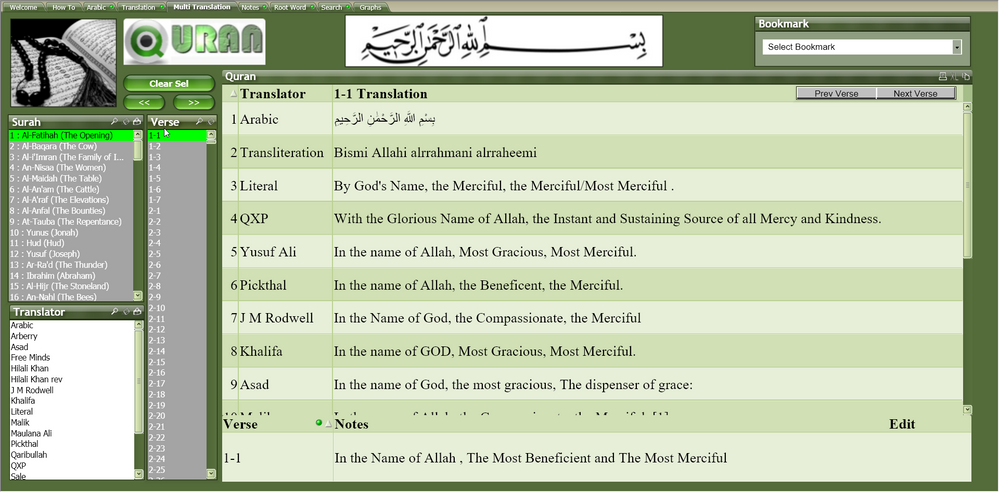
I have made a QlikView application to read Arabic & English Quran, The people who often read Quran , will enjoy reading through QlikView application.F... Show MoreI have made a QlikView application to read Arabic & English Quran, The people who often read Quran , will enjoy reading through QlikView application.
Features:1. Read Arabic Quran2. Read English Translation & Transliteration3. Compare different translations.4. Searching Arabic word.5. Searching Arabic Root word.6. Writing personal notes on each verse.Let me know, if any one have suggestions.
Long Time Ago, in 2009 I built this application and uploaded in Qlik Community. I think it was Qlik V9 during that time. After the Qlik Community upgrade , my upload got lost but my post is still there as below. Some how I found the file and re-uploaded.
https://community.qlik.com/t5/QlikView-App-Dev/Quran-in-Qlikview/td-p/145817
Regards,
Abdul Khalique -
Why you should stop using Qlik’s Capability API
As a hardcore Qlik mashup developer, you probably have tried many different Qlik APIs. Among all of them, I bet capability API is the apple of your ey... Show MoreAs a hardcore Qlik mashup developer, you probably have tried many different Qlik APIs. Among all of them, I bet capability API is the apple of your eye; it is at least for me. Since its release, it has no doubt been my №1 tool for visualization embedding. However, I think it is about time to say my saddest farewell.
Goodbye, capability API.
Well, first of all, I would like to explain why I think the Capability API no longer works for me.
The primary reason is the Capability API is chunky. It wraps every single possible function into one js file. Most projects only leverage 20 percent of the functions. Using the Capability API imposes significant redundancy, especially during load time.
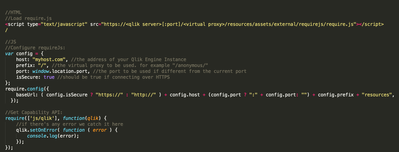
To me, another limitation of the Capability API is that it is loaded from the Qlik server.
Most users take three steps to load a chart into a webpage:
Authenticate -> Load Require.js from Qlik -> use Require.js to load the Capability API. (#Tip: You can use your local instance of Require.js, to improve performance.)
The Capability API itself is a 3MB JavaScript file, which often takes significant time to initialize. And this delay is inevitable. Yuck!
The Capability API is too old. Its development was based on the first version of Angular.js, which was invented in the Stone age of the web programming world. Even though it is still usable, i̵t̵ ̵m̵a̵k̵e̵s̵ ̵m̵e̵ ̵f̵e̵e̵l̵ ̵o̵l̵d̵ ̵u̵s̵i̵n̵g̵ ̵i̵t̵, it is awkward to use together with newer frameworks like React.JS or mobile development.
I decided it’s about time to switch to enigma.js and nebula.js, both of which are open-source libraries from Qlik.
First of all, both enigma.js and nebula.js are available on NPM, which is a huge plus for me. Below is a graph explaining why. (TLDR: it is faster, lighter, and more flexible)
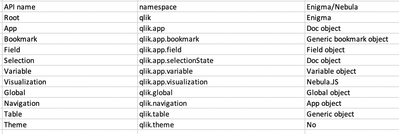
For me, enigma.js and nebula.js together are the perfect replacement for the Capability API. They are not only faster, but they also don’t compromise functionality. Below is a list of all APIs in Capability API and their relevant counterparts in enigma+nebula.
So that concludes the article, but that is not the end of it. Below is a list(very long) mapping all functions from the Capability API to enigma.js and nebula.js. Hope you find it useful.
Happy coding!
╔════════════════════╦════════════════════════════════╗
║      Root API      ║             Enigma             ║
╠════════════════════╬════════════════════════════════╣
║ callRepository     ║ General http request           ║
║ currApp            ║ Global.getActiveDoc            ║
║ getAppList         ║ Global.getDocList              ║
║ getExtensionList   ║ Global.reloadExtensionList     ║
║ getGlobal          ║ Session.global                 ║
║ getThemeList       ║ NA                             ║
║ off                ║ remove angular listener        ║
║ on                 ║ angular listener               ║
║ openApp            ║ Global.openDoc                 ║
║ promise object     ║ angular listener               ║
║ registerExtension  ║ NA                             ║
║ resize             ║ NA                             ║
║ sessionApp         ║ Global.createSessionApp        ║
║ sessionAppFromApp  ║ Global.createSessionAppFromApp ║
║ setDeviceType      ║ NA                             ║
║ setLanguage        ║ NA                             ║
║ setOnError         ║ angular listener               ║
╚════════════════════╩════════════════════════════════╝
╔═══════════════════════╦═══════════════════════════════════╗
║        App API        ║              Enigma               ║
╠═══════════════════════╬═══════════════════════════════════╣
║ addAlternateState     ║ Doc.addAlternateState             ║
║ back                  ║ Doc.back                          ║
║ clearAll              ║ Doc.clearAll                      ║
║ close                 ║ Doc.deleteConnection              ║
║ createCube            ║ Doc.createObject                  ║
║ createGenericObject   ║ Doc.createObject                  ║
║ createList            ║ Doc.createObject                  ║
║ createTable           ║ Doc.createObject                  ║
║ destroySessionObject  ║ Doc.destroySessionObject          ║
║ doReload              ║ Doc.doReload                      ║
║ doSave                ║ Doc.doSave                        ║
║ field                 ║ Doc.getfield                      ║
║ forward               ║ Doc.forward                       ║
║ getAppLayout          ║ Doc.getAppLayout                  ║
║ getAppObjectList      ║ Doc.searchObjects                 ║
║ getFullPropertyTree   ║ Doc.getFullPropertyTree           ║
║ getList               ║ Doc.getObject                     ║
║ getObject             ║ Doc.getObject                     ║
║ getObjectProperties   ║ GenericObject.getFullPropertyTree ║
║ getScript             ║ Doc.getScript                     ║
║ getSnapshot           ║ Doc.getSnapshotObject             ║
║ lockAll               ║ Doc.lockAll                       ║
║ off                   ║ remove angular listener           ║
║ on                    ║ angular listener                  ║
║ removeAlternateState  ║ Doc.removeAlternateState          ║
║ searchAssociations    ║ Doc.searchAssociations            ║
║ searchResults         ║ Doc.searchResults                 ║
║ searchSuggest         ║ Doc.searchSuggest                 ║
║ selectAssociations    ║ Doc.selectAssociations            ║
║ selectionState        ║ NA                                ║
║ setScript             ║ Doc.setScript                     ║
║ unlockAll             ║ Doc.unlockAll                     ║
╚═══════════════════════╩═══════════════════════════════════╝
╔═══════════════════════╦═════════════════════════════╗
║      Global API       ║           Enigma            ║
╠═══════════════════════╬═════════════════════════════╣
║ cancelReload          ║ Global.cancelReload         ║
║ getAppList            ║ Global.getDocList           ║
║ getAuthenticatedUser  ║ Global.getAuthenticatedUser ║
║ getProgress           ║ Global.getProgress          ║
║ getProductVersion     ║ Global.productVersion       ║
║ getQTProduct          ║ Global.QTProduct            ║
║ isPersonalMode        ║ Global.isPersonalMode       ║
║ off                   ║ remove angular listener     ║
║ on                    ║ angular listener            ║
╚═══════════════════════╩═════════════════════════════╝
╔════════════════════════╦════════════════════════════════╗
║      Variable API      ║             Enigma             ║
╠════════════════════════╬════════════════════════════════╣
║ create                 ║ Doc.createObject               ║
║ createSessionVariable  ║ Doc.createSessionVariable      ║
║ get                    ║ Doc.getVariableByName          ║
║ getByName              ║ Doc.getVariableById            ║
║ getContent             ║ Variable.getContent            ║
║ setContent             ║ Variable.setContent            ║
║ setNumValue            ║ GenericVariable.setStringValue ║
║ setStringValue         ║ GenericVariable.setNumValue    ║
╚════════════════════════╩════════════════════════════════╝
╔══════════════╦═════════════════════╗
║ Bookmark API ║       Enigma        ║
╠══════════════╬═════════════════════╣
║ apply        ║ Doc.applyBookmark   ║
║ create       ║ Doc.createBookmark  ║
║ remove       ║ Doc.destroyBookmark ║
╚══════════════╩═════════════════════╝
╔═══════════════════╦══════════════════╗
║ Visualization API ║ Nebula.JS        ║
║ Field API         ║ Doc.getField     ║
║ Table API         ║ Doc.createObject ║
║ Selection API     ║ GenericObject    ║
║ Navigation API    ║ NA               ║
║ Theme API         ║ NA               ║
╚═══════════════════╩══════════════════╝
-
Qlik Digest - January 2023
SHARE YOUR STORY AT QLIKWORLD!Our global annual conference #QlikWorld is back LIVE and in person in Las Vegas! From April 17-20, expect a thrill-ride ... Show MoreSHARE YOUR STORY AT QLIKWORLD!
Our global annual conference #QlikWorld is back LIVE and in person in Las Vegas! From April 17-20, expect a thrill-ride full of insights, learning and peer-to-peer connections. Do you have an inspiring Qlik success story to share on our global stage? This is an amazing opportunity for you to showcase the incredible things you have accomplished with Qlik. Submit your proposals by January 13. LEARN MORE
Qlik Cloud Reporting Now Supports PowerPoint
This new capability enables Qlik Sense users to produce presentation-ready slides from their analytics and distributed reports can now be generated in PowerPoint format. Watch Preview Video
Product Portfolio Roadmap Webinar
Join our Product Management team on January 12 for an overview of Qlik’s Data Integration product strategy, roadmap, and new capabilities, exclusively for customers and partners. Register Now
Curious about what's next in Data and Analytics?
Check out this Qlik webinar – Calibrate for Crisis: Top 10 BI & Data Trends 2023 on January 11. We’ll reveal the trends that will impact you and your organization over the coming year. Register Now
Early Access Program: Review Our New Product Features!
We will soon be releasing Business Glossary capabilities as part of our Qlik Cloud Catalog services. Before we release them, we want customers to test drive the new features and share their feedback. Interested?
Email Chris.Ortega@qlik.com
ADDITIONAL FEATURED CONTENT
-
Qlik Sense Wordpress Plugin
There are a lot of people that use Wordpress as their company's portal. If you are one of these people then, you may find this plugin very useful. You... Show MoreThere are a lot of people that use Wordpress as their company's portal. If you are one of these people then, you may find this plugin very useful. You can create a mashup from within wordpress, using the Capabilities API, without writing a single line of code. Just add the settings with the host and the App ID, then the shortcode for the objects that you want and you are done.
Here, I will show you how to do that.
- First go to your wp admin panel, under "Plugins" click on "Add New" and then search for "Qlik"
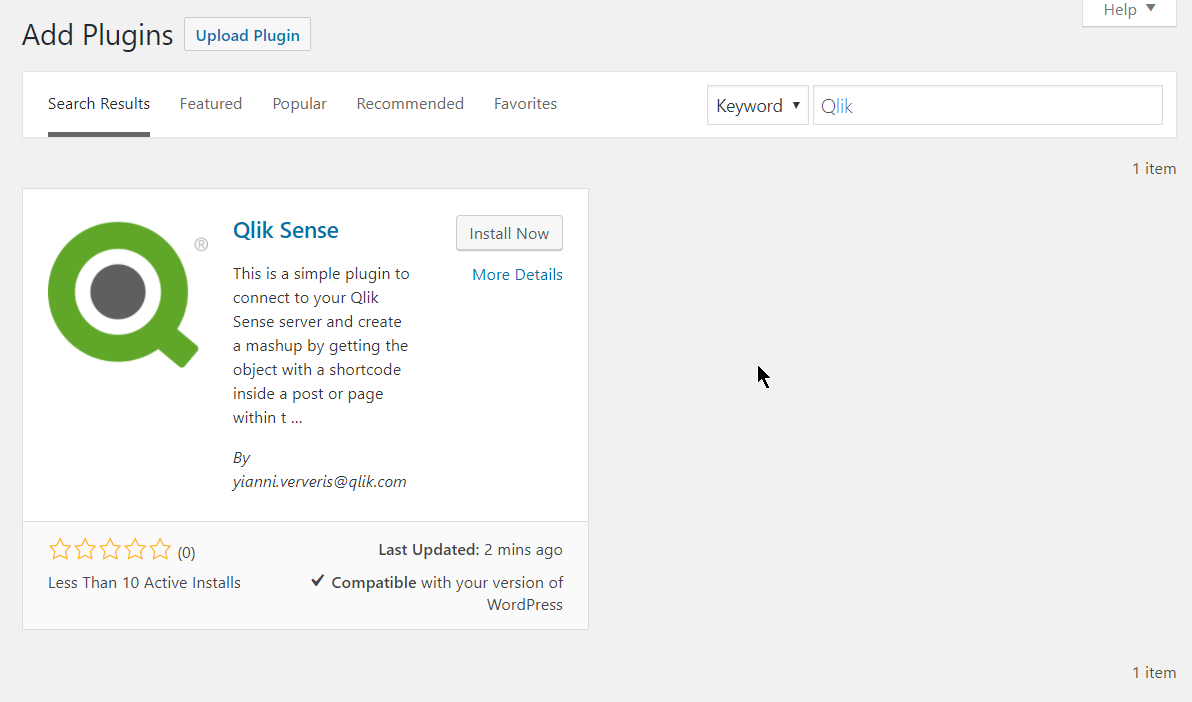
- Click on "Install Now" and then on "Activate"
- This will create a "Qlik Sense" settings page, just open that
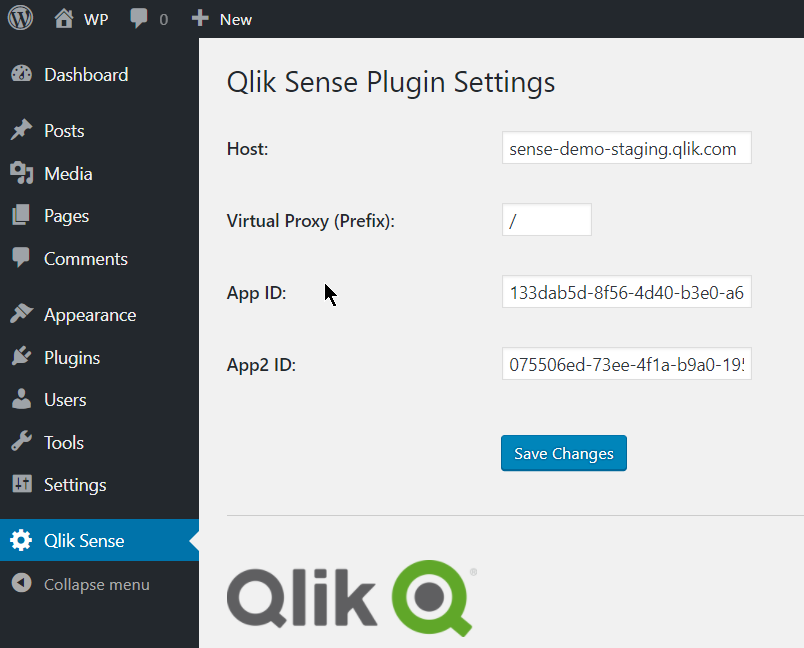
- Here you need to define your host, the Virtual Proxy (prefix) and the App Id, as you would in a regular mashup. If you are planning on using a second app, then add the second app id in "App2 ID".
- Save changes.
- Then add the shortcode into your posts "[qlik-sense-object id="page1-obj2" qvid="nvqpV" height="400" app2="true"]"
- id: is the unique div id. This is needed especially when you want to display the same object in 2 different instances
- qvid: Is the object id as found in the "dev-hub/single-configurator"
- height: The height of the visualization in pixels
- nointeraction: Add this if you want to disable interactions. If you want the objects to have interaction, you can just omit this.- app2: Add this if your object is coming from the second app that you have specified in the settings
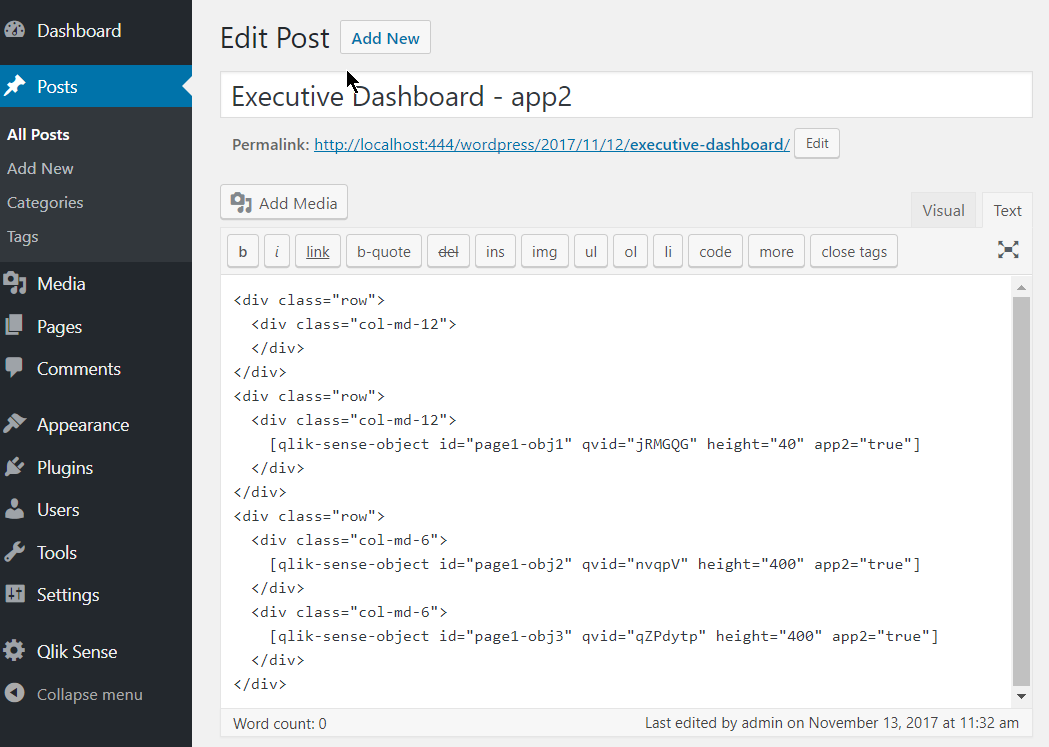
- I have added few objects with a specific height in a bootstrap template for better layout. Now, lets preview the page
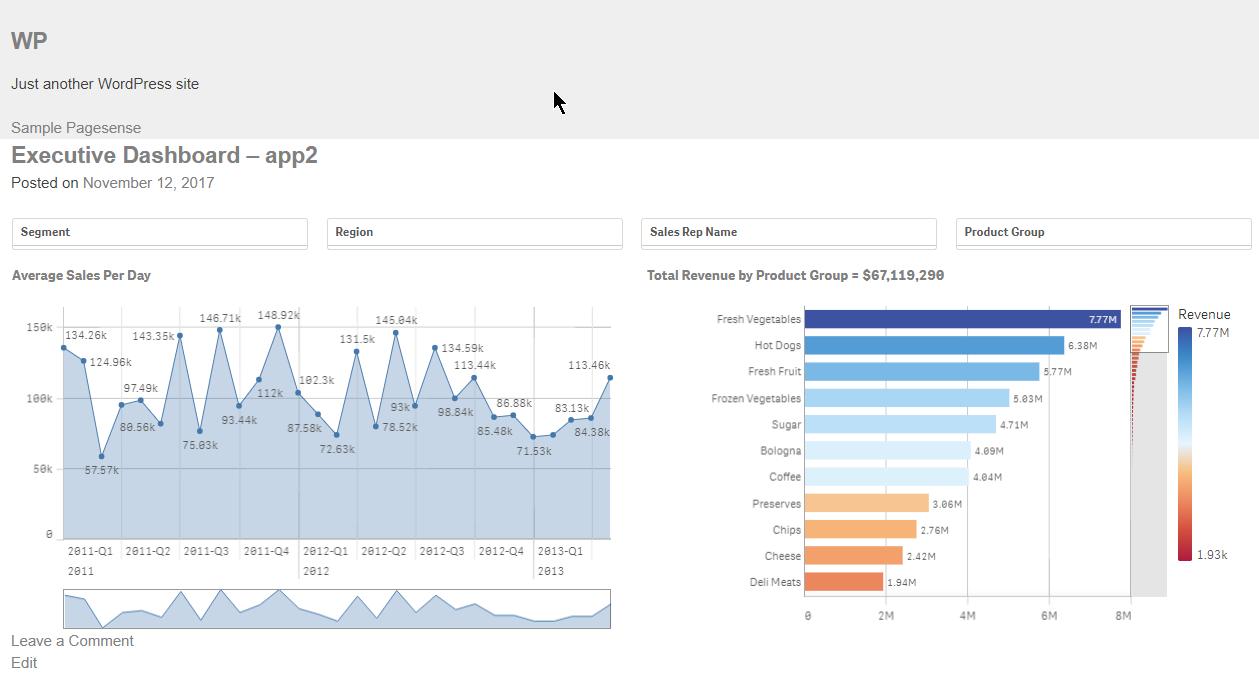
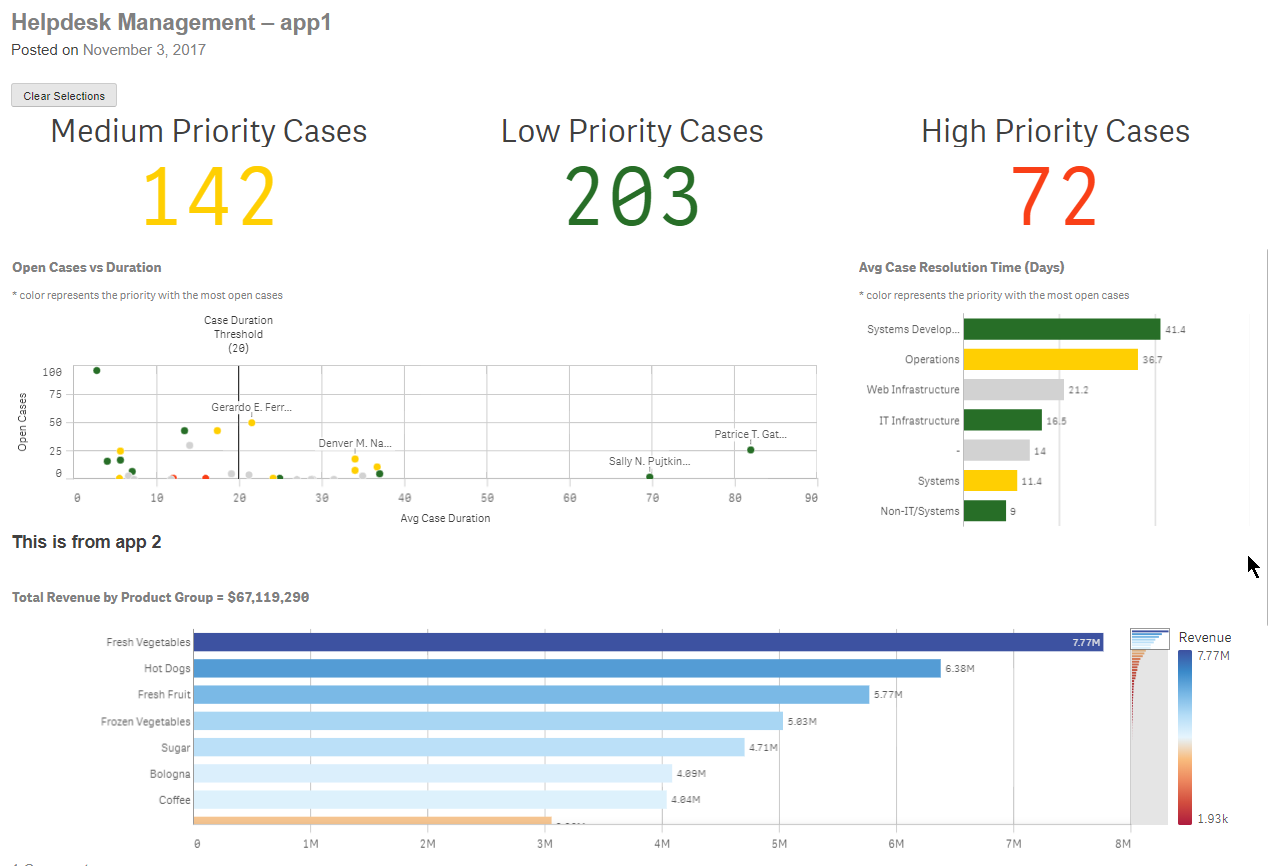
Make sure you whitelist your url in the virtual proxy.
If you use it and like it, please give it a 5 star in Wordpress.
This is it!
Yianni
In Portuguese: Qlik Sense Plugin para Wordpress by cleveranjos. Thank you Clever!
- First go to your wp admin panel, under "Plugins" click on "Add New" and then search for "Qlik"