Unlock a world of possibilities! Login now and discover the exclusive benefits awaiting you.

Analytics & AI
Forums for Qlik Analytic solutions. Ask questions, join discussions, find solutions, and access documentation and resources.
Data Integration & Quality
Forums for Qlik Data Integration solutions. Ask questions, join discussions, find solutions, and access documentation and resources
Explore Qlik Gallery
Qlik Gallery is meant to encourage Qlikkies everywhere to share their progress – from a first Qlik app – to a favorite Qlik app – and everything in-between.
Qlik Community
Get started on Qlik Community, find How-To documents, and join general non-product related discussions.
Qlik Resources
Direct links to other resources within the Qlik ecosystem. We suggest you bookmark this page.
Qlik Academic Program
Qlik gives qualified university students, educators, and researchers free Qlik software and resources to prepare students for the data-driven workplace.
Recent Blog Posts
-
New Data Visualization Capabilities Now Live in Qlik Sense SaaS
At Qlik, we take customer feedback seriously and routinely incorporate customer recommendations into product delivery. The new features support both a... Show MoreAt Qlik, we take customer feedback seriously and routinely incorporate customer recommendations into product delivery. The new features support both analytics creators and consumers, with more customization options and improved usability to help you make data-driven decisions and take action in the business moment.
Application Chaining
Application developers can now connect applications together through a new navigation option on the action button. When the target application shares fields and current values with the source, utilize the button option to specify the app and sheet ID, and the selection will be applied to the target. Application Chaining makes it easier to split functionality across applications for faster load time, accelerated response time, and simplified governance.
Font Styling
An ongoing initiative of ours is to provide you with the most modern components to satisfy use cases and solve today’s business challenges. Over the past 18-months, we’ve worked toward modernizing visualization capabilities utilizing the Nebula framework. We recently launched font styling updates for Bar and Pie charts covering titles, subtitles, and footnotes, and including options for font size, color, and family. Within the next week, Map charts and Combo charts will offer those options, giving you more power and flexibility to customize as you wish or conform to your organization’s standards. Font styling will be added to more charts soon.
Note: Chart creation via Simplified Authoring, offers font styling on all charts.
Custom KPI Tooltip
Over the past year, we added custom tooltips as options to bar, combo and map charts. Now, the ability to create a custom tooltip for the KPI object is available with Qlik Sense SaaS. This is the first tooltip added to a dimension-less object. The tooltip is conveniently displayed upon hovering over the object, adding context to your KPIs.
Coming Soon: Set Analysis outer scoping
Together with the new Simplified Authoring in Qlik Sense SaaS, we are enhancing set analysis. Previously, you could only place set analysis expressions within another expression. Soon, you’ll be able to build compound statements and support Master Measures by placing the set analysis expression at the beginning of measures to provide outer set scoping. This is particularly helpful when working with complex master measures that come in different flavors of one base measure; and you will be able to set expressions to tweak the base master measure.
For example:
{<Year={2021}>} [Master Measure]
More information on this can be found here.
Join the “Do more with Qlik” webinar on October 26 to see these features and others in action.
-
A New Navigation for Qlik Community
Article Updated: Sept 27 4 AM ET [Qlik Community Navigation Refresh Complete] Most minor issues resolved. [resolved] Issue found with top search ico... Show MoreArticle Updated: Sept 27 4 AM ET [Qlik Community Navigation Refresh Complete]
Most minor issues resolved.
[resolved] Issue found with top search icon: nav disappears when click; refresh page for nav to reappear. Please use search on body of Community pages.
Please report any problems to QlikCommunityAdmins@qlik.com
---------
Article Updated: Sept 27 1 AM ET [Qlik Community Navigation Refresh Complete]
We are working thru a few minor issues, please report any problems to QlikCommunityAdmins@qlik.com---------
More details in this article: The New Qlik Community Header & Nav – What’s ChangedIt's been months in the making and required involvement from many parts of the business here at Qlik; we are happy to share that we have a brand new navigation here on Qlik Community.
It will feel different. It will look different. It will take some time to get used to the change.
The challenge: Navigation hover-over at the top level creates performance issues - a slowness I'm sure many of you have experienced. Not to mention, important pages buried too deep in the navigation require many painful clicks to finally reach your destination. Our data is clear as to the high traffic pages that you frequent and so we know with certainty what is important for new members as well repeat visitors.
The opportunity: To re-create the navigation so that we could:
- reduce navigation clutter
- add dynamic mega-menu functionality for more seamless wayfinding
- reorganize content within the community structure
Reduce navigation clutter
To reduce navigation clutter we started by removing the sitemap leaving only a top level navigation. It will be an intentional 'click' on your part to see what lies beneath each menu item. Removal of the hover-over afforded us significant improvements in site performance, speed and page load times.Unauthenticated view
Authenticated view (Partner)
Add Dynamic mega-menu functionality
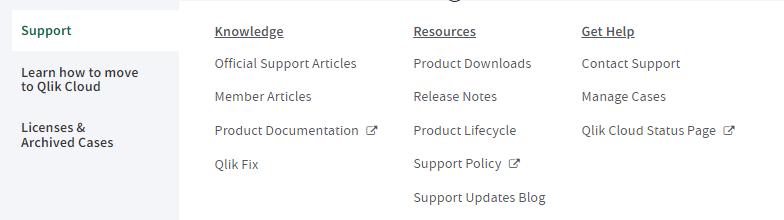
The mega menu design can go multi-columns wide; allowing us opportunity to move things around as business needs demand. You will no longer lose your spot where your cursor was hovering (thank you for tolerating that as long as you did).Each link is intentionally placed with care and consideration for our members. The mega menu can be easily updated putting us in a good position to respond to user feedback (we read your survey responses - hint hint!)
Reorganize content within community structure
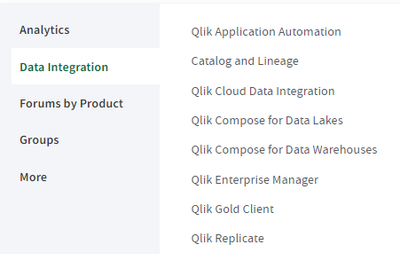
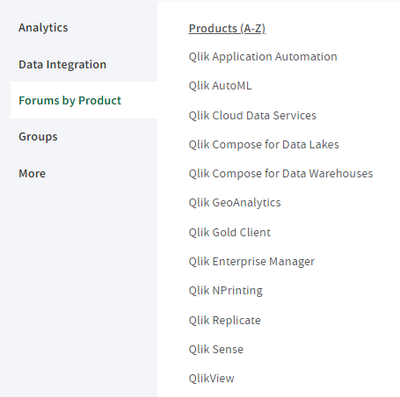
Our forums will be reorganized and in some cases renamed. Please take a few minutes to reacquaint yourself with all the updates. We have provided a few different ways for you to find a forum:
- Analytics
- Data Integration
- By Product (alphabetized)
(example 1)
(example 2)
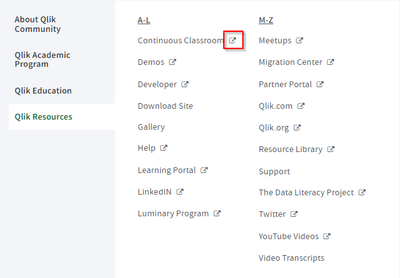
We've made it obvious when you are leaving the site with our new external link indicator.
but wait there is more...
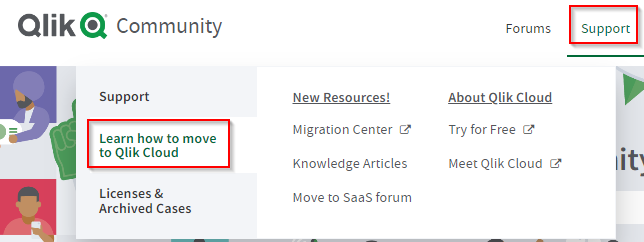
Learn how to move to Qlik Cloud will be a brand new space in Qlik Community.
Last but not least, take note of the reordering of mail, notification and search icons by your avatar. The 'ask a question' button will shift just a little bit.
For any issues or concerns post launch please leave a comment here or write to us at: QlikCommunityAdmins@qlik.com
We are here to help you in your journey with Qlik. The Qlik Community Team is grateful for your dedication and membership and mostly for your commitment to helping others in this wonderful space we call Qlik Community.
As always, we welcome your feedback.Qlik Community Team
@Melissa_Potvin @Sue_Macaluso @Jamie_Gregory @nicole_ulloa @emmaspickermanIssues we are working thru:
[RESOLVED] mobile device hamburger menu rendering in duplicate, under investigation
[RESOLVED] carousel on home page and throughout are not loading properly
[RESOLVED]bottom of home page / filters not displaying properly and cards appearing in duplicate[IN PROGRESS] fixing mobile display of header to include mail and bell notifications

-
Demonstrate the importance of analytics to your students with these customer sto...
Our Qlik Academic Program team is often asked by educators for real life use cases and customer stories for their students. Students will be much more... Show MoreOur Qlik Academic Program team is often asked by educators for real life use cases and customer stories for their students. Students will be much more motivated and focused if they can understand the bigger picture of what they are studying and how it will serve them in the future.
In this blog I have put together some customer stories related to different industries. Students may not know which industry they’d like to venture into, but the wide range of stories collected in this blog are an example of how nearly every industry, around the globe, needs to utilize and understand their data.
Food & Beverage
This customer story from Wicked Sister shows us that even your dessert contains traces of data. Wicked Sister had been using excel reports and were still using paper to calculate their profit/loss reports, leading to large opportunity for human error. Read their customer story here to find out how Qlik Sense has helped them to better manage their data and keep growing.
Retail
Urban Outfitters is a well-known creative lifestyle brand that students are likely to have at least passed by for a window shop. Time consuming, unclear reporting meant that store managers spent most of their time in the back office and not enough on the sales floor. Read their story to learn about how utilizing their data has helped empower workers and improve in store performance.
Media
Conde Nast is the home of iconic brands such Vogue, Vanity fair and GQ but it’s not fashion that keeps these brands running day to day, it’s the data team that supports every function and department. Read about how issues with data accessibility and quality meant that Conde Nast sought out Qlik Sense to keep them competitive.
Finance
Many students will have heard of HSBC and may well have an account with them. The amount of data produced and used by a company the size of HSBC comes with challenges. HSBC needed to know which data was actually relevant, and then try locate where that data was stored. Click here to learn about how Qlik helped HSBC to tackle these problems.
Charity/Non-profit
Direct relief is an international non-profit humanitarian organization providing emergency medical assistance and disaster relief. Watch this video to learn about how utilizing data and adopting Qlik has enabled them to help more people at a lower cost and much faster.
Life Sciences
Data is at the core of everything Novartis do, from patient research to drug development. It is also vital that Novartis stay on top of their data. This video will tell you about how Novartis use insights from data to stay competitive and develop new medicines.
More of these stories can be found on our Qlik customer stories website. IF you want to start training for free on the software that is making a difference to so many of these companies, follow this link to learn more about our Qlik Academic Program – qlik.com/academicprogram.
-
Working with Set Analysis and Set Expressions
Hello Qlik Users! If you are on the Qlik Sense App Development forum or the QlikView App Dev forum, you might see some very seasoned developers writin... Show MoreHello Qlik Users!
If you are on the Qlik Sense App Development forum or the QlikView App Dev forum, you might see some very seasoned developers writing line after line of code. You might be asking yourself, “what does all this mean!?” It can look intimidating.
One of the possibilities, is that the code is for Set Analysis.
Set analysis gives you a way to define a set or a group of values that is independent of any selections. It is commonly used for making comparisons (e.g. this year vs last year). With set analysis, you use set expressions to analyze data.
Set expressions are how you define the field values. A set expression must be used in an aggregation function (like sum) and it must be enclosed by braces, {}. The expression consists of operators, identifiers and modifiers.
Here are some suggestions on how to get started with Set Analysis and Set Expressions:
Keep it simple.
Play around with examples provided on Qlik Help*. Get familiar with the syntax and the structure of the expressions.
Take a self-paced class on our Learning portal.
We offer a few classes on set expressions and set analysis:
Review our video resources.
There are so many videos available on Set Analysis. Some of the videos are a little bit older, but they are still relevant. Here are a couple I recommend:
Search the Qlik Community.
There is so much content that has been created in the form of articles, Help documentation, Community posts and documents, YouTube videos, etc. One search will search all the available platforms so you do not have to scour the internet.
Ask your peers for help.
Use our Qlik Community forums (Qlik Sense App Development and QlikView App Dev) to get help from your peers. I love promoting our Community’s development resources. The developers out on Qlik Community are brilliant and eager to help.
Try out the Set Analysis Wizard for QlikView**
The Set Analysis Wizard for QlikView is not a Qlik tool but was created by an employee. It is also something we like to use in Qlik Support. Even though it says for QlikView, it still applies to Qlik Sense.
I hope these resources help you on your Set Analysis journey. If you have any suggestions or recommendations on materials that helped you learn Set Analysis, post them in the comments below.
Kind regards,
Qlik Digital Support
*The same document is also available for QlikView.
**The information in this post is provided as-is and to be used at own discretion. Depending on tool(s) used, customization(s), and/or other factors ongoing support may not be provided by Qlik Support.
-
Now’s the time to take a look at field-level lineage and impact analysis
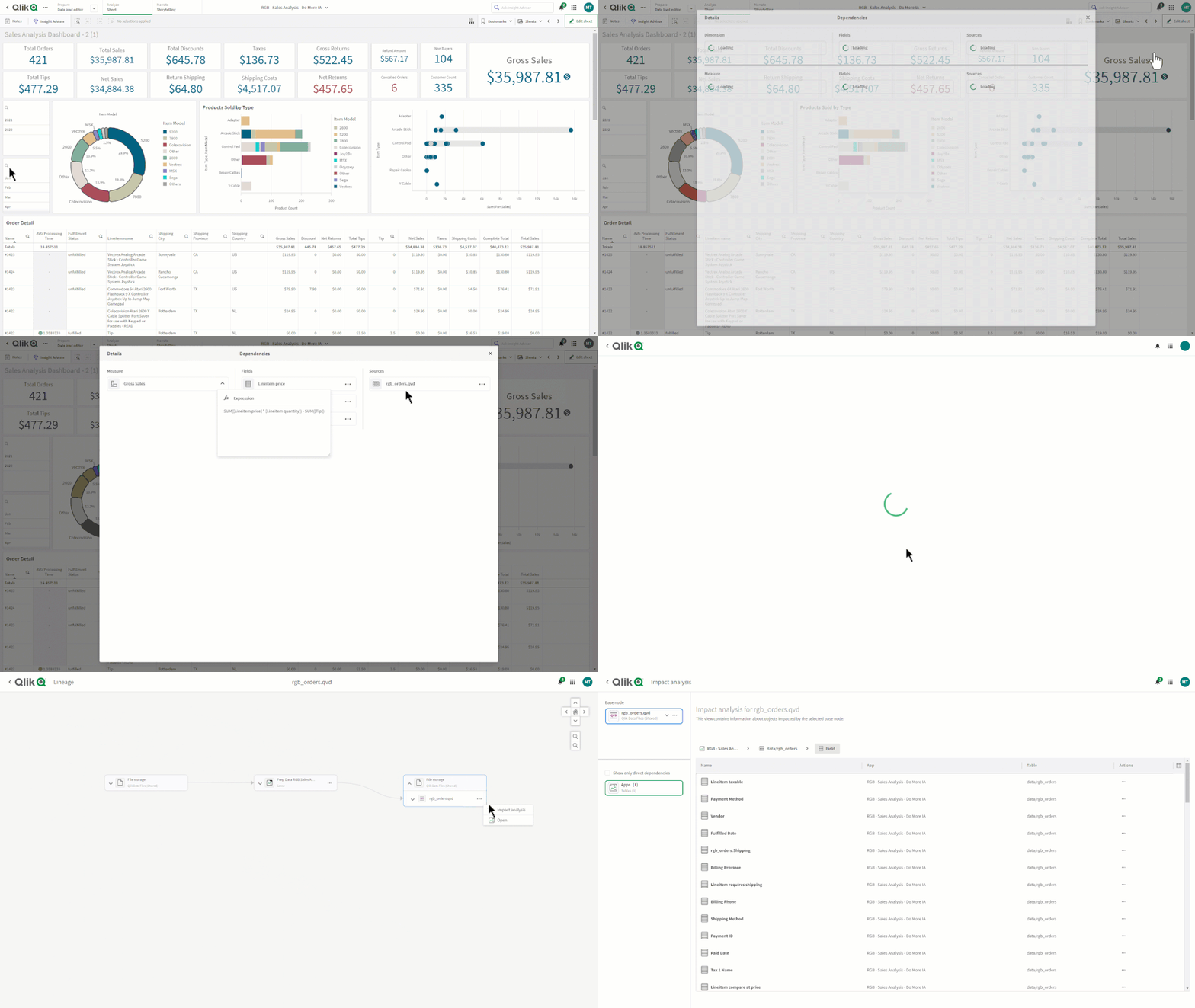
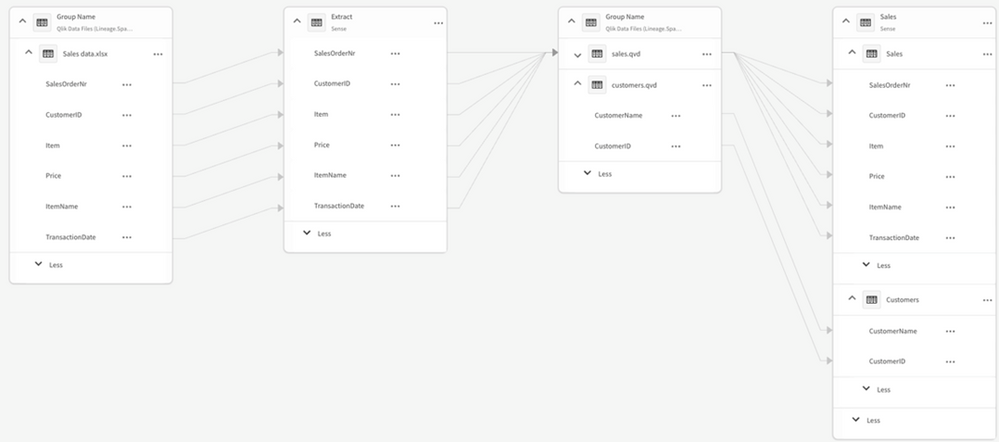
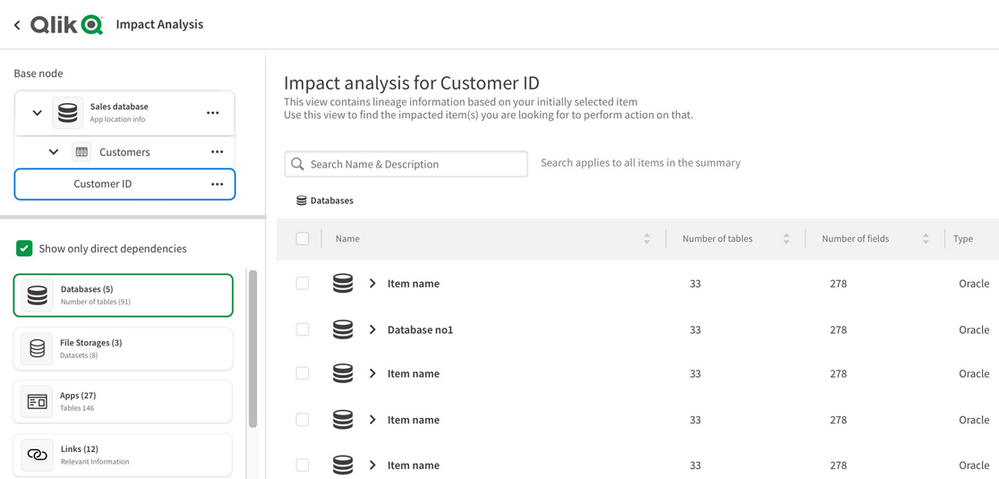
Note that Qlik makes a distinction between Lineage and Impact Analysis. Lineage is more focused on looking upstream (ex. “where did this data in the a... Show MoreNote that Qlik makes a distinction between Lineage and Impact Analysis. Lineage is more focused on looking upstream (ex. “where did this data in the app come from?”) while Impact Analysis is more about looking downstream (ex. “which apps are using this data field?”).
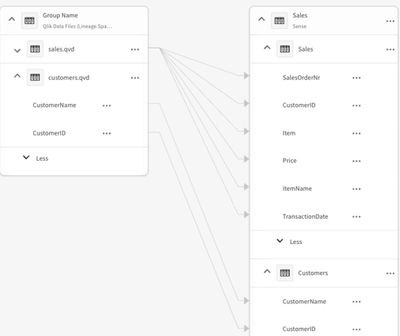
The field-level lineage capabilities within Qlik enables you to not only see data history by table but also the specific field within a table - starting with end-user applications all the way back to the original source.
If you’re also using the Qlik Lineage Connectors, you can additionally see field-level lineage for content within Qlik Sense Client-managed, QlikView, Tableau, PowerBI and various on-premise data repositories. Remember that any Qlik Sense SaaS customer can use the Qlik Lineage Connectors for free when connecting with Qlik-related sources.
There is also an option available within any chart that provides users with the ability to show a data lineage summary of the chart’s dimensions and measures.
And if you want to understand what the impact would be if a field value was modified, Impact Analysis shows which databases, apps, files or links are directly or indirectly linked to that field.
For more information, check out these available resources:
- Working with lineage and impact analysis (Qlik Help)
- Field-level lineage and Impact Analysis (Qlik Help videos)
-
Partner Engineering team releases a Qlik Cloud Rest Postman
Partner Engineering Team just released a Qlik SaaS Postman Collection to make easier for partners and customers to learn how to interact with Qlik Clo... Show MorePartner Engineering Team just released a Qlik SaaS Postman Collection to make easier for partners and customers to learn how to interact with Qlik Cloud REST API .If you need more samples, feel free to open a request, we are adding accordingly to your feedbackWe took the decision of decommission this repo because there is a such easier way to import one Qlik API as a collection in Postman
- Go to the API you want to test or use. Let´s say for example: https://qlik.dev/apis/rest/apps
- You are going to see a link "Download specification" just below the section title
- Download the JSON file and store it in you computer
- Open your Postman console and look for the "import" button
- Drag and drop your JSON file
- Check that your API was imported
- Configure your authentication at collection level, the easier way is to get one token from your tenant and pasting it here
- Add a variable called baseUrl (case sensitive) and configure it to your tenant address, example https://partner-engineering-saas.us.qlikcloud.com/api
That´s it, have fun!
-
Supply Chain Management Shifts from Cost to Risk
Recently Qlik's CK Tan (Senior Director, Solutions and Value Engineering) posted an interesting article regarding Supply Chain Management and the effe... Show MoreRecently Qlik's CK Tan (Senior Director, Solutions and Value Engineering) posted an interesting article regarding Supply Chain Management and the effect that crises such as COVID 19 caused. Going forward, companies must adjust the way they have done business and ensure they are better prepared for a world in which supply chain is no longer a given.
The article highlights several examples of large companies who faced supply chain issues all of which realized they needed to change the way they do business.
"These challenges are compelling supply chain executives to think differently. They have to act fast or risk slashing production, impacting sales and losing customers to competitors. After years of focusing on cost efficiencies or cost savings, 93% of supply chain executives now say they plan to increase the level of resilience across their supply chains."
Read the full article here supply chain cost to risk also, check out these demo examples of supply chain opportunities with Qlik Sense
University students studying supply chain management can take advantage of this shift by joining the @Anonymous #academicprogram for a year of Qlik Sense software, a subscription to the Qlik Learning Portal which includes analytics and data literacy training, certificate opportunities and more. Apply today by visiting https://www.qlik.com/us/company/academic-program

-
Cooler weather does not mean we're cooling down!
Hello Qlik Community! Here in Raleigh, the leaves are starting to change colors. The temperature is beginning to cool down in the morning (it’s still ... Show MoreHello Qlik Community!
Here in Raleigh, the leaves are starting to change colors. The temperature is beginning to cool down in the morning (it’s still 80-90 degrees F/26-32 degrees C in the afternoon). College football is in full swing. We are thisclose to saying, “It’s fall, y’all!” - one of my favorite sayings.
You would think we would be winding down with the end of the year only months away, but I can tell you some of the biggest updates are yet to come.
Here are the September enhancements:
Cloud Change Log on Product Innovation Blog
Keep track of the latest Cloud changes on the Product Innovation Blog with the new Cloud Change Log RSS feed.
Dynamic Topics Page
The topic page will now display the topic name in the banner and the breadcrumb.
‘Last Updated’ field on Support TKB
Questions on whether an article is still valid? Check the ‘Last Updated’ field! You can now find this field on the Knowledge page:
As well as the search results:
Don’t forget; it’s also on the article itself:
‘My Posts’ toggle added to Search
Are you looking for previous posts you have authored? Find all your posts easily with the flick of a switch!
Accessibility updates
@nicole_ulloa has been working hard to ensure Qlik Community meets accessibility requirements. Fixes went out for
- Entering Data in the “Search the Community” input field
- Textual Description for Sitemap image
- Empty link text for navigation links
Accessibility is an ongoing project – more updates to come!
‘Post a Question’ button renamed to ‘Create a Post’
Forums are used throughout Qlik Community, not only to post questions but to share opportunities and knowledge. So, the Forum page button has been renamed ‘Create a Post’ to accommodate all the reasons you may post to a forum.
I have a feeling we will have some big things happening in the next couple of weeks😉 Make sure you're subscribed so you know what's happening in the Qlik Community!
Your Qlik Community Admins,
Melissa, Sue, Jamie, Nicole and Emma
-
【オンデマンド配信】顧客成功例に見る、データアーキテクチャの刷新:米国最大の住宅ローン貸付会社
米国最大の住宅ローン貸付会社、United Wholesale Mortgage(UWM)社は、競合他社よりもスピーディに成約できるよう、金融テクノロジーでブローカーを支援しています。しかし、従来の ETL によるアプローチはエラーが発生しやすく、労力と時間を要することから、クラウド分析を可能にす... Show More米国最大の住宅ローン貸付会社、United Wholesale Mortgage(UWM)社は、競合他社よりもスピーディに成約できるよう、金融テクノロジーでブローカーを支援しています。しかし、従来の ETL によるアプローチはエラーが発生しやすく、労力と時間を要することから、クラウド分析を可能にするアーキテクチャの刷新を迫られていました。
同社は、比較的短期間でデータソースをライブデータストリームに変換し、データレイクを機械学習に活用することができました。これにより、顧客の融資状況を迅速に把握できるようになり、正確性・情報取得の利便性を大幅に向上。CPU 使用率やコンピューティングコストも削減することができました。
本 Web セミナーでは、Qlik、Confluent for Apache Kafka®、Microsoft® Azure Synapse を組み合わせてデータソースをライブデータストリームに変換する方法について、同社の担当者がご紹介します。
※ 参加費無料。パソコン・タブレット・スマートフォンで、どこからでもご視聴いただけます。日本語字幕付きでお届けします。
- 最新のストリーミング基盤の構築:
変更データキャプチャ(CDC) テクノロジーで、さまざまなソースからリアルタイムのデータを取得 - 移行中のデータを保持:
極めて重要な実稼働システムから継続的にデータをストリーミング - リアルタイム分析の実現:
分析データパイプラインを構築して、最新のデータを提供し、高度な分析のユースケースに対応 - ローコード / ノーコード:
継続的にデータをストリーミングするプロセスをハードコーディング不要で自動化
- 最新のストリーミング基盤の構築:
-
Qlik Management Console: Content
We are back in our third edition of our tour around the Qlik Management Console. In the first we edition we looked at a general overview, then in the ... Show MoreWe are back in our third edition of our tour around the Qlik Management Console. In the first we edition we looked at a general overview, then in the last edition, we looked at the Governance section. Today we will be looking at the Content section.
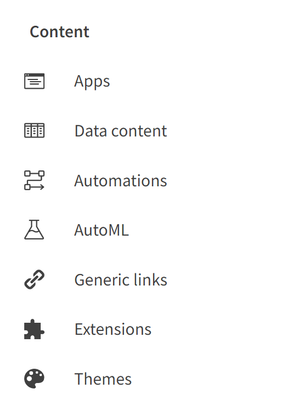
AppsThe Apps section of your Qlik Management Console will list the various apps in your tenant. This section contains great information on each app in your tenant, such as the name, owner, space that the app is in, the size and description if you have one. Here you can also change the owner, or the space the app is in, or just delete the app entirely. This section also allows you to view and manage the published and staged apps in your tenant.
Data Content
Data content shows the data connections and assets. For example, if you have connected to a database and your tenant is sourcing data from that database, that connection would be listed here. Users can view the Name, Owner, Space and Type of connection from this section. This section is great for viewing where your data is coming from and ensuring the right source is being used.
Automations
Automations are used to send messages to users and services. For example, if a certain threshold is met, users can set up an automated message to be sent to them. In this section, users can manage these automations, enabling, disabling, and deleting them. This section also provides information on the name of the automation, status, when it last happened, what mode it is in, the owner, description and if the automation has been completed or not.
AutoML
AutoML stands for Automated Machine Learning. AutoML generates machine learning models by using historical data to make predictions on current data. Put simply; AutoML looks at what has been done in the past, to do the same in the present. In this section, you will find the jobs that are running for AutoML experiment versions and predictions. Here you can see the Experiment name, when it was created, the user that created it, and the status of the experiment. If you have access rights, you can also cancel jobs.
Generic links
This section allows users to create links that make on-premises apps available in the cloud. Here you’ll be able to upload a CSV file to upload several links at the same time. The linked apps will be presented as the native apps but will be opened in their respective environments.
Extensions
Here you can manage the extensions that are used in your tenant. You’ll find information such as the name, description, and author of the extensions, among many others. Extensions can be used for a variety of reasons, giving additional features to Qlik Cloud.
Themes
Themes change the look of your Qlik Cloud apps. In this section you can upload new themes and view the authors of the themes. You can also check the description, when the theme was published and when the theme was uploaded to your tenant.
And that will cover the Content section of the Qlik Management Console. If you feel like I have missed anything, please leave a comment below. If you are enjoying this tour and would like to see more like it, leave a like on this post. In my next blog entry, I’ll be going over the Integration section.
-
Using Colors with Qlik Sense Visualizations, Measures and Dimensions
Our Christof Schwarz is back and has created a video tutorial that shows you how to use PERSISTENT CUSTOM colors with Qlik Sense visualizations. Persi... Show MoreOur Christof Schwarz is back and has created a video tutorial that shows you how to use PERSISTENT CUSTOM colors with Qlik Sense visualizations. Persistent colors map all dimension values to specific consistent colors that are represented equally in all charts on the sheet. When you perform selections - the values displayed will all be represented by the same color in the charts. However the colors can change when the sequence or number of values for that dimension have changed. So this tip will show you how to assign specific custom colors to those values so they don't change and remain "sticky" as Christof puts it.

Enjoy!

-
Qlik Sense 3.2: Extension Properties
After reading Michael's wonderful post on the 3.2 features, https://community.qlik.com/blogs/qlikviewdesignblog/2017/04/04/introducing-qlik-sense-32?e... Show MoreAfter reading Michael's wonderful post on the 3.2 features, https://community.qlik.com/blogs/qlikviewdesignblog/2017/04/04/introducing-qlik-sense-32?et=blogs.comment.created#commen…, I admit, I wanted to get into more details on each of the topics he mentioned. Even though this is impossible since there are so many goodies hidden in 3.2, I decided to focus more on the properties panel while creating custom extensions.
Some of these will make us retouch some of our extensions since, personally, I used workarounds like custom color in an input field as hex, inject dropdowns as html etc
Below I show the latest properties and at the end I attach an extension with everything working... Please note that, as the help pages suggest, some of these are "considered EXPERIMENTAL and may be subject to change or be removed in future releases."
For more details, please bookmark Qlik Sense Developer's help page
http://help.qlik.com/en-US/sense-developer/3.2/Subsystems/APIs/Content/extensions-api-reference.htm
SIMPLE TEXT DESCRIPTION Integer 
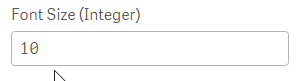
text: {
label:"This is a description for the properties panel (Text Component)",
component: "text"
},
fontSize: {
type: "integer",
expression: "none",
label: "Font Size (Integer)",
defaultValue: "10",
ref: "vars.fontSize"
},
INPUT TEXT BUTTON 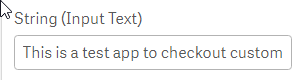

inputText: {
type: "string",
expression: "none",
label: "String (Input Text)",
defaultValue: "This is a test app to checkout custom properties",
ref: "vars.inputText"
},
button: {
label:"My Button (Button Component)",
component: "button",
action: function(data){
alert("My visualization extension name is '"+data.visualization+"' and have id '"+data.qInfo.qId+"'.");
}
},
BUTTON GROUP Header 2 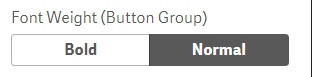

weight: {
type: "string",
component: "buttongroup",
label: "Font Weight (Button Group)",
ref: "vars.weight",
options: [{
value: "bold",
label: "Bold",
tooltip: "Select for Bold text"
}, {
value: "normal",
label: "Normal",
tooltip: "Select for normal text"
}],
defaultValue: "normal"
},
show: {
type: "boolean",
label: "Show extra div? (boolean)",
ref: "vars.show",
defaultValue: false
},
COLOR PICKER DROP DOWN 

colorPicker: {
label:"Background (Color-picker)",
component: "color-picker",
ref: "vars.color",
type: "integer",
defaultValue: 0
},
dropDown: {
type: "string",
component: "dropdown",
label: "Select Options (dropdown)",
ref: "vars.dropDown",
options: [{
value: "option1",
label: "Option 1",
tooltip: "Select for Option 1"
}, {
value: "option2",
label: "Option 2",
tooltip: "Select for Option 2"
}, {
value: "option3",
label: "Option 3",
tooltip: "Select for Option 3"
}],
defaultValue: "option2"
},
LINK SLIDER 

link: {
component: "link",
},
slider: {
type: "number",
component: "slider",
label: "Letter Spacing (Slider)",
ref: "vars.slider",
min: 1,
max: 10,
step: 1,
defaultValue: 1
},
RANGE SLIDER SWITCH 

rangeSlider: {
type: "array",
component: "slider",
label: "Range slider",
ref: "vars.rangeSlider",
min: 1,
max: 20,
step: 1,
defaultValue: [8, 17]
},
switch: {
type: "boolean",
component: "switch",
label: "Show Border (Switch)",
ref: "vars.switch",
options: [{
value: true,
label: "Show"
}, {
value: false,
label: "Hide"
}],
defaultValue: false
},
TEXT AREA ARRAYS 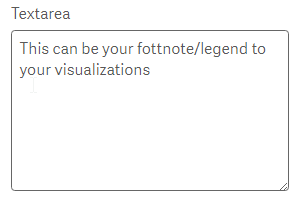
textarea: {
label:"Textarea",
component: "textarea",
rows: 7,//the amount of rows in the textarea component (default is 3)
maxlength: 100,//will not allow more than 100 characters
ref: "vars.textarea",
defaultValue: "This can be your fottnote/legend to your visualizations"
},
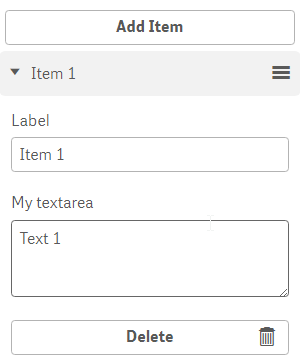
MyList: {
type: "array",
ref: "listItems",
label: "List Items",
itemTitleRef: "label",
allowAdd: true,
allowRemove: true,
allowMove: true,
addTranslation: "Add Item",
items: {
label: {
type: "string",
ref: "label",
label: "Label",
expression: "none"
},
textarea: {
label:"My textarea",
component: "textarea",
maxlength: 100,//you shouldn't write too much
ref: "myTextarea"
}
}
}
Attached find the extension.
Yianni
-
The Date Function
Interpretation vs Formatting The first thing you should be aware of is that there are two different functions: Date#() and Date(). The first is an Int... Show MoreInterpretation vs Formatting
The first thing you should be aware of is that there are two different functions: Date#() and Date(). The first is an Interpretation function and the second is a Formatting function.
- Interpretation functions use the textual value of the input, and convert this to a number.
- Formatting functions use the numeric value of the input, and convert this to a text.
In both cases, the output is a dual, i.e. it has both a textual value and a numeric value. The textual value is displayed, whereas the numeric value is used for all numerical calculations and sorting.
The table below shows how to use the interpretation function Date#(). Note that the format code must match the input parameter.

This is very different from the formatting function Date(). Next table shows how to use this function. Note that the format code matches the format of the output text.
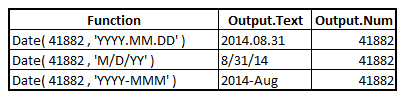
In real life, it is often useful to nest an interpretation function inside a formatting function:

Formatting vs Rounding
The second thing you should be aware of is that the Date() function and other formatting functions never change the numeric value of the input value.
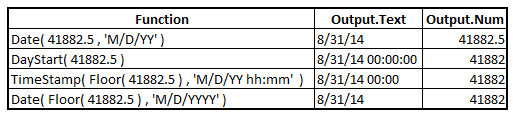
This means that you can format a timestamp as a date only, without the time information. This can sometimes be confusing since there is a “hidden” value. In the table below, you can see that the input value corresponds to 12:00 in the middle of the day, but the Date() function effectively hides this from the textual output - but it remains in the the numeric value.

So what should you do if you want to remove the time part of the field, and just keep the date part? Well, obviously you must use a function that changes the numeric value: You need a Rounding function, e.g. DayStart() or Floor().
In the table below, you can compare the output of the Date() function with a couple of different rounding and formatting options.
Summary
The above discussion is not relevant to dates only. It is just as relevant for Years, Weeks, hours, seconds and any other time interval. Further, it is relevant to a number of other functions:
Interpretation functions: Date#(), TimeStamp#(), Time#(), Interval#(), etc.
Formatting functions: Date(), TimeStamp(), Time(), Interval(), etc.
Rounding functions: Round(), Floor(), Ceil(), DayStart(), WeekStart(), MonthStart(), etc.
Combine these functions sensibly, and you will be able to round or format any way you want.
Further reading related to this topic:

-
Qlik Digest - September 2022
What’s New at Qlik?In Qlik Cloud, Qlik AutoML brings the power of machine learning and predictive analytics directly to you. Plus, Direct Access with ... Show MoreWhat’s New at Qlik?
In Qlik Cloud, Qlik AutoML brings the power of machine learning and predictive analytics directly to you. Plus, Direct Access with Qlik Data Gateway enables you to safely connect to and analyze enterprise data that lives behind your firewall.
The August client-managed releases for Qlik Sense, Qlik Replicate and Qlik Catalog feature new capabilities with Databricks and more styling options for your visualizations. Learn More
Get Certified!
Validate your knowledge in Qlik products, data analytics, and data literacy with Qlik Certifications and Qualifications. Once earned, download your digital badge, add it to your email signature, or share on social media to showcase your skills to the world! Learn More
Product Portfolio Roadmap Webinar
Exclusively for Qlik customers and partners, join us on September 22 to get an overview of Qlik’s analytics product strategy, roadmap, and new capabilities in 2022 and beyond. Register Here
Featured Customer Story
Australian energy provider Western Power shares their secret to successful data transformation. Learn More
Additional Featured Content
Watch the latest Qlik Sense SaaS in 60
Register to get a close-up view of Qlik Auto-ML
Be Data Brilliant Podcast: Why Data Needs More Diversity
Lineage and Impact Analysis features now available in Qlik Sense SaaS
-
Bill of Materials
Most hierarchies are dimensional hierarchies. This implies several things: First, you have a many-to-one relationship between the levels: a day belong... Show MoreMost hierarchies are dimensional hierarchies. This implies several things: First, you have a many-to-one relationship between the levels: a day belongs to one (and only one) month, a month to one (and only one) quarter, etc. Strictly speaking, it is not a hierarchy unless this condition is fulfilled.
Secondly, the hierarchy contains no measures. Instead, numbers are stored in a transactional table that is linked to the dimensional hierarchy.
But there is another hierarchy-like structure, the Bill of Materials, the “BoM”. This is a list of items, assemblies and sub-assemblies representing the design of a product or device. Many products are planned and documented with BoMs.
A multi-level BoM depicts parent-child relationships and shows the hierarchical structure of the assemblies and their related subcomponents. A multi-level BoM is essentially a nested list whose items are listed to illustrate multiple assemblies within a product.
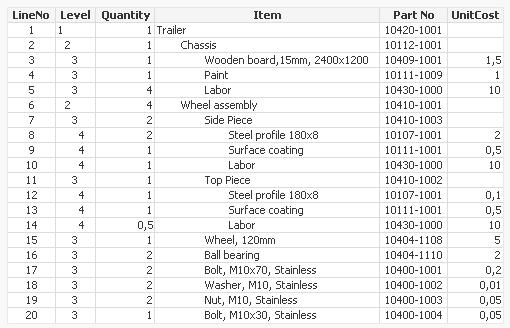
But a BoM is very different from a dimensional hierarchy. It does not have to have a strict many-to-one relationship between the levels. For instance, a specific bearing type can be used in several places. For the BoM, this means that the bearing can have several parents in the hierarchy.
Further, each line in the BoM has numbers in it, typically Quantity and Cost. These are measures that should be summed. In a sense, a BoM is more similar to a transaction table than a dimensional table.
A BoM can easily be loaded and analyzed with Qlik Sense or QlikView, but there are some challenges: First, the list often lacks a parent reference. Instead, the parent-child relationship is implied by the order of the rows and the Level field, and visualized by indentations.
Secondly, aggregating the measures is not straightforward. When summing the costs, the multiplicities of all the nodes above it must be taken into account. In the example in the above table, the wheel assembly uses 2 bearings, and the trailer uses 4 wheel assemblies. Then the trailer obviously needs 8 bearings. In other words: The row for the wheel assembly – and all rows belonging to it – must be looped 4 times when summing the cost.
Luckily, both these challenges can be handled in the Qlik script. One possible solution is the following:
Hierarchy ( [Part No], Parent, Description )
Load *,
Subfield( Path, '/', Level ) as Parent;
Load *,
Left( Peek( Path ), Index( Peek( Path ) & '/', '/', Level ) -1 ) & '/' & [Part No] as Path
While IterNo() <= Units;
Load *,
If( Frac( Quantity)=0, Quantity, 1 ) as Units,
If( Frac( Quantity)=0, 1, Quantity ) as Amount
From BoM ;
The reference to the parent is created in two steps: First a Path is built using the Level and the Path of the above row. Having the path, it is straightforward to extract the parent id using Subfield().
Further, each row is loaded several times using a while loop. Hence, row 16 (the ball bearings) is loaded twice since its Quantity is 2. But it should be loaded 8 times since the Quantity of its parent (row 6, Wheel assembly) is 4. This multiplication is achieved using the Hierarchy prefix.
Finally, the above multiplication algorithm only works for integer quantities. For this reason the bottom Load splits the Quantity into two fields: a field Units that is used in the While loop, and an Amount that is used in the aggregation:
Sum( Amount * UnitCost )
However, this means that nodes that have non-integer quantities cannot have any children. If they do, the above algorithm cannot be used, and the cost roll-up must be made a different way. Luckily, this is rarely – or never – the case in real life.
Good luck with your Bill of Materials!
Further reading related to this topic:
-
Qlik Academic Program participates in ICT Learnathon 2022
ICT Academy in association with the industry partners, launched its fifth season of ‘LEARNATHON 2022’ - a self-learning initiative for higher educatio... Show MoreICT Academy in association with the industry partners, launched its fifth season of ‘LEARNATHON 2022’ - a self-learning initiative for higher education students to build their foundational IT skills online.
Since 2018, through Learnathon, ICT Academy has inculcated self-learning among college students and benefitted many students.
The 5th edition of Learnathon has been launched this year by ICT Academy in partnership with global tech majors such as Qlik. This initiative is exclusive to the member institutions of ICT Academy such as colleges and Universities across India.
Learnathon 2022 will see participation from more than 600 colleges. Nine Industry partners including Qlik are participating in this initiative to offer their learning courses and academic programs
The Qlik Academic Program is associated with Learnathon for a second year in a row after a great response in 2021. Students have been very enthusiastic about the learning pathways offered under the academic program and they have actively pursued training for the Qlik Sense Business Analyst and Qlik Sense Data Architect pathways with many of them getting certified. This will add value to the future prospects of students given the fact that data analytics is one of the most sought after careers.
To know more about the free data analytics resources of the Qlik Academic Program, visit: qlik.com/academicprogram
-
In memory of Gysbert Wassenaar
It is with deep sadness that we write this post. Unfortunately, we learned that we lost one of our most valued Qlik Community memb... Show MoreIt is with deep sadness that we write this post. Unfortunately, we learned that we lost one of our most valued Qlik Community members, Gysbert Wassenaar. Gysbert passed away this past weekend. He was not just a member of our Community; he was a Qlik Luminary Alumni, which means he was part of an exclusive program that brings together the best and brightest customers and enthusiasts in the Qlik ecosystem. Most currently, he was part of our Qlik Community MVP Program. As a Qlik Community MVP, he was one of 32 members that went above and beyond answering questions, moderating, and dedicating his time to helping other community members. As a matter of fact, he posted almost 21,000 times! That’s how much he wanted to help! We even featured Gysbert last year; that’s how incredible he was. We were so lucky to get to know Gysbert and knew that we could always depend on his expertise and participation. He will be profoundly missed in our Community.
Words from his family:
It is with great sadness that we must announce that Gysbert Wassenaar has passed away. Our dear, smart, and humble colleague and friend was a pillar of strength to us as well as within the international Qlik Community. Feel free to share this message with other acquaintances. Your memories, replies or condolences will be greatly appreciated.
-
Human Resource Dashboard By Tapati
Human Resource Dashboard By Tapati Freelancer Human Resource Dashboard will be used by my prospective clients as a portfolio of my work and this... Show MoreHuman Resource Dashboard By TapatiFreelancer Human Resource Dashboard will be used by my prospective clients as a portfolio of my work and this dashboard shows different analyses of employee performance monitoring, employee details and directory.
Discoveries
Human Resource Dashboard will be used by my prospective clients as a portfolio of my work and this dashboard shows different analyses of employee performance monitoring, employee details and directory.
Impact
Organisation will be able to maintain optimum performance of the employee along with their holistic development in the organisation and the Human resource department will be able to keep a track of the overall employee outlook.
Audience
Prospecting human resource managers who will be using this app on regular basis to keep the employee performance in check which helps them for holistic development of employees.
Data and advanced analytics
We have human resource data in this app this will show the trend and give detailed insight about the human resource outlook of the organisation and empower them to make a data-driven decision.
-
事務所移転のお知らせ
時下ますますご清祥のこととお慶び申し上げます。平素は格別のご高配を賜り厚くお礼申し上げます。 この度、弊社はデータを行動につなげる「アクティブインテリジェンス」の実践を通じた機動力の向上、およびアフターコロナの新しいワークスタイルへの対応をめざし、東京本社を新事務所へ移転することになりましたことお知... Show More時下ますますご清祥のこととお慶び申し上げます。平素は格別のご高配を賜り厚くお礼申し上げます。 この度、弊社はデータを行動につなげる「アクティブインテリジェンス」の実践を通じた機動力の向上、およびアフターコロナの新しいワークスタイルへの対応をめざし、東京本社を新事務所へ移転することになりましたことお知らせ申し上げます。
これを機会に、社員一同一層社業に専念いたしますので、今後とも倍旧のお引き立てを賜りますようお願い申し上げます。【移転先住所】 〒105-0001 東京都港区虎ノ門1-3-1 東京虎ノ門グローバルスクエア 13階
※電話番号は変更ございません
【業務開始日】 2022年 9月 12日(月)2022年 9月吉日
クリックテック・ジャパン株式会社
カントリーマネージャー
今井 浩 -
Qlik AutoML - 機械学習のパワーで分析部門を強化(Qlik Blog 翻訳)
ブログ著者:James Fisher 本ブログは Qlik AutoML – The Power of Machine Learning for Analytics Teams の翻訳になります。機械学習は、売上予測から解約率の低減・顧客生涯価値・在庫の最適化・資本の配分など、多岐にわたる予測分析... Show Moreブログ著者:James Fisher 本ブログは Qlik AutoML – The Power of Machine Learning for Analytics Teams の翻訳になります。
機械学習は、売上予測から解約率の低減・顧客生涯価値・在庫の最適化・資本の配分など、多岐にわたる予測分析のニーズに対し、業界やユーザーコミュニティで利用されています。
通常、データサイエンティストのプロフェッショナルは、非常に詳細かつ高度な方法で、上位の優先事項にのみ焦点を当てます。では、それ以外はどうなるのでしょうか?Qlik AutoML は、「その他の90%」のユースケースに予測分析を適用し、分析部門が大きな価値を創出できるようにします。
Qlik は AIを活用して、単なる履歴的な分析から予測的・処方的な分析への移行を可能にします。従来の分析は、過去のデータから発生したことを把握・深掘りして、「なぜ、そのようなことが起きたのか」という、ある程度のインサイトを得て適切な意思決定を行い、より有効な行動を起こそうとしていました。
Qlik AutoML のロジックも同じですが、機械学習を利用して過去のデータを分析し、将来の結果を予測できるモデルを構築します。推測するのではなく、より具体的な目に見える形で意思決定ができるようになります。予測データと説明できるデータの両方があれば、「これから何が起きるのか」だけでなく、もっと重要な「その理由がわかる」ということです。起こりうる結果とその要因を把握すれば、最善の意思決定から行動を起こすことができるのです。
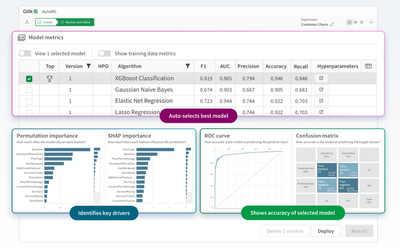
Qlik AutoML は Qlik Cloud に完全に統合されました。分析部門が AutoML を活用できるよう、シンプルかつコード不要の方法を提供することで、機械学習モデルのトレーニング・予測・意思決定の計画を策定することができます。Qlik AutoML は、独自の分析エンジンを活用し、Qlik Sense で予測データの探索や what-if シナリオのテストを可能にします。また、Qlik のエンドツーエンドプラットフォームを使用すると、通知と自動化で行動を促すことができます。
すべてのエンタープライズ SaaS サブスクリプションには、無制限のテストおよび 2 つの展開モデルが含まれていますので、Qlik AutoML の優れた機能をすぐに体験することができます。ぜひ、お試しください。