Unlock a world of possibilities! Login now and discover the exclusive benefits awaiting you.

Analytics & AI
Forums for Qlik Analytic solutions. Ask questions, join discussions, find solutions, and access documentation and resources.
Data Integration & Quality
Forums for Qlik Data Integration solutions. Ask questions, join discussions, find solutions, and access documentation and resources
Explore Qlik Gallery
Qlik Gallery is meant to encourage Qlikkies everywhere to share their progress – from a first Qlik app – to a favorite Qlik app – and everything in-between.
Qlik Community
Get started on Qlik Community, find How-To documents, and join general non-product related discussions.
Qlik Resources
Direct links to other resources within the Qlik ecosystem. We suggest you bookmark this page.
Qlik Academic Program
Qlik gives qualified university students, educators, and researchers free Qlik software and resources to prepare students for the data-driven workplace.
Recent Blog Posts
-
Push the Boundaries of Analytics - Qlik Sense Bot (video)
Good Tuesday Qlik Community! Today I have a fun and entertaining way to showcase the power of the Qlik Sense platform, its APIs and the art of the pos... Show More
Good Tuesday Qlik Community! Today I have a fun and entertaining way to showcase the power of the Qlik Sense platform, its APIs and the art of the possible. But first, let me give you some background. In March, Qlik participated in the Gartner BI Bake Off (direct highlights here) - and for the 'innovation' portion of the presentation, my colleague Josh Good demonstrated a neat concept, showing what is possible with the Qlik platform and it's robust set of APIs - a Qlik Sense Bot - developed by my colleague Juan Gerado Cabeza. Since then we are getting numerous requests to see and learn more about what was shown on that day, so I have create this brief video to share some of its insights.
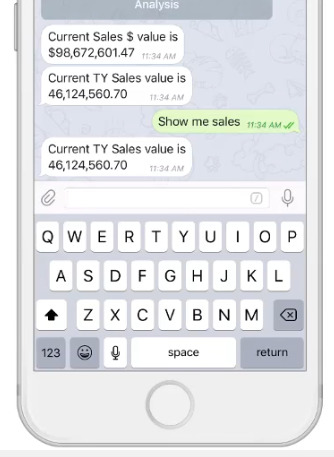 What is a Bot you may ask?
You already know some popular bots – Siri, Cortana, Alexa and of course Google. These guys are programs designed to perform tasks, such as setting an alarm, telling you the weather, searching online or even ordering a pizza. So why not have a bot tell you who your top sales people are, alert you when profit margin reaches 20% – or - even have it send you charts and reports directly to your device? The possibilities are endless. Juan as done just that, creating an analytical assistant - that in actuality turns Qlik data visualization into conversational analytics.
Now understand the Qlik Sense Bot - IS NOT a product provided by Qlik, but rather a neat concept that demonstrates the art of the possible when using the Qlik platform and its APIs. Now - neatness, coolness and Qlik platform superiority aside, what I like the most about this innovation is that it provides many real world applications. Bots can be used by anyone, anywhere, on any device and at anytime – scheduling automated tasks and providing access to information when and where you need it – reducing complexities, and increasing availability of insight by simply having a conversation. So in my opinion I do see this as a viable product offering, but you never know. Watch this brief video to learn more about this awesome concept. If you want even more information about this superior innovation, please contact us at qlik.com, or you can reach out to us on Twitter or on the Qlik Community.
Have a great day!
Regards,
Michael Tarallo (@mtarallo) | Twitter
Pushing the Boundaries of Analytics - Qlik Sense Bot
We want to hear from you. Please leave your comments and questions in the comments section below.
NOTE: To increase resolution or size of the video, select the YouTube logo at the bottom right of the player. You will be brought directly to YouTube where you can increase the resolution and size of the player window. Look for the 'settings' gears icon in the lower right of the player once at YouTube.
NOTE: Can't see the video? Download the .mp4 to play on your machine or mobile device.


-
Context Is Next
Why Contextual Learning Is The Best New Way to Learn Software?"The way that we learn as adults has evolved over time. As technology continues to evolv... Show MoreWhy Contextual Learning Is The Best New Way to Learn Software?

"The way that we learn as adults has evolved over time. As technology continues to evolve, we learn more about how our brains process information. We are going through another inflection point in leaning towards a model of learning based off contexts and relationships."
From one-to-one to many-to-many
Learning started as apprenticeships where students learned on the job with a master teacher. This worked well, but since this was a one-to-one relationship, it did not scale well. Then, the model evolved to a one-to-many, teacher-centric approach where one teacher trained many students at once. This then evolved into a learner-centric approach where learners took control of their own learning, including self-directed learning approaches and performance support. Some of the benefits of the learner-centric approach are that students are able to learn what they want, when they want to learn it. In that way, teachers didn't have to teach concepts which may not be relevant to all, or which may go at different levels or speeds which are not ideal for each student. However, what was initially lacking from the learner-centric approach is context and social relationships, a many-to-many approach to learning.
To read the full article written by Kevin Hanegan (VP Knowledge & Learning) visit Context Is Next | Qlik Blog

-
Engine API and qSocks - Connecting and getting a list of available apps
In an earlier post, i have demonstrated how to connect to our app using Mashup API and displaying the objects on our webpage without much coding (http... Show MoreIn an earlier post, i have demonstrated how to connect to our app using Mashup API and displaying the objects on our webpage without much coding (https://community.qlik.com/blogs/qlikviewdesignblog/2015/05/22/creating-a-webpage-based-on-the-qlik-sense-desktop-mashup-api).
In one of my projects, I had to create custom charts one of which is to compare two golf players versus one measure. That means that I had to have a chart with 2 lines, one for each player, compared hole by hole This kind of visualization does not exist yet in Qlik Sense so I decided to build everything with qSocks and the Engine API.
I think this is the best solution for custom projects like this, since the Engine API is faster and it is loading only raw data.
qSocks is a wrapper intended to make our life easier on communicating with the Engine.(QSocks - Engine API wrapper).
In this first tutorial, I will show you how to connect to your Qlik Sense server and get a list of the available apps with qSocks.
- In your html header, add qSocks that you downloaded from the link above and your js file.
  <script src="js/qsocks.bundle.js"></script>
  <script src="js/index.js"></script>
- In your index.js, or however you have named your js file, add the connection configuration.
var config = {
  host: 'yourserver.com',
  isSecure: true
};
- Establish a connection with the server based on that configuration.
qsocks.Connect(config).then(function(global) {
- Get the list of all available apps on the server.
global.getDocList().then(function(docList) {
- If you want to view the available apps on your console, do a forEach loop on that docList.
docList.forEach(function(doc) {
- Here is what the console will output if you do "console.log(doc)"

Here is the full code:
var config = {
  host: 'yourserver.com',
  isSecure: true
};

function connect() {
  qsocks.Connect(config).then(function(global) {
       global.getDocList().then(function(docList) {
            docList.forEach(function(doc) {
                 console.log(doc.qDocId)
            });
       });
  });
};

connect();
In the next tutorial I will show you how to use the app id (qDocId) to connect to the app and get the available objects to display
-
November 2017 Features and Amazon Redshift Now Available in Qlik Sense Cloud
(Originally posted on 11/29 on the Qlik Sense Cloud blog, so in case you missed the updates, read on!)Qlik Sense November 2017 ReleaseOur Qlik Sense N... Show More(Originally posted on 11/29 on the Qlik Sense Cloud blog, so in case you missed the updates, read on!)
Qlik Sense November 2017 Release
Our Qlik Sense November 2017 release features are available in Qlik Sense Cloud. Qlik Sense Cloud Basic and Qlik Sense Cloud Business users now have access to the newest data prep, visualization, and usability improvements, including:
- Improvements to existing chart types:
- Tables – scroll sideways
- Box Plot – color by expression
- Distribution Plot – color by expression, control bubble size, and add jitter (to keep dots from overlapping)
- Combo Chart – display value labels
- Ongoing Visual Data Prep Enhancements
- UI based in-line data table
- Data Transformation Lineage
- Refresh and add data available from analysis edit mode
- Dynamic Sheet Names – utilize an expression in the name of a sheet
- Navigation Improvements using Keyboard – use the tab key to move around the screen
Mike Tarallo shows off all of these new features in his recent design blog post.
New Connectivity – Amazon Redshift
We’re excited to announce that Amazon Redshift is the newest addition to our expanding list of connectivity options for Qlik Sense Cloud Business users. Now you can easily connect to data stored in your Amazon Redshift database by creating a new connection in Add Data or the Data Load Editor. Visit our help section to learn more about how to set up the connection.
The full list of connectivity options in Qlik Sense Cloud Business now includes:
- General Connectivity: upload or attach files; connect to web files; REST, Microsoft SQL Server, and Amazon Redshift
- CRM Connectivity: Salesforce, SugarCRM, and Microsoft Dynamics
- Other Cloud applications: Bitly, Facebook, Google Analytics, Google Adwords, MailChimp, Slack, SurveyMonkey, Twitter, and YouTube
Coming Soon
We’re close to releasing our Dropbox connector for Qlik Sense Cloud Business and excited to add another flexible connectivity option for users. For a preview of how to use the Dropbox connector, check out Mike Tarallo’s recent design blog and video below about how to refresh file-based data stored in Dropbox.
More Qlik Sense Cloud highlights:
- On-Demand Webinar: Cloud BI Strategy: Do’s, Don’ts, and Gotchas
Hear about the latest trends in cloud BI! Cindi Howson of featured analyst firm Gartner explains all the factors you need to know about cloud BI. Plus, Anthony Deighton, Qlik's Chief Technology Officer and Senior Vice President, Products, shares the latest on Qlik's unique hybrid cloud solution.
- Live Qlik Sense Cloud Webinars: attend a live, interactive webinar with the team to get your Qlik Sense Cloud questions answered and learn more.

- Improvements to existing chart types:
-
PRESS RELEASE! Qlik Expands Academic Program with Mission to Bridge the Data Lit...
The Academic Program is excited to announce that we released a global press release today that features information about all of the programs new reso... Show More The Academic Program is excited to announce that we released a global press release today that features information about all of the programs new resources and feedback from students and professors who have successfully shared in the benefit of becoming members!
Sneak Peek...
“By participating in the Qlik Academic Program, these students are not only making themselves more marketable, but they’re prepared to stand out in today’s competitive workforce and set the new standard as the next generation of data literate business leaders driving the analytics economy.”
For the full article visit
https://www.qlik.com/us/company/press-room/press-releases/0103-qlik-expands-academic-program
We encourage you to share this article through social media!
-
Looking to be Data Literate? Begin with Curiosity!
Data literacy is everywhere, but don’t know where to begin? Start with a curious mind....It has been said that curiosity killed the cat, well, in the ... Show MoreData literacy is everywhere, but don’t know where to begin? Start with a curious mind....

It has been said that curiosity killed the cat, well, in the case of data and analytics, curiosity brings success.
In the world of data and analytics, we are hearing a lot more about data literacy, and the reality is, data literacy is vitally important to companies and their cultures to succeed, but most people are asking: where do we begin? There are many steps and things that can be done to build the right data literate culture, infusing success in data literacy throughout an organization, but there is a certain mindset that needs to permeate throughout the organization: curiosity. What does it mean to be curious within analytics? Why is curiosity such a vital mindset to have within the world of data literacy?
Did you know the Academic Program offers a Data Analytics course that delves into Data Literacy?! Professors and students can review the course materials by visiting the Course: Academic Program Learning Resources.
NOTE: If you do not have access you can reapply to the program by visiting https://www.qlik.com/us/company/academic-program
To read the full article written by Jordan Marrow (Qlik Global Head of Data Literacy) visit Looking to be Data Literate? Begin with Curiosity! | Qlik Blog
-
Year in review. 2017 Top Blog Posts
It's time for the end-of-the-year in review post, it's time for the cream of the crop.During 2017 six main authors and a respectable number of guest b... Show MoreIt's time for the end-of-the-year in review post, it's time for the cream of the crop.
During 2017 six main authors and a respectable number of guest bloggers posted a total number of 85 articles (plus this one).
We wrote 39,822 words (7,819 distinct words), that’s 15% more than the number of words we wrote previous year. We wrote the word “Qlik” 566 times, an absolute record. You contributed 695 times to the success of this blog in the comments section, we truly appreciate your feedback and comments!
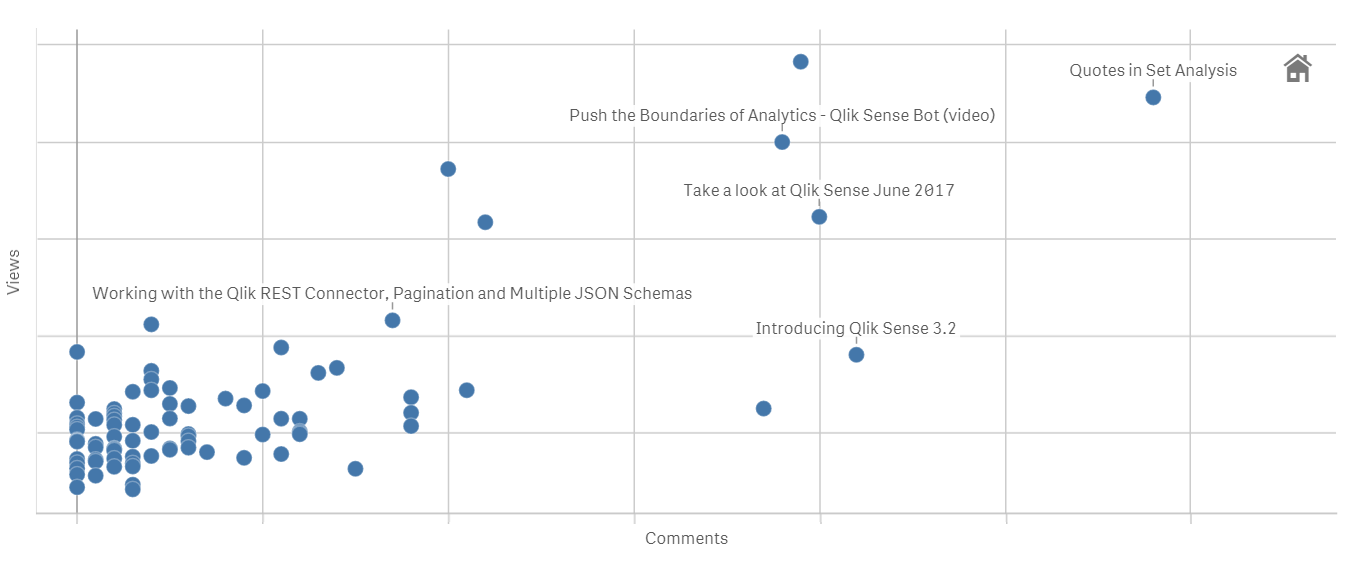
Most popular posts in 2017
Most read/visited posts
Don't be the last one to read it!
- Qlik Sense September 2017 - What's New
- Quotes in Set Analysis
- Push the Boundaries of Analytics - Qlik Sense Bot (video)
- Take a look at Qlik Sense June 2017
- Introducing DAR mashup template
Most commented posts of the year
Everyone is buzzing
- Quotes in Set Analysis
- Introducing Qlik Sense 3.2
- Take a look at Qlik Sense June 2017
- Qlik Sense September 2017 - What's New
- Push the Boundaries of Analytics - Qlik Sense Bot (video)
The underdogs 2017
They worth a second read.
- Qlik Sense WordPress Plugin
The world most popular CMS and the most powerful Analytics platform combined? it seems like a perfect match. This blog post is capturing a lot of comments, check it out and join the conversation. - Rank Function
Some of the old Qlik functions still have secrets, check this post to learn what you are missing from the Rank function. - Intro to Qlik Open Source Software
It feels great to contribute to the Open Software community, read what Qlik has to offer! - Salesforce and CIO dashboard mashups available to the public
You can use these examples as templates or just dissect them into pieces to learn more about Qlik APIs and how to build impacting data sites.
I wish you an enjoyable New Year countdown!
Arturo (@arturoqv)

-
Qlik Help!
Did you know about Qlik | Help ?! The Help page is dedicated to ensure you are equipped with all the resources and knowledge necessary to be successf... Show More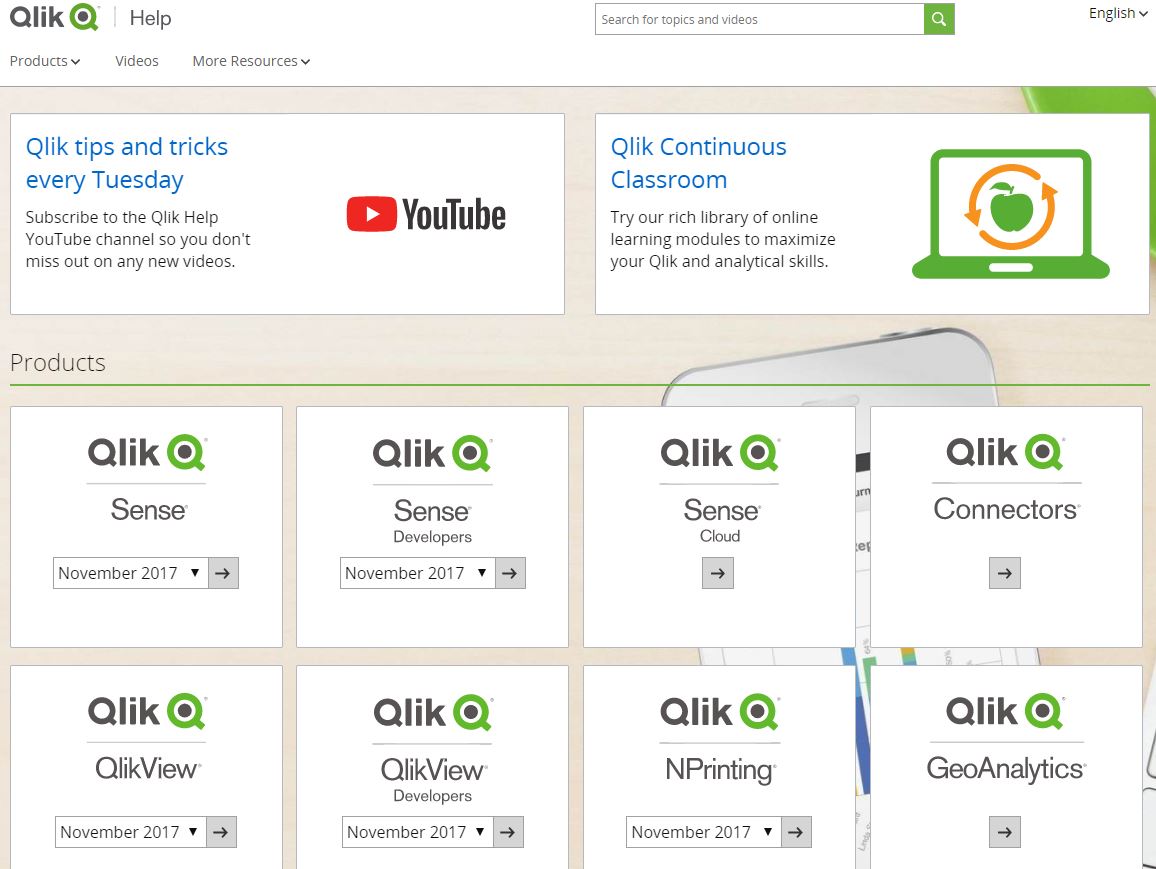 Did you know about Qlik | Help ?! The Help page is dedicated to ensure you are equipped with all the resources and knowledge necessary to be successful with Qlik Sense or any other Qlik product you might be working with!
After using the free training from the Qlik Continuous Classroom, the Help page is a great resources which provides videos, tutorials, guides, demos, and much more! Plus its available in multiple languages!
Save this link Qlik | Help and remember to take advantage of the Help site when in need!
-
Mashup Editor - Search as you type box
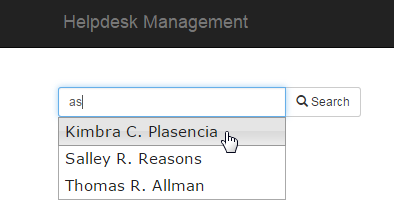
In my previous posts I have showed how to use bootstrap's drop-down menus with the Capabilities API. In this tutorial I will show you how to use jQuer... Show MoreIn my previous posts I have showed how to use bootstrap's drop-down menus with the Capabilities API. In this tutorial I will show you how to use jQuery's UI to get results as you type like this
- From the dev-hub (http://localhost:4848/dev-hub/) click on "Create New", to create a new mashup. Give it a name and select as template the "Grid mashup template"
- Select the "Helpdesk Management.qvf" for your app.
- On the right hand side, click on "Create a list". This will be the results that we would like to search on.
- From the left hand side click and drag the "case details" table onto the preview panel
- Click on "Fields" and select "Case Owner".
- Under "Rows" put 100 since we do not need any more for this tutorial, and give a name to your callback function. I usually name mine as "refactorData" because I restructure all of the data in a more accessible format. Once you hit create, you will see that the code for the list was added as well as the refactorData in line 108.
- In our html's headers, after bootstrap css and right before requirejs, add the jquery ui css and js
<link rel="stylesheet" href="https://community.qlik.com//code.jquery.com/ui/1.11.4/themes/smoothness/jquery-ui.css">
<script src="https://code.jquery.com/jquery-2.1.4.min.js"></script>
<script src="https://code.jquery.com/ui/1.11.4/jquery-ui.min.js"></script>
<script src="https://maxcdn.bootstrapcdn.com/bootstrap/3.2.0/js/bootstrap.min.js"></script>
- Let's add the code into our callback function
function refactorData(reply, app){
     var data = [];
     for (var i = 0; i < reply.qListObject.qDataPages[0].qMatrix.length; i++) {
          data.push(reply.qListObject.qDataPages[0].qMatrix[0].qText);
     }
     $("#search").autocomplete({
          source: data
     });
};
- In our "function AppUi ( app ) {" add the code below that will make the actual selection in our app
$( "#searchBtn" ).on( 'click', function () {
     app.field('Case Owner').selectValues([$('#search').val()], false, false);
});
- Now Let's add the text box in our html page. Replace the "<div class="col-sm-4 qvplaceholder" id="QV01">" with this one
<div class="col-sm-4 qvplaceholder" id="QV01">
     <div class="input-group input-group-sm">
          <input type="text" class="form-control" placeholder="Type in the Case Owner" aria-describedby="basic-addon1" id="search" name="search">
          <span class="input-group-btn">
               <button class="btn btn-default" type="button" id="searchBtn"><span class="glyphicon glyphicon-search" aria-hidden="true"></span> Search</button>
          </span>
     </div>
</div>
And that's it. The final should look like this
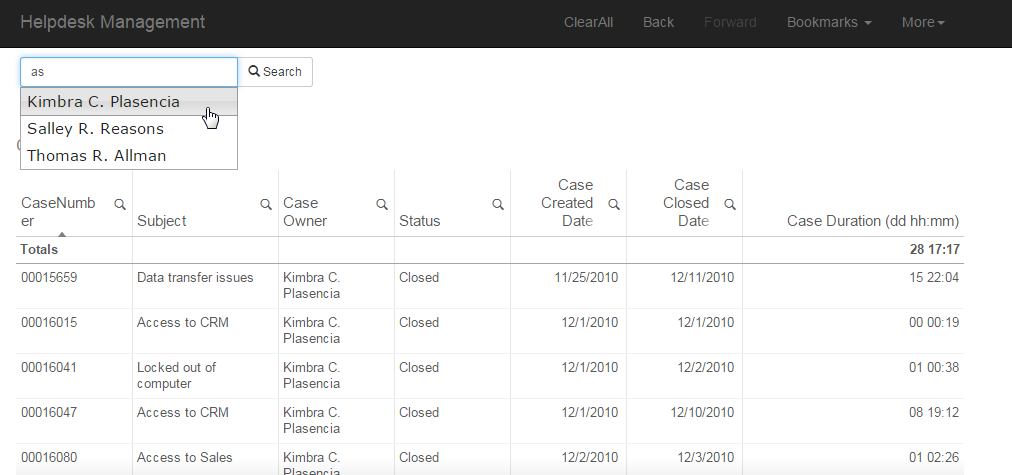
YV
-
We want you - Apply to be a 2018 Qlik Luminary!
Hi Guys, we are almost at the finish line for 2017! So roll up your sleeves and get ready to show off that Qlik creativity and passion as we are ready... Show More
Hi Guys, we are almost at the finish line for 2017! So roll up your sleeves and get ready to show off that Qlik creativity and passion as we are ready to start accepting applications for our 2018 Qlik Luminary program. Here to tell you more is our Global Customer Communications Manager, Viktoria Lindback.
Viktoria Lindback has had many roles during her 5-year tenure at Qlik. Today, she runs global customer programs including the https://www.qlik.com/us/solutions/customers/qlik-luminaries which means she gets to spend the majority of her time interacting with the most enthusiastic Qlik users around the world.
If you haven’t heard of the Qlik Luminary Program yet, this is a great time to get educated about it because we’re accepting applications to the 2018 Qlik Luminary Program as we speak!

Click here to see our awesome Qlik Luminary Class of 2017
Every year, we roll out the green carpet to a remarkable group of people who all receive the “Qlik Luminary” designation. With deep drive, passion and expertise, Qlik Luminaries are constantly pushing the envelope, finding new and innovative ways to use, deploy and talk about Qlik solutions. Some of them are BI thought leaders; others are recognized industry visionaries, business leaders, or masterful developers. But what they all have in common is a passion for innovating with Qlik and sharing their expertise with others in a global arena. You will catch them speaking at events, running Qlik Dev Group, writing blog posts, contributing to case studies, and participating in Qlik Community and other social networks. A great place to follow their work is #QlikLuminary on Twitter.
Here are some of the characteristics of a Qlik Luminary:
- Passionate about Qlik and widely recognized as a BI innovator and expert in his or her field
- Active and consistently helpful on Qlik Community
- Active on online forums, industry social networks, and/or organizational or personal blog
- Willing to share best practices and knowledge at industry events, forums, in the press, and with industry analysts
- Prolific content creator who creates or contributes to blogs, white papers, reviews, articles, videos, etc.
There are also plenty of benefits to being a Qlik Luminary. They enjoy free access to state of the art Qlik training, custom merchandise, exclusive engagements with R&D, Product Management, and Support teams, membership in a private Qlik Community group, NDA briefings with Qlik product executives, and VIP treatment at Qonnections.
We are accepting applications for the 2018 cohort until December 31st here: https://www.qlik.com/us/solutions/customers/qlik-luminaries
Don't miss your chance to join a group of the sharpest brains and most skilled users in the BI industry!Kinds Regards,
Viktoria (@VLindback) | Twitter
Global Communications Manager
Qlik
-
When do you post to Facebook? (revisited)
I posted back in May about creating an app that allows a user to authenticate with Facebook, grabs the user's post data, generates a load script, and ... Show MoreI posted back in May about creating an app that allows a user to authenticate with Facebook, grabs the user's post data, generates a load script, and creates a Qlik Sense session app with enigma.js (When do you post to Facebook?). At the time, I still had to overcome a few hurdles to put it up live so you could check it out yourself. Since then, it's also become possible to create a Qlik Sense session app with the Capability APIs so that you can use the Visualization API with your on-the-fly Qlik Sense session apps, which I posted about in September (Creating apps on the fly).
The demo is now up live, and there's two versions of it, one using enigma.js, and one using the Capability APIs. They're pretty minimal when it comes to design yet, I plan on building them out a bit more still, but it's cool to just see this all working, authenticating a user with Facebook, grabbing their data, generating a load script, creating a Qlik Sense session app, and visualizing the data. It's easy to see how something like this could be applied to a business use case where users may have very user-specific data. Check the demos out below!
Capability APIs version - Qlik Sense Session App Demo - Capability APIs
enigma.js version - Qlik Sense Session App Demo - enigma.js
-
Data Science: The New Art
Data Science is a new and growing field, but what exactly is it? In this digital world of data, the Internet of Things, and more, there is one term w... Show MoreData Science is a new and growing field, but what exactly is it?

In this digital world of data, the Internet of Things, and more, there is one term which seems to come up everywhere: Data Science.
Data Science has taken on a life of its own, bringing immense value to organizations when utilized correctly - but what does it mean? And how should organizations embrace it? I recently asked an industry thought leader and expert on this topic, Marie Clark of Ambient Intelligence, to help define and shed light on this curious world.
To read the full article written by Jordan Marrow (Qlik Global Head of Data Literacy) visit Data Science: The New Art | Qlik Blog
-
Thank you team for the New Qlik Help Site
Hello Qlik Community! In Tuesday's edition of the Design Blog I highlight some of the latest features found in our new Help Site - created with collab... Show More
Hello Qlik Community! In Tuesday's edition of the Design Blog I highlight some of the latest features found in our new Help Site - created with collaboration from our engineers, technical writers and our Product Content and Media team. We hope that the site's new layout and navigation features make it easier to find the information you need, when you need it.
The New Qlik Help Site
"Teamwork for results" -- this is one of Qlik's core values that many of us embrace when creating content that makes our community successful with the Qlik platform. However, few are aware of our unsung heroes that work behind the scenes to bring you this great content, delivered to the Qlik Help site as well as our Qlik Help YouTube channel. I'd like to take this moment to thank and recognize them on behalf of the Qlik Community.
There is a small army led by Renata Rieschel, Director Product Content and Media. Renata manages the development and maintenance of all the content, design and infrastructure of the Qlik Help site. Our technical writers and architects not only design and write the help documentation, but they are also tasked with writing video scripts and verifying content from a linguistic point of view for many of the structured help videos you will find on the Qlik Help Channel. We have even enlisted the appealing voice talents of our Collaboration Product Designer, Stephen Jasionowski and our Internal Communications Manager Helene Rudzinski to provide the voice-overs for many of the help channel videos created by our interaction designer Giuseppe Panella, including those from our new series Qlik Tuesday Tips and Tricks - found on YouTube.
With all this great content being created, both visual and text-based - how should it be hosted, what will the UI look like, how will people search, navigate and find what they need? That is where Magnus Franzen and Tobias Leander come in. They have built a framework and implemented a platform to host all this content and strive to improve the performance, accuracy and usability of it daily, providing you with the best user experience possible.
I'd also like to recognize our technical writers, interaction designers, web developers, architects and engineers in Product Content and Media whom all work together to bring you the best content in a timely and efficient manner.
Sara Garmark
Jim Siwila
Mary Newell
Chris Bushnell
Konstantinos Fioretos
Thomas Oxenby
Thomas Lewis
Daniel Chabot
Daniel Rignell
Filippo Guizzetti
Greg Ralston
Julia Beingessner
Kyle Weishaar
Mary Newell
Michelle Thomas
Ralf Narfeldt
Sarah Anderson
Ingemar Hansson
Karin Dahlgren
Swati Jha
Thank you Team!
Regards,
Michael Tarallo (@mtarallo) | Twitter
Senior Product Marketing Manager
QlikCan't see the video?
Download the .mp4 and watch from your computer or mobile device.
-
Barcelona Marathon, a mashup for discovery
Guided apps are probably the more common data viz pieces nowadays. Are strongly influenced by the traditional journalistic approach to a story and rel... Show MoreGuided apps are probably the more common data viz pieces nowadays. Are strongly influenced by the traditional journalistic approach to a story and related with storytelling. The goal of guided apps is to walk the reader from point A to point Z.
A well-constructed guided visualization is incredible powerful at proving a point, examples can be found almost daily at mass media websites. As a data professional, I love data stories but maybe because I’m such a data geek I usually never get completely satisfied by the visualizations used to emphasize the story. I almost always hungry for ways to explore the data or I simply miss one angle from the story to feel fulfilled.
On the other hand, the so-called Discovery apps are intended to let the user to manage the ride and rely on reader capacity to be able to interact and to understand the data they are looking at. Scenarios with simple and familiar data are generally more appropriate for discovery apps.
We recently got one of those great data sets for discovery, simple data and containing thousands of potential stories in it. Barcelona Marathon organization contacted us to create a piece to let runners (data users) to explore every corner of their data. They have been collecting runners’ data during the last decade, our part was just to put a nice wrap around it. We like to see it as a nice hybrid (more on the discovery side) of guided and discovery app.
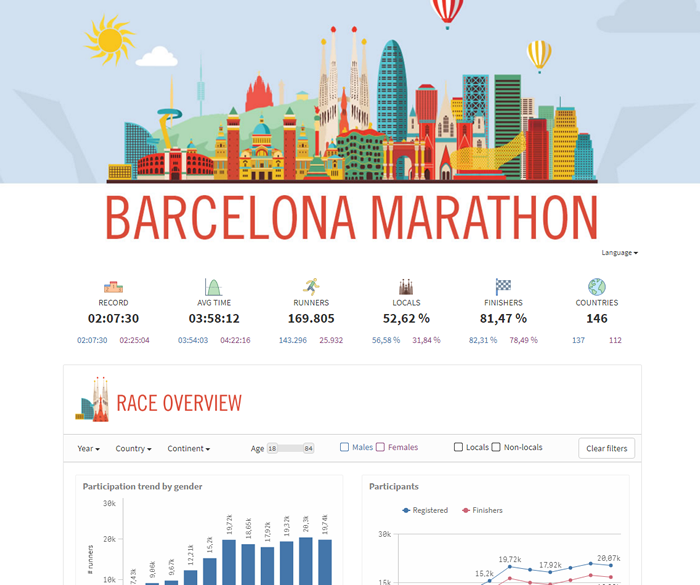
We divided the mashup into three sections trying to help first time users to better get familiarized with the data. It’s just a visual separation of the data, each section belongs to the same data model, filters are global and every selection affect all the charts. For the clarity of it we reduced the use of set analysis as much as possible.
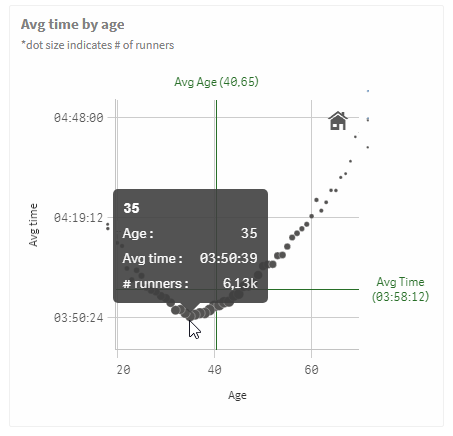
The app starts with race overview data, about participation and finishing times. The second section serves as demographic info, with three main characteristics to consider, age, sex and nationality. Finally, we reserved a little bit of complexity for the very last section, we called it Performance. As you can see in the picture below taken from the chart “Avg time by age” the sweet spot age for someone to run this marathon is 35 years old, in average people in that age get the best results.
You can check the mashup live at Barcelona Marathon page here or as a stand-alone version at Marató Barcelona.
Regards,
Arturo Munoz (@arturoqv)
-
NULL – The Invisible Nothing
NULL is not a value. It is a lack of value. It is a placeholder that marks nothingness. So, how does QlikView show the concept of nothing – when thi... Show MoreNULL is not a value. It is a lack of value. It is a placeholder that marks nothingness.
So, how does QlikView show the concept of nothing – when this is the relevant answer to the user’s click?
To investigate this, I will use a hypothetical database with two tables: Customers and Orders. The Customers table is a list of customers, and the Orders table is a list of orders that these customers have placed.
List boxes
In the picture below, you have a selection of two customers that haven’t placed any orders, i.e. they exist in the Customers table but there are no corresponding records in the Orders table. As a result, all values in the OrderID list box are gray.
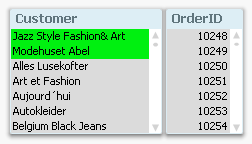
In other words; for a list box, it is simple: NULL is not visible as an explicit list box entry. If all entries are marked as gray, then the empty set is the answer to the click, i.e. NULL is the answer.
If you have a list box where you have a visible entry that is blank; that you can click on; that can be selected, then it is not a NULL. NULLs are never visible in list boxes and can never be selected. Instead, you have an empty string or some kind of white space.
Table boxes
In a table box, as well as in all other places where a NULL can occur, e.g. labels, text boxes, buttons, etc., NULLs are displayed as dashes. In these places, NULL is visible but not selectable.
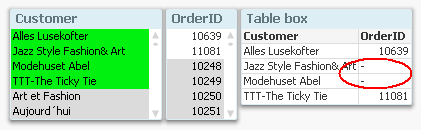
Chart dimensions
For a chart, it becomes more complicated. First of all, a NULL can occur either as a dimensional value or in the measure - the expression. These are two very different cases and should not be confused. Further, the two cases are managed in two different places in the chart properties.
With the above data, it would be reasonable to make a chart that shows sales per customer. If there are orders that are not attributed to any customer, then you will get a NULL in the dimension of the chart – a NULL which is displayed as a dash. Below you can see that order nr 10874 has no customer associated:
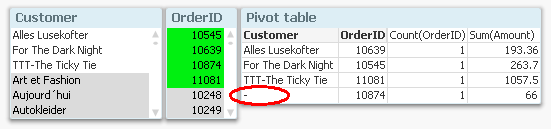
If you don’t want to show lines with NULLs in the dimension, you can suppress these on the Dimensions tab in the chart properties.
Chart measures
If your data is the other way around, i.e. you have customers that are not attributed to any orders, you will for these get NULLs in OrderID and Amount. However, the Sum() and Count() functions still return zero, which is correct, since Sum(NULL) is zero. Other aggregation functions such as Only() may return NULL, though, and this will be displayed as a dash.
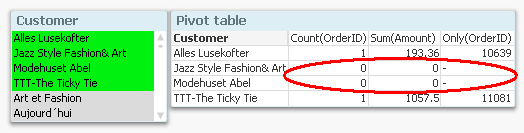
If you don’t want to show lines with zeros or NULLs as expression value, you can suppress these on the Presentations tab in the chart properties.
So, the bottom line is that NULLs are sometimes visible, sometimes not. Sometimes they are displayed as dashes, and when aggregated, usually as zeros. But they are never selectable.
And with this, I hope that the mystery around NULLs is somewhat less of a mystery.
PS. In this blog post, I use “NULL” to denote both real NULLs and missing values. What the difference is? Read this (updated) white paper and find out. There you can also read about how to make NULLs both visible and selectable.

-
Professor references Qlik Sense in International Conference on Analytics
At an International conference on Data Science and Analytics ( ICDSA '17) organised by Department of Computer Science of Rathinam College, Coimbatore,... Show MoreAt an International conference on Data Science and Analytics ( ICDSA '17) organised by Department of Computer Science of Rathinam College, Coimbatore, Dr. Siddhartha Ghosh, Kandula Neha and Ballari Saha from Vidya Jyothi Institute of Technology, Hyderabad presented a paper of 'Data Analytics in Academics' explaining the challenges and issues faced by the academic community in analytics. This paper was among the final 120 papers selected from a total of 215 papers received by the organisers. Papers from the conference are being published in the ICT Academy, Bonfring and IJSER Journal. The publication has been undertaken by Coimbatore Institute of Information Technology, ISBN 978-1-941505-70-0
The researchers presented the various tools and technologies used most commonly in academics. They made some sample analysis using Qlik Sense of data using in educational institutions such as placement data, test results,faculty data and visualised their findings with the help of various charts and graphs in Qlik Sense. They also demonstrated how associations can reveal connections between various data sets thus demonstrating the potency of the patented Qlik Associative Indexing technology.
In the words of the researchers, following are their concluding remarks- This paper gives an overview of the Qlik Sense and its application the field of academics. It explores data deeply and shares insights instantly and reveal connections in the data to see opportunities visualized through charts, bar graphs, pie charts, histograms etc. The learning and understanding to look at data with new visualization options enriched us with data analytics in modern world and its application in academics.
-
Data profiling as you load data
Since the introduction of Data Manager (the Data manager is where you visually add and manage data from your own data sources, or from Qlik DataMarket... Show MoreSince the introduction of Data Manager (the Data manager is where you visually add and manage data from your own data sources, or from Qlik DataMarket, so that you can use it in your app) Qlik has been constantly improving the set of features that makes the task of loading data an enjoyable part of the analysis process.
One of the most recent (and genius) additions to Data Manager is the “Summary card”
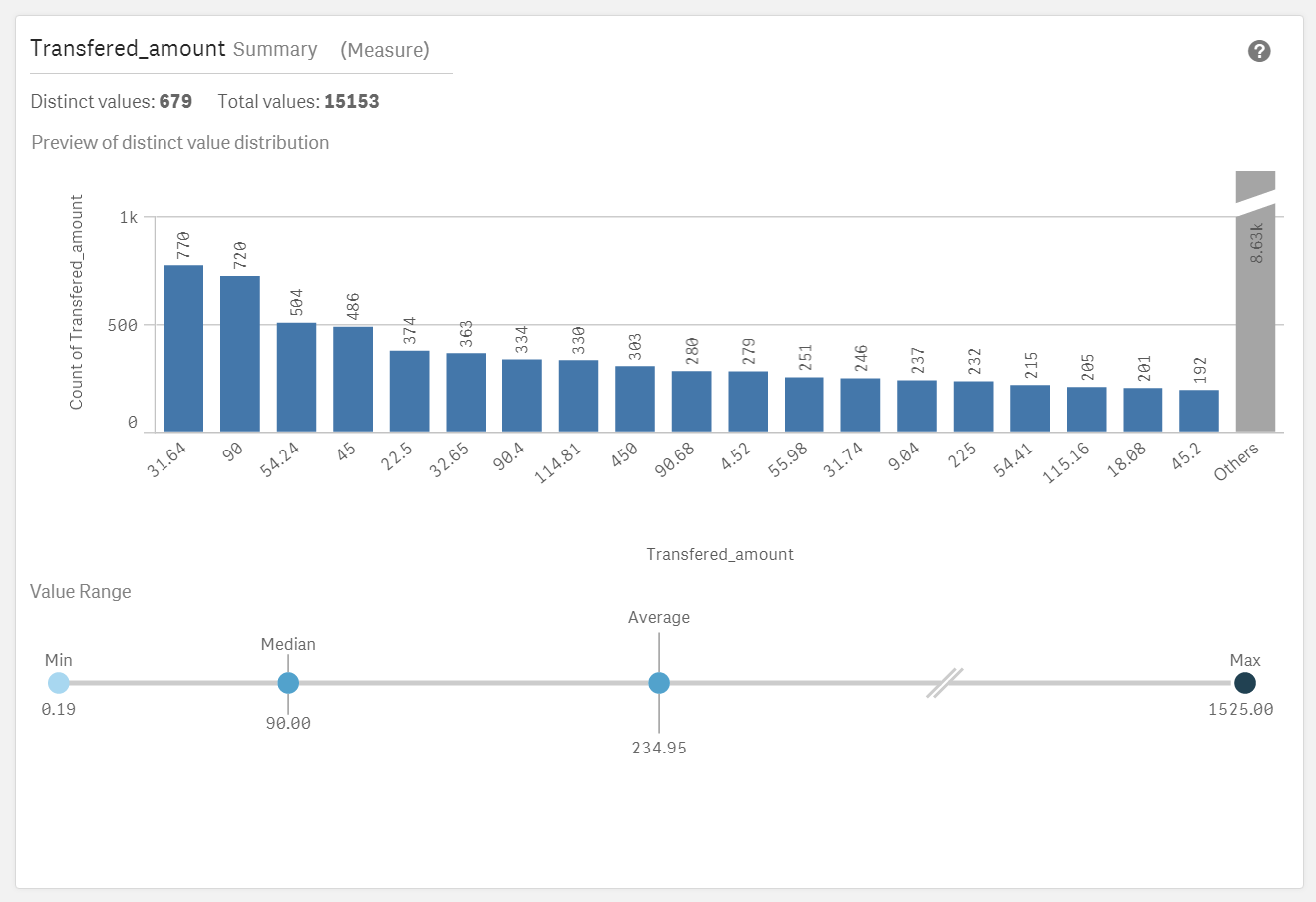
So what is the Summary card?
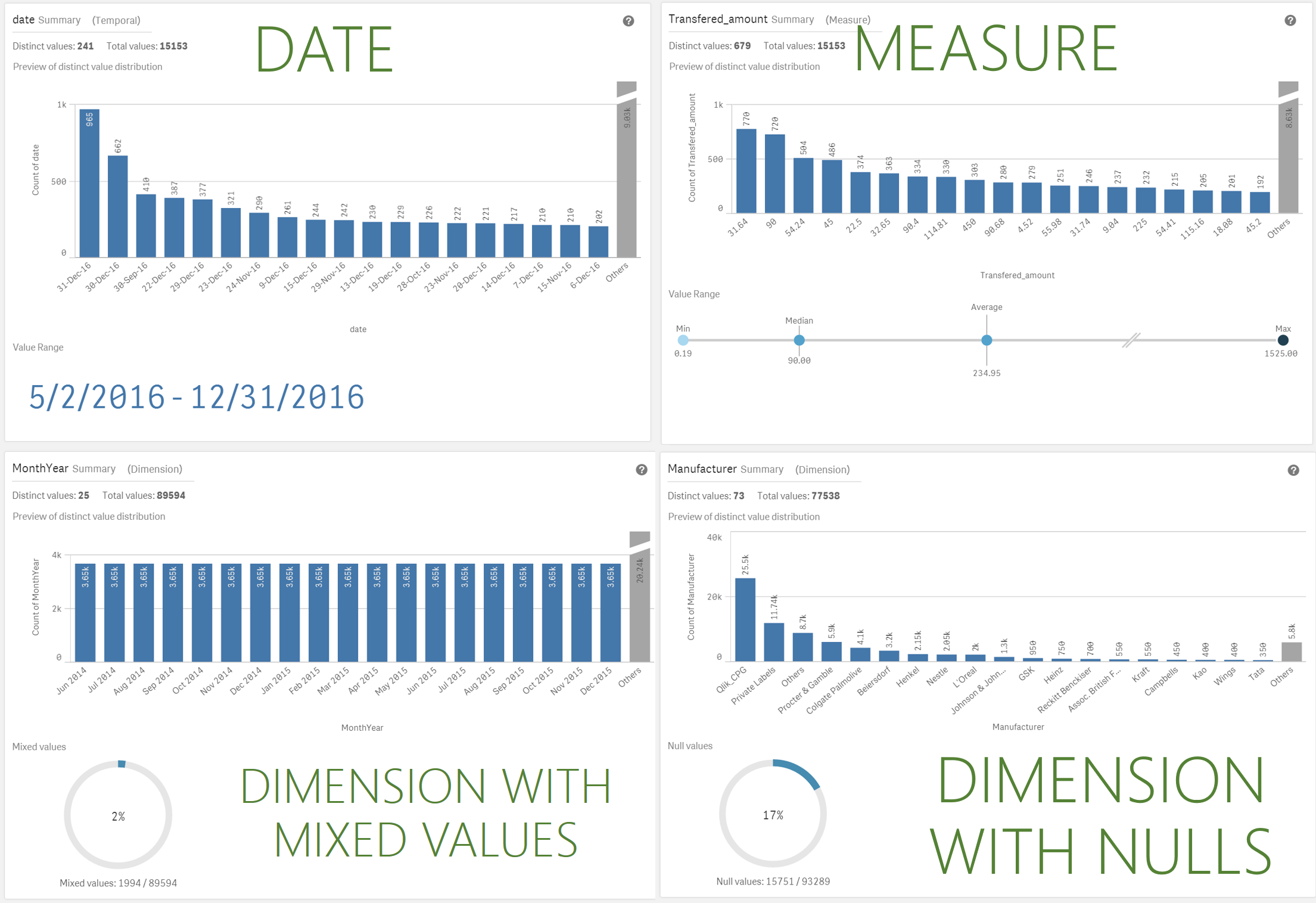
Summary data profiling card is a visual representation of your data. It contains a set of elements, values and charts, that let you better understand each field in your data set.
Summary card has been designed to help you anticipate and prevent data quality issues before loading data into Qlik Sense. The Summary card content adapts to the field selected, so depending on the column data type, measure, dimension, or time it will present you with different insights.
For measures the following information is provided
- Field name
- Field type
- Distinct Values
- Total Values
- Preview of the distinct value distribution in a bar chart showing the 20 highest count elements.
- Value Range. It is a very interesting chart itself, for a measure field it will show a distribution chart showing the Min, Median, Average, and Max values for the field.
If a temporal field is selected the Value Range will display the first and last date in the range. - Null Values and Mixed values charts only appears based on the field data.
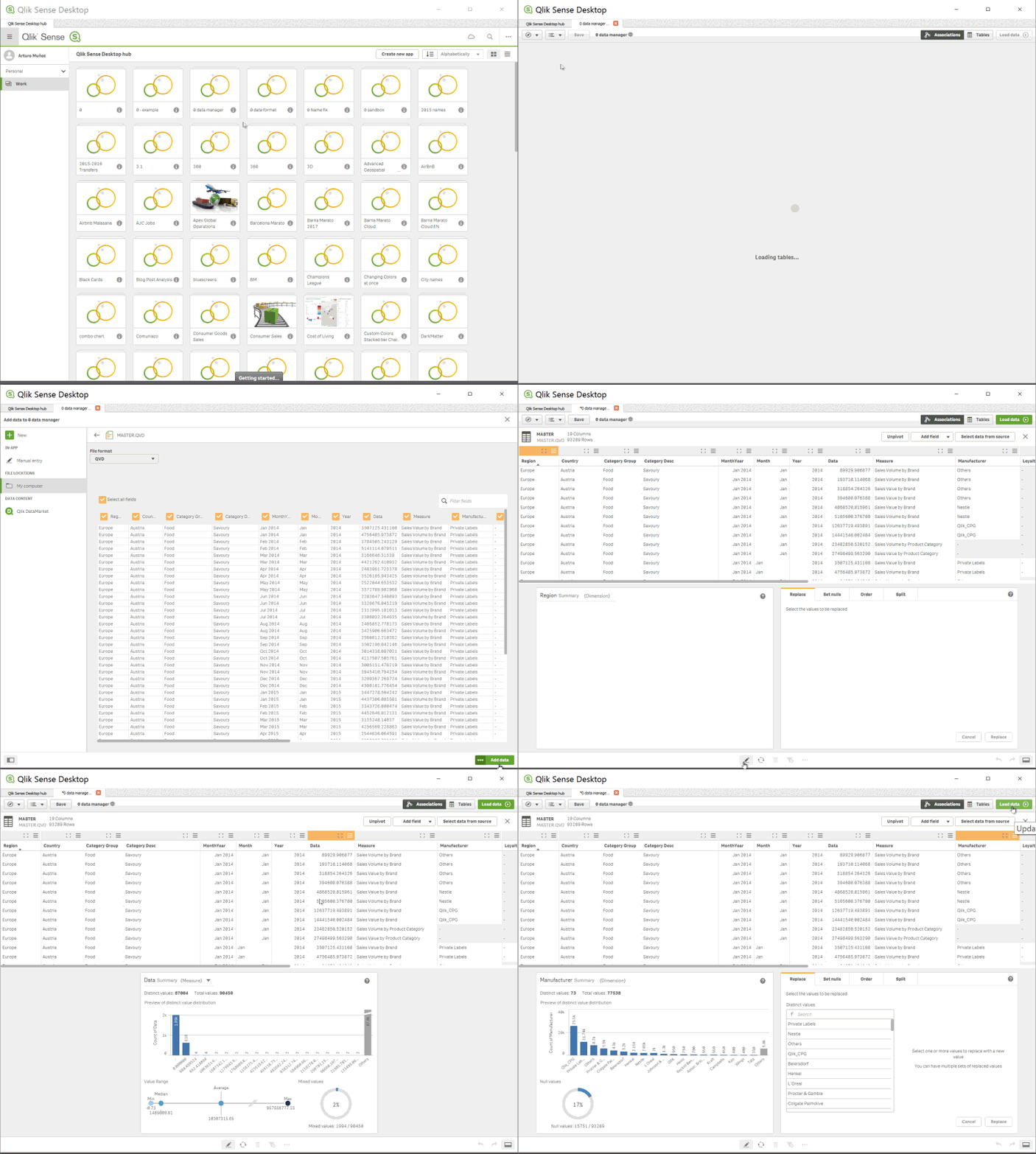
How to access the Summary card
To see and use the Summary card by yourself you have to get to Data manager, In Data manager, select a table and click the pencil icon, then select a table field and the Summary card appears. Or just check the animation below:
Enjoy it!
Arturo (@arturoqv)
-
Qlik Sense November 2017 is now available
Qlik Sense November 2017 is now available from our Customer Download Site. You can also try out many of the new capabilities in Qlik Sense Cloud wh... Show MoreQlik Sense November 2017 is now available from our Customer Download Site. You can also try out many of the new capabilities in Qlik Sense Cloud where you can use Qlik Sense Cloud Basic for free or try Qlik Sense Cloud Business with a free 30 day trial.
Watch this brief highlights video to learn more:
You will find many new features and capabilities in this release including:
For Business Users
- Improvements to existing chart types
- Tables - Ability to scroll sideways.
- Box Plot - Ability to color by expression.
- Distribution Plot – Ability to color by expression, control bubble size, and add jitter (to keep dots from overlapping).
- Combo Chart - Ability to display value labels.
- Navigation Improvements using Keyboard - Ability to use the tab key to move around the screen.
For App Builders
- Dynamic Sheet Names - Ability to utilize an expression in the name of a sheet.
- Ongoing Visual Data Prep Enhancements
- UI based in-line data table
- Data Transformation Lineage
- Refresh and add data available from analysis edit mode - The ability to both refresh and add data from the UI under data icon in edit mode. This eliminates the need to switch over to the data manager in order to initiate these common tasks.
- Control Calculation Condition Message - Ability to control the message that a user sees when a calculation condition hasn't been met.
- Update to Quote Interpretation in Set Analysis
- This change ensures that set analysis interprets quotes in the same way as other areas of the engine and is consistent with our documentation and best practices. However, some developers may have incorrectly utilized the single quote in places that should have double quotes and this enforcement of the intended use will cause issues in these cases.
- Apps created in prior versions will not need to be updated as the system will respect the old method for these apps. However, customers may opt to force all apps to respect the new rules.
- This change (using single quotes for literal values) allows for the ability to support case sensitive search strings in Set Analysis.
For Administrators
- SAML Single Sign-on Logout
- Continued On Demand App Generation Enhancements
For Developers
- Extension Certification Badging
- Qlik Sense Cloud Specific Improvements
- Utilize Linux as platform for presenting demo apps on Qlik Sense Cloud
- Note: See connector updates under Qlik Connectors
Qlik Connectors
- Additional Web Connectors – The following web connectors are now available in Qlik Sense Cloud Business and included in Qlik Sense Cloud Business trials and subscriptions: Facebook Insights, Microsoft Dynamics CRM, SugarCRM, Survey Monkey, MailChimp, Bit.ly, Slack. The Facebook Pages and Google Analytics also now include access to additional tables. These connectors are already available for Qlik Sense Enterprise.
- Redshift, Google BigQuery and Dropbox- A new native connector for Redshift will be made available to Qlik Sense Cloud Business in November. Connectors for both Redshift and Google BigQuery will be released to Qlik Sense Enterprise in November also a Dropbox Connector will be made available to Qlik Sense Cloud Business and Enterprise.
- Improvements to existing chart types
-
Qlik and Accenture; The Netflix Data Challenge
For several months now myself along with colleagues from the Academic Program and our industry partners Accenture, have been working to build a Data C... Show More
For several months now myself along with colleagues from the Academic Program and our industry partners Accenture, have been working to build a Data Challenge; a Hackathon if you will but with a focus on students who aren't specifically from Computer Science backgrounds.
In conjuncture with the University of Bath, we arranged to run a two day session looking to provide students skills on key topics in Data Analytics and get hands on with some real world data. Invitations to the event were sent to the Business Analytics and MBA students, with around 40 students in attendance with teams of 3-4.
What was the challenge?
Participants were to use data provided by Qlik from the moviedatabase.com, along with the wealth of resources and data available on the internet around Netflix's catalogue, to design a schedule of releases for next year based on what the students decided would be popular films from the data. Finally they were to come up with an original content idea as this is where Netflix make the most margin from their investments.
Day 1
The first day consisted of introductions from Qlik and Accenture, covering topics around industry use of BI tools and techniques, customer case studies and finally a workshop using Qlik Sense. The workshop was designed to show participants features of Qlik including;
- Data loading
- Data modelling
- Data visualisation.
Day 2
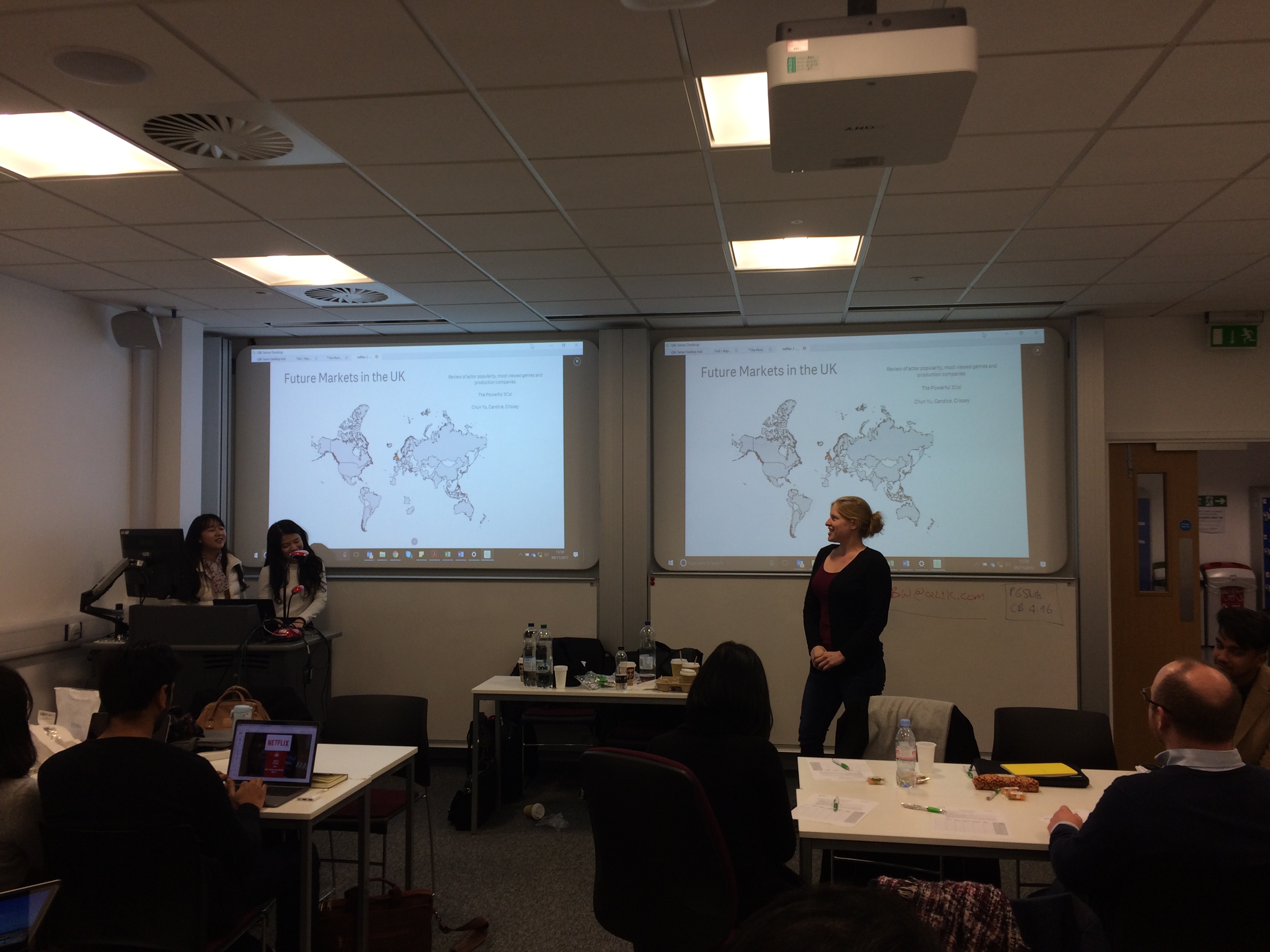
Day 2 was the main day, a 6 hour data challenge to bring together the students new knowledge in Qlik Sense and use the movie database and other resources available to them online to answer the brief. The students were scored out of 10 on 5 different areas;
1. Quality of Dashboard
2. Data Model structure
3. Presentation structure and content
4. Has the team answered the question?
5. Original Netflix content idea
Outcome
It was an opportunity for everyone involved to try something that we hadn't explored before. The University of Bath was for them a chance to improve students knowledge of data analytics, team work and the real world data challenges.
Accenture were provided an opportunity to show themselves as a major future player in the analytics space and hopefully to persuade some students to come and work with them.
For Qlik, a chance to help students in their career paths and for me to understand the complexities in organising a data challenge and ultimately to provide a group of students a small insight the future data economy and improve their data literacy.
A huge thanks must go out to those that helped me organise this, Deniz Kog, Aylar Charyyarova and Jian Yi Oh from Accenture. Martin Royds from Qlik and finally Gunes Erdogen from The University of Bath, who made this event possible.
-
Why does it take so long to get results from a Qlik Certification BETA Exam?
Pass/fail results are typically sent 8-10 weeks after taking a beta certification exam. I'm sure many out there wonder why!Here's what happens behind ... Show MorePass/fail results are typically sent 8-10 weeks after taking a beta certification exam. I'm sure many out there wonder why!
Here's what happens behind the scenes during this phase of the exam development process:
1. After the beta exam period ends, we gather all the result data and send it to our test development partner, Alpine Testing Solutions.
2. Alpine calculates all kinds of statistics on the result data and identifies which items are performing well and which are not. Poorly performing items can be too easy (>90% get it right), too hard (<10% get it right) or have other warnings which indicate it is not measuring what we expect. Then they recommend which items to "Keep" or "Delete"
3. Qlik then reviews the recommendations and every single comment entered by beta testers, which may indicate something is off or the item is unclear. Final Keep/Delete decisions are made by the Certification Program Manager, which are sent back to Alpine.
4. Using the kept items, Alpine assembles a new form and statistically equates it to the previous form. This is needed to assure congruence between releases of the certification exams.
5. Qlik receives the new form (which is a list of items to go on the operational form), and creates an exam specification to send to Pearson VUE.
6. Pearson VUE uses the exam specification to build the operational form, which then goes through a few QA and review cycles between Qlik and Pearson VUE. We check the exam many times to ensure there are no errors in it!
7. After the operational form is finalized, it is published and the exam is ready for delivery.
8. Then we take the operational form and use it to score the beta results.
And that, my friends, is why it takes so long to get your beta results!

Thanks to those who participated in taking a beta exam, and your continued patience is appreciated.
Karen Origlio
Sr. Certification Program Manager @ Qlik