Unlock a world of possibilities! Login now and discover the exclusive benefits awaiting you.

Analytics & AI
Forums for Qlik Analytic solutions. Ask questions, join discussions, find solutions, and access documentation and resources.
Data Integration & Quality
Forums for Qlik Data Integration solutions. Ask questions, join discussions, find solutions, and access documentation and resources
Explore Qlik Gallery
Qlik Gallery is meant to encourage Qlikkies everywhere to share their progress – from a first Qlik app – to a favorite Qlik app – and everything in-between.
Qlik Community
Get started on Qlik Community, find How-To documents, and join general non-product related discussions.
Qlik Resources
Direct links to other resources within the Qlik ecosystem. We suggest you bookmark this page.
Qlik Academic Program
Qlik gives qualified university students, educators, and researchers free Qlik software and resources to prepare students for the data-driven workplace.
Recent Blog Posts
-
Don't join - use Applymap instead
It is, in fact, one of my favorite functions and I do not seem to be alone in this choice. Several of the QlikView developers who regularly write on Q... Show MoreIt is, in fact, one of my favorite functions and I do not seem to be alone in this choice. Several of the QlikView developers who regularly write on QlikCommunity seem to share this preference and have written about this function, e.g., QlikView Notes, Quick Intelligence and QVApps.
So, what does the function do? Well, basically it is just a lookup function – it takes one value as input, checks if this value exists in a mapping table and returns the corresponding value from the second column in the mapping table. Think of it as a translation function where the translation is fetched from a pre-defined, two-column table. A simple translation function, but you can still do a lot with it...
What has this got to do with joins? Everything. A very common situation in data modeling is that you need to get a single field value (per record) from a different table than the current one. Then the standard way to do this is to use a join. However, in QlikView you can – and should – use Applymap() instead. The only time that you cannot use Applymap() instead of a join is if you want to fetch more than one single corresponding value (record) from the second table.
Let's look at an example of how to use Applymap(): In an ERP system, the customer table is the table where all information about the customer is stored, e.g. the name and country of the customer. Further, it could be that you need the customer’s country when making a calculation in the order table. This is a field that you don't have in the order table. In SQL you would join the two tables to get country into the order table.
In the QlikView script you would instead first define the mapping table that maps a customer ID to a customer country as follows:
MapCustomerIDtoCountry:
Mapping Load CustomerID, Country From Customers ;The second step is to use this information when reading the order table, such as:
Orders:
Load *,ApplyMap('MapCustomerIDtoCountry', CustomerID, null()) as Country
From Orders ;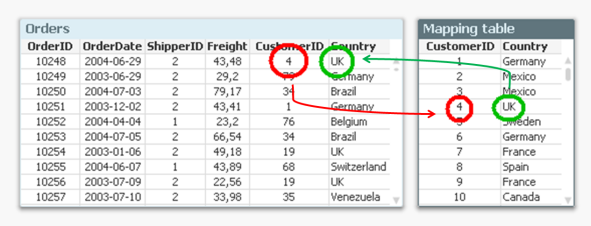
The "null()" as third parameter of the function defines what it should return when the customer ID isn't found in the mapping table.
And with this, you have joined the field Country with the order table – without using a join. And you have done it faster and with less chance of errors. Bottom line: Whenever you know that you just want to fetch one single value per record – don’t join. Use Applymap() instead.
See more in the Technical Brief on Joins and Lookups.

-
How to create a custom theme in Qlik Sense
Custom Themes is one of the new features shipped with February release so make sure you are updated before trying to come up with your own. To create ... Show MoreCustom Themes is one of the new features shipped with February release so make sure you are updated before trying to come up with your own.
To create a new theme, first we need to understand what exactly is a theme and what it can do for us. A custom theme is a collection of files stored in a folder, it must contain a definition (QEXT) file, a main JSON file, and optionally any other assets you might need to support the custom theme such as CSS files, custom font files, images, etc.
Custom themes let users to quickly apply different levels of customization to their apps, some of you might be interested in having your custom color palletes, while someone else might just need bigger font size, both can be achieved with Custom Themes. Theme authors can target individual visualization objects via JSON and/or use a custom CSS to modify the sheet styles.
From Qlik Help
The custom styles can be defined in two ways:
- In the JSON file you define the style for the individual visualization types, for example bar charts and line charts.
- CSS styling is more general and flexible. You can, for example, style sheets, visualizations and extensions.
Creating a simple custom theme
I'll be using Qlik Sense Desktop for this example, please check the help page for instructions on how to install a Custom Theme in Qlik Sense Server.
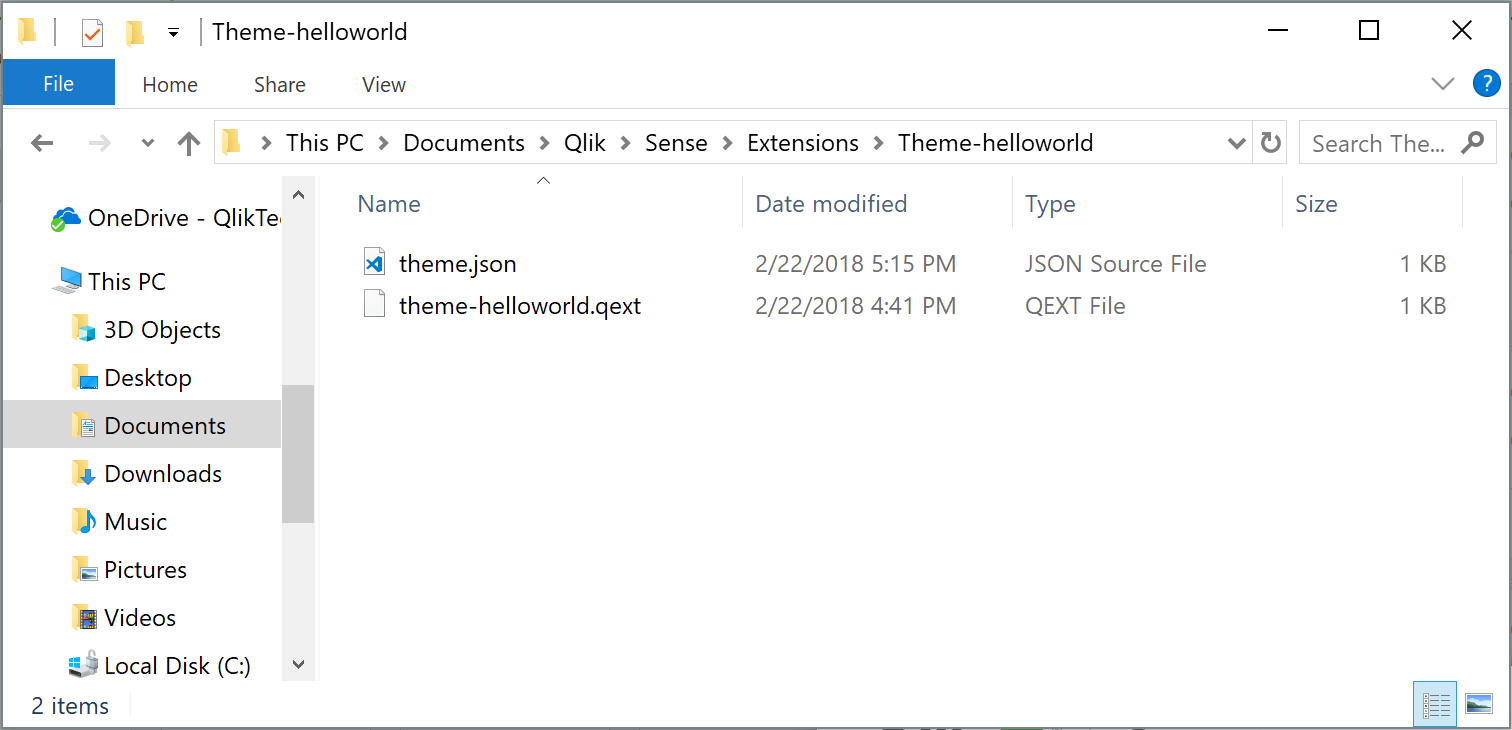
- Go to your extensions folder: C:\Users\[username]\Documents\Qlik\Sense\Extensions
- Create a new folder, I'll call mine theme-helloworld
- Create a new file and rename it to theme-helloworld.qext. The QEXT file is a definition file that contains a few lines, where only name and type are the only mandatory lines.
{ "name": "Hello World theme", "description": "My first custom theme", "type": "theme", "version": "1.0.0", "author": "Arturo Muñoz" }- Now, it's time for the JSON file. Create a new file, name it theme.json
- Edit the theme.json file with your favorite text/code editor
- My advice is to start your theme with the sample code you can find in Qlik Help so you can familiarize with JSON and it's properties:
{ "_inherit": true, "_variables" : { "@greenColor" : "#61a729", "@text": "#4c4c4c" }, "color": "@text", "fontSize": "12px", "object" : { "title": { "main": { "fontSize" : "16px" } } }, "dataColors": { "primaryColor": "@greenColor" } }- The JSON file will change the primary color of your charts from Qlik dark blue to the custom green as defined in the variable at line 4 and will also modify the charts title to a font size of 16 pixels.
This is a simple example but there are much more you can do with the JSON file, you could for example, define new color schemes for measures, change the axis', labels, legends font size and color and much more.
Actually you could even load your custom CSS through the JSON file so you can target and hack any predefined style within your app, so you could modify object paddings, change font family, and so forth.
If you've followed the steps above you should have something like:
How to activate a Custom Theme?
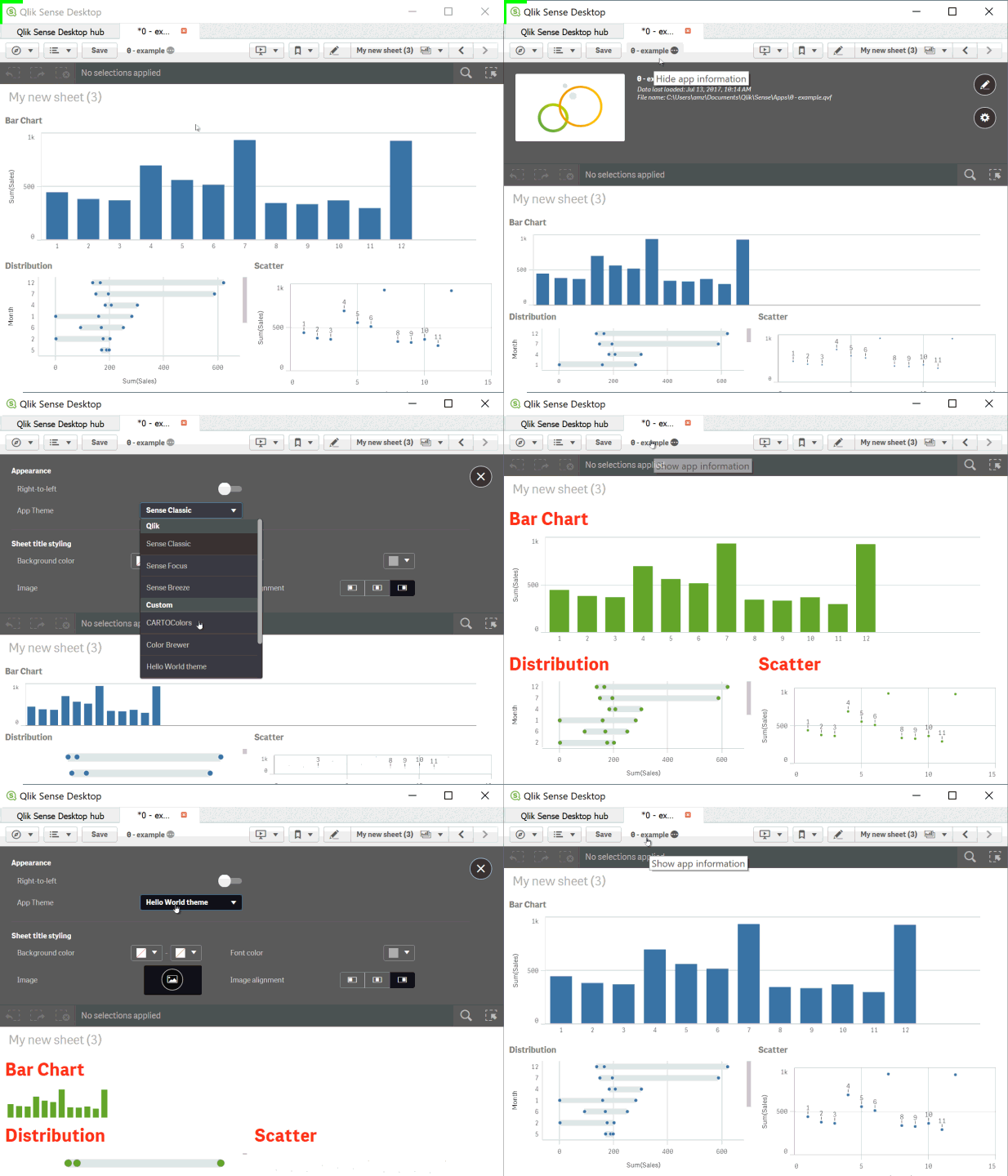
Check how to apply a Custom Theme to your app in the animation below
Tips from the expert... and theme sharing!
I've asked my colleague Nabeel Asif for some tips since he created the Custom Theme based on Color Brewer that we are sharing today (check the attachments). This is what he said:
All of our standard themes just give one sequential and one diverging gradient for measures, and two color schemes for dimensions. But you can actually define as many options as you like through the “scale” and “palettes” properties in the theme’s JSON.
For sequential and diverging gradients, Qlik uses seven colors to define a scheme. But you don’t actually need to specify all seven colors. Just define the two colors at the extremes, and Qlik does a nice job of calculating the rest. Of course, if you want very specific colors you can define them yourself.
Often apps will be designed with red representing something bad or dark colors representing higher values. To maintain this look as the user switches themes, you should follow these conventions in the JSON:
- Diverging scales should be ordered from reddish hues to bluish hues.
- Sequential scales should be ordered from dark to light.
Please don't forget to always check Qlik Help for the most recent specifications.
Enjoy

-
Tech Layoffs 2020–2023 (Decomposition Tree & More)
Tech Layoffs in 2020–2023 AnyChart — QS Extensions Explore tech layoffs in-depth using decomposition tree and other interactive visualizations p... Show MoreTech Layoffs in 2020–2023AnyChart — QS Extensions Explore tech layoffs in-depth using decomposition tree and other interactive visualizations powered by Qlik and AnyChart based on data from Layoffs.fyi by Roger Lee.
Discoveries
Identify which countries, industries, and companies have experienced the most job cuts and when they occurred. Compare the number of layoffs with funds raised and gain other insights into tech layoff statistics over the past few years.
Impact
Analyze layoffs in the technology sector worldwide since the COVID-19 pandemic with data from Layoffs.fyi.
Audience
Everyone who wants to know more about tech layoffs.
Data and advanced analytics
This app features charts built with AnyChart's Decomposition Tree and Combo Chart extensions for Qlik Sense. The data used in this analysis is from Layoffs.fyi.
-
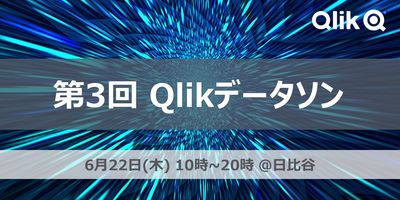
【開催レポート】 第3回 Qlikデータソン @ 日比谷国際ビル
6月22日、第3回のQlikデータソンを開催しました。 過去2回のデータソンはオンライン開催でしたが、今年はついにリアル会場で開催できました。QlikユーザーやQlikパートナー、初級者から上級者まで、約70名のQlikアプリ開発者が日比谷の会場に一堂に会しました。ここから丸一日、参加者全員がQli... Show More6月22日、第3回のQlikデータソンを開催しました。
過去2回のデータソンはオンライン開催でしたが、今年はついにリアル会場で開催できました。QlikユーザーやQlikパートナー、初級者から上級者まで、約70名のQlikアプリ開発者が日比谷の会場に一堂に会しました。ここから丸一日、参加者全員がQlikに向き合う、まさにQlik漬けの熱い一日になりました。
このブログでは、第3回Qlikデータソンの様子をお届けします。
なお、受賞者のQlik Senseアプリは、日本語デモアプリサイト「Qlik Showcase」に一般公開されています。
また、7月11日(火曜) 14時より「Qlik Japan Live:Qlikデータソンアフター配信(視聴申込はコチラ)」と題して、アワード受賞アプリのご紹介などデータソンの様子をライブ配信でお届けさせていただきます!■朝10時、日比谷に集合!そしてデータソンスタート!
最初に、Qlikの中嶋よりオープニングのご挨拶とデータソンの課題やデータに関する説明がありました。参加者にはデータソンの課題や使用するデータに関する情報は一切事前に告げられておらず、このとき初めて課題とデータが提供されました。
参加者の皆さんは「大手モバイル通信会社のデータアナリスト」として、自社顧客データの分析を言い渡されました。以下のような「社内からの要望」を受けて、Qlik Sense SaaSを使ったデータの可視化や分析に取り組みます。
"顧客属性・契約・請求・サポートといったあらゆる角度から探索できるBIアプリが欲しい。"
"支払遅延を頻繁に起こしている顧客の特徴を知りたい。"
"現在の契約者と解約してしまったお客様の特徴を比較して、改善点があれば指摘してほしい。"また、今回のデータソンではQlik Sense SaaSによる分析のみならず、自動機械学習「Qlik AutoML」を使用した予測分析にも挑戦することができました。過去に通信契約を解約してしまった顧客の属性や行動履歴をヒントに、「一体どんな顧客が将来解約に至りやすいのか」といったことを機械学習を用いて予測分析しました。
データや課題の読み込みからデータの可視化、探索、予測、そしてプレゼンテーションの準備まで...途中お弁当タイムを挟みながら、提出締切の15時30分まで5時間みっちりと取り組みました。皆さん、ものすごい集中力でした!
(こっち見んな)
■いよいよ成果発表会!プレゼン大会!
16時からは、全参加者が分析結果をプレゼンする成果発表会が行われました。参加者数が非常多かったため、ユーザー部門とパートナー部門で部屋を分かれてそれぞれで発表会を実施しました。持ち時間は1チーム5分間!どのチームも短時間でアピールポイントを詰め込んだ素晴らしい発表でした。
成果物の評価は、参加者による投票とQlik審査員による審査で行いました。皆さん、食い入るように他の参加者の発表を熱心に見聞きしていましたね!
■ドキドキのアワード授賞式!そして懇親会で互いの健闘をたたえあう
発表と投票が終わったあと、ユーザーとパートナーが改めてひとつの部屋に集合しました。ここで、我らがQlik Japanカントリーマネージャー今井 浩の乾杯挨拶を皮切りに、懇親会スタート!
ちなみに、乾杯挨拶の中では最近発表されたQlikとTalendの統合の話題にも触れられました。
Qlik CloudプラットフォームにさらにTalendの強力なデータ統合・データ品質などのソリューションが加わることにより、市場でもユニークなデータソリューションベンダーにQlikは進化しています!そして...いよいよアワード発表の時間がやってきました!Qlikの濱野と中嶋が壇上にあがり、パートナー部門、ユーザー部門それぞれの賞を発表しました。
受賞者は以下の通りです。
*チーム参加の場合「チーム」と併記し、個人参加の場合は、個人名を記載しています。①パートナー部門
・デザイン賞: 久米 弘文 様
・テクニカル賞: ちいかわ(チーム、TDCソフト)
・優秀賞: インサイトクラン(チーム、日立社会情報サービス)
・最優秀賞: 吉野 智士 様(株式会社アシスト)
②ユーザー部門
・アイデア賞: K2000(チーム)
・デザイン賞: チーム横浜(チーム、富士通株式会社)
・テクニカル賞: BHI(チーム)
・優秀賞: 川上 直人 様(株式会社デンソー)
・最優秀賞: DdSD(チーム、本田技研工業株式会社)受賞されたみなさま、おめでとうございます!
受賞者のQlik Senseアプリは、日本語デモアプリサイト「Qlik Showcase」に一般公開されています。ぜひ一度覗いてみてください!また、7月11日(火曜) 14時より、「Qlik Japan Live:Qlikデータソンアフター配信(視聴申込はコチラ)」と題して、アワード受賞アプリのご紹介など、データソンの様子をお届けさせていただきます!
■さいごに
第3回Qlikデータソンは、参加者が熱心にデータ分析に取り組み、すばらしい成果を共有する場となりました。QlikユーザーもQlikパートナーも、初級者も上級者も、さまざまなバックグラウンドを持つ参加者が一堂に集まり、データソンの魅力を存分に楽しんでいただけたのではないかなと思います。ご参加いただいた皆様、本当にありがとうございました。
-
Fully Integrated AI and ML - The Path Forward (Part 3 of the Series)
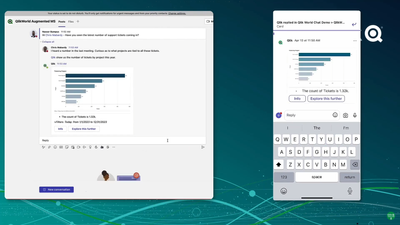
In this third video, we demonstrate our capabilities to embed augmented analytics features and capabilities using multiple integration endpoints avail... Show MoreIn this third video, we demonstrate our capabilities to embed augmented analytics features and capabilities using multiple integration endpoints available in Qlik Sense. We demonstrate a game-changing upcoming feature we showed at QlikWorld - conversational analytics within Microsoft Teams. We then cover the different types of integrations for embedding augmented capabilities, and show an example of API usage and embedded analytics in a web app.
Can't see the video? Access to YouTube Blocked or Restricted? Check out the playlist in on the Qlik Video Page.
With the newly released augmented analytics APIs, we are delivering an essential avenue for our users to leverage automated insights and natural language interaction in the environments of their choosing, as well as build business logic using data across a wide breadth of sources. Developers can leverage all of this to craft their own embedded experiences and mashups, while continuing to guide the user experience using business logic and items like example questions. All these endpoints come with developer guides and resources to assist developers with getting started.
Stay tuned for the next video in which we will be highlighting the use of Machine Learning Services in within our augmented analytics capabilities, including a demonstration of an exciting new capability for Key Driver Analysis.
AI & ML Path Forward Series:
Read Part 2 - Automated Insights through Insight Advisor in Qlik Sense
Read Part 1 - Qlik's Fully Integrated AI and ML Capabilities -
U.S. Climate, 2010–2023
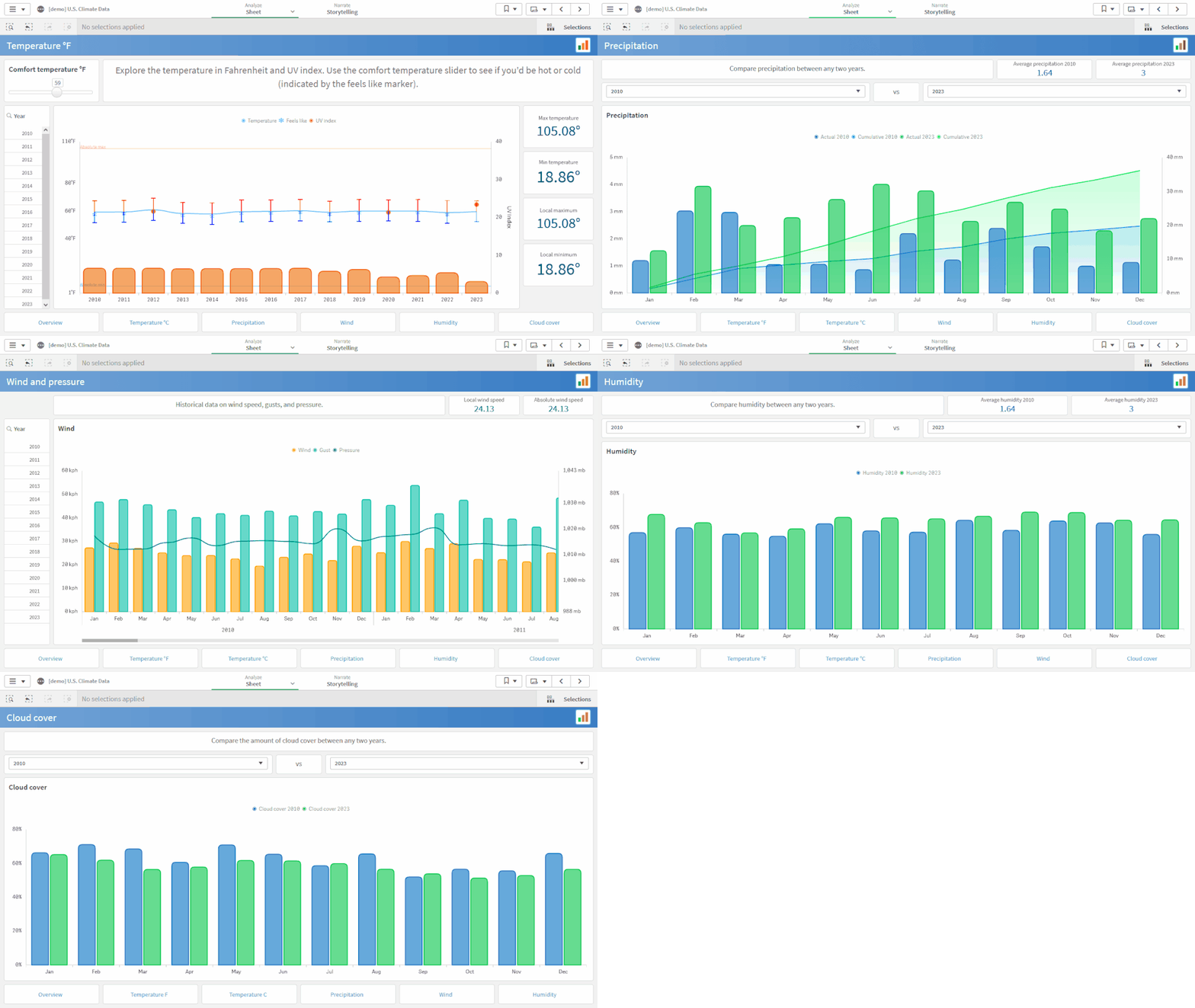
U.S. Climate, 2010–2023 AnyChart — QS Extensions Explore climate data for the United States between 2010 and 2023 from various perspectives with... Show MoreU.S. Climate, 2010–2023AnyChart — QS ExtensionsExplore climate data for the United States between 2010 and 2023 from various perspectives with the help of advanced Combo Charts powered by AnyChart's extension for Qlik Sense.Discoveries
Monitor air temperatures and assess the comfort level of the weather. Delve into precipitation, wind, humidity, pressure, UV index, and cloud cover data, compare year-over-year trends, and discover more insights.
Impact
Check out AnyChart's Combo Chart extension in action and see how it can help you analyze the changes of several metrics over time or by category when they vary in scale, to discover possible correlations.
Audience
Anyone who wants to analyze weather data in-depth and see examples of advanced, yet still very intuitive to build combo charts in Qlik Sense.
Data and advanced analytics
The data is taken from the U.S. Climate Data dataset on Kaggle. The application features combo charts built with AnyChart's dedicated extension for Qlik Sense.
🔗 >> VIEW IT LIVE OR DOWNLOAD (.QVF) <<
-
Register Now for an Upcoming Live Instructor Webinar!
Qlik Continuous Classroom Live Instructor Webinars for the second half of the year are now available for registration! Delivered on a variety of advan... Show MoreQlik Continuous Classroom Live Instructor Webinars for the second half of the year are now available for registration! Delivered on a variety of advanced topics above and beyond the content offered in our self-paced learning. Sessions are held at 10:00 am in the associated time zone.
Below are a few examples of topics you will find for upcoming sessions:
- Custom Properties in Qlik Sense QMC and Hub – June 30
- Introduction to Set Analysis -July 3
- Data Classification - July 14
- Using Set Analysis (Without Writing Expressions) - July 17
- Debugging Data Load Editor Scripts - July 24
- Using the Insight Advisor - August 7
- Nested Aggregations - August 25
- Access Control: Customize Streams, Apps and App Objects Access - August 30
If you are unable attend a session for any reason, don't worry. Your registration link will provide you access the on-demand recording after the session is over.
Click here to access the Upcoming Events Calendar to view and register for an upcoming webinar.
Filtering capabilities allows you to find Learning events (Live Instructor Webinars, Academic Program Webinars, Workshops and more!) easier by filtering on Time Period, Region, Price, User Role and Category.
-
Document Approval
Document Approval Inphinity Documents, approval steps, final decision, related data as well as additional notes. All in one secure place - in th... Show MoreDocument ApprovalInphinityDocuments, approval steps, final decision, related data as well as additional notes. All in one secure place - in the Qlik application. Upload the document and let it be checked (facts, finance, legal). Capture data about checks and save notes if needed. Open the document, see the data, and make the decision - approve or decline it. The application is available for FREE (www.demo.myinphinity.com).Discoveries
See all documents that are/were in the approval process, their current stage, and related data.
Impact
TRANSPARENCY, EFFICIENCY, and SECURITY in approval processes.
Audience
Anyone involved in approval processes in your organization.
Data and advanced analytics
Documents, a full changelog, as well as a visual representation of the process flow, are available throughout.
-
Qlik Data Integration Newsletter - June 2023
This is our inaugural edition of our Monthly Newsletter for Qlik Data Integration updates. We'll cover one endpoint per month and share our top resour... Show MoreThis is our inaugural edition of our Monthly Newsletter for Qlik Data Integration updates. We'll cover one endpoint per month and share our top resources, best practices, release updates and upcoming webinars.
Subscribe to the Qlik Data Integration topic to be notified of future editions!Index
- Resource Highlights:
- Webinars
- Knowledgebase Articles
- Analyze Qlik Replicate Logs
- Endpoint Spotlight: Oracle
- New Issues Reported
- Tips!
- Release Updates
- Fixes
- Enhancements
- Qlik Data Integration Product End of Life Versions:
Resource Highlights:
Webinars
Book your calendar for the upcoming Qlik Replicate Q&A session scheduled for July 25th at 10:00 AM EDT. It is a live Q&A session with a panel of Qlik experts. Bring your questions, and we do our best to answer them.
Explore Qlik Support's recorded Techspert webinar series on-demand or visit our YouTube Channel to discover more!
Knowledgebase Articles
Analyze Qlik Replicate Logs
- We have put together a comprehensive guide on how to analyze Qlik Replicate log files. The guide will show you how to verify what version you are running what types of tasks are being run, and more: How to analyze a Qlik Replicate log
- In addition, we've compiled a List of the error types in Qlik Replicate.
Endpoint Spotlight: Oracle
Find our latest knowledge base articles for Oracle endpoints.
New Issues Reported
- Resume tasks failing after upgrading to 2022.11 SP03(.475) and SP04(.546).
- The correct SCN is not stored when the task is stopped. The task cannot be resumed due to the wrong SCN captured. Find the resolution in Qlik Replicate with Oracle endpoint: Resume tasks failing after upgrading to 2022.11 SP03(.475) and SP04(.546).
- Qlik Replicate captures no Data after the Oracle Source has been upgraded to 4 Node RAC
- The SCN value of the Qlik Replicate task is no longer valid after the Oracle environment upgrade as the SCN has changed. Find the resolution in Qlik Replicate captures no Data after the Oracle Source has been upgraded to 4 Node RAC.
- Qlik Replicate using Oracle source fails with missing redo log
- Qlik Replicate is always reading V$archived_log to get the archived REDO information. The redo log needs to have an active/available status from the V$archived_log.
- Find a solution to this error in Replicate using Oracle source fails with missing redo log.
Tips!
- How to start a Replicate task with Oracle source endpoint from a requested SCN
- To find the current SCN value follow the steps in How to start a Replicate task with Oracle source endpoint from a requested SCN.
- What is the usage of Oracle directories in Replicate Oracle source?
- Find answers for the following related question:
- Purpose for creation of directories in Oracle (Source)
- What are files we are going to keep in these directories
- What storage required for the directories
- If files are going to keep in the directories then what will be the retention period
- What's the usage of Oracle directories in Replicate Oracle source
- Find answers for the following related question:
- Best Practice: Configure Oracle ASM with copy redo logs to a temporary folder
- When the Copy redo logs to temporary folder option is enabled, Qlik Replicate instructs Oracle to copy the full redo log or chunks of the redo log to a local folder residing on the Oracle Server machine or to a shared network folder accessible by Oracle Server.
- Find out more in Configure Oracle ASM with copy redo logs to a temporary folder.
Release Updates
Fixes
Qlik Replicate May 2023 SP1
Type: Issue
Component/Process: Oracle Source - Replicate Log Reader
Description: Added support for Oracle DIRECT INSERT statements with PARALLEL_DML for non-compressed pages.
Enhancements
August 2023 SR
- New Confluent Endpoint (based on Kafka)
November 2023 IR
- Confluent Schema Register using BOTH authentication methods (Public Key + Username & password)
- Expose stream buffer tuning parameters in task settings per ideation request: Replicate & QEM - Expose stream buffer tuning para... - Qlik Community - 1763259
Note: To request features, share ideas, and upvote other ideas check out our ideation platform: Request | Feedback (qlik.com)
Qlik Data Integration Product End of Life Versions:
Qlik Release Qlik Replicate / Enterprise Manager End of Support Date Qlik Compose End of Support Date February 2021 November 2020 SR1 November 2022 February 2021 February 2023 May 2021 May 2021 May 2023 May 2021 May 2023 August 2021 May 2021 SR1 May 2023 August 2021 August 2023 November 2021 November 2021 November 2023 November 2021 November 2023 For more information, see Qlik Product Lifecycles.
-
Visualization Innovations Extend Self-service Exploration and Analysis
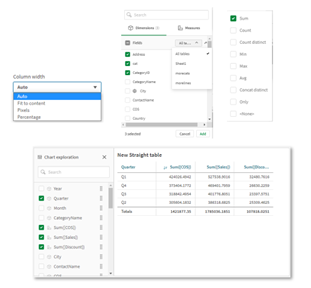
One of the most significant updates of the year, the new Straight Table greatly boosts self-service capabilities with expanded exploratory analysis an... Show MoreOne of the most significant updates of the year, the new Straight Table greatly boosts self-service capabilities with expanded exploratory analysis and reporting. The Straight Table, now available in the Visualization Bundle (available natively at a later date), acts as a catch-all table, providing application developers with the flexibility to pick and choose how they would like their layout presented.
Through the Straight Table, developers can add numerous fields simultaneously, alternate dimensions and measures, customize column width, view user field picker, choose pagination or virtual scroll, and store the layout in bookmarks.
Also, the new Filter Pane is a highly requested feature improvement. Similar to the QlikView List Box, the new Filter Pane includes a grid layout. It also provides several new capabilities, including grid mode, search mode (with wildcard option), checkbox mode, compact view, and histogram.
Other recent improvements give you more flexibility, allowing you to customize according to company branding, department, or personal preference. These include:
- Axis and value label styling for Bar, Pie, Combo Chart, Scatter Plot, DistPlot, BoxPlot, Waterfall Chart, Histogram, Mekko Chart, and Gauge Chart
- New styling panel for Line Chart and Mekko Chart (plus BG Image/Color options)
All these capabilities are now available in Qlik Sense SaaS and Qlik Sense Client-Managed.
Visit Qlik Help for more information. Additional details on these updates can be found here. And, for an array of Qlik Data Visualization updates, visit the Qlik Visualization Showcase.
-
【オンデマンド配信】富士通(株)事例:どうする?!データ利活用 悩める推進リーダーの集い
企業のビジネス活動において、データはこれまで以上に必要不可欠な資産となっています。増え続けるデータを管理・統合・分析し、データでアクションを起こす必要性が増している現在、成功している企業はどのようなデータ戦略を実行しているのか?本 Web セミナーシリーズでは、Qlik でデータからアクションを起こ... Show More企業のビジネス活動において、データはこれまで以上に必要不可欠な資産となっています。増え続けるデータを管理・統合・分析し、データでアクションを起こす必要性が増している現在、成功している企業はどのようなデータ戦略を実行しているのか?
本 Web セミナーシリーズでは、Qlik でデータからアクションを起こすデータ主導のビジネスで成功しているお客様より、課題から導入の経緯、デモンストレーション、活用例などをご紹介します。※ 参加費無料。パソコン・タブレット・スマートフォンで、どこからでもご視聴いただけます。
オンデマンド配信:
どうする?!データ利活用 悩める推進リーダーの集い各社でデータ利活用を推進する、悩めるリーダー仲間のみなさん。正解がない中、確かな手ごたえを感じることばかりではない中、次の一手に迷っていませんか?
本セッションでは、富士通が進める「データドリブン経営」の推進現場の今!をご紹介します。データ利活用基盤・サービス/人財育成/カルチャー変革、それぞれの推進リーダーが、活動を進める中で見えてきた課題と、その課題をどう乗り越えようとしているのかをお伝えします。 -
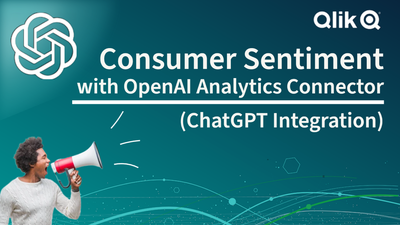
Consumer Sentiment with #chatgpt and the Qlik Analytics OpenAI Connector - Comi...
The OpenAI Analytics Connector - Coming Soon! I want to sell some items in my retrogaming collection, but I am not sure exactly what I should sell. I ... Show MoreThe OpenAI Analytics Connector - Coming Soon!
I want to sell some items in my retrogaming collection, but I am not sure exactly what I should sell. I need external insight from the broader retrogaming community to help make a decision based on their sentiment. Ah, I know - I can integrate my Qlik Cloud Analytics retrogaming collection app with OpenAI (#chatgpt ) using the OpenAI Analytics Connector (Coming Soon) to get a general feeling about what people are saying about particular items in my collection. This can help me decide if I should sell it or keep it. What do you think? Let me know in the comments.
Users can utilize our new, real-time OpenAI analytics connector to embed generative AI content within their analytics apps for natural language context and insights, synthesizing data for supplemental analysis, and asking questions using data from Qlik. This connector is built on the same architecture as our other advanced integrations, allowing direct, engine-level data exchange as the user clicks. The connector is easily accessible from our Analytics Connectors menu and can be used in both the data load process to augment data sets and for real-time questions through expressions within chart objects.

-
Qlik トレーニングのご案内
本トレーニングは、Qlik 製品の導入やデータリテラシーの向上に必要な世界水準の内容で構成されており、即座に製品をご活用いただけます。 バーチャルインストラクターによるトレーニング Qlik のエキスパートによるインタラクティブなハンズオン学習をご体験ください。ご自宅やオフィスにいながら、外出す... Show More本トレーニングは、Qlik 製品の導入やデータリテラシーの向上に必要な世界水準の内容で構成されており、即座に製品をご活用いただけます。
バーチャルインストラクターによるトレーニング
Qlik のエキスパートによるインタラクティブなハンズオン学習をご体験ください。ご自宅やオフィスにいながら、外出することなく、講師や他の受講生との交流などのメリットをご都合に合わせて受けられます。
コースの内容はこちらからダウンロードいただけます。
トレーニングソリューションパッケージ
エンドツーエンドのトレーニングソリューションパッケージでさらなるスキルの向上が期待できます。インストラクターによるライブトレーニングの 12 ヶ月サブスクリプションと、自習型の Qlik オンラインコースを組み合わせることができます。コースはすべて、ユーザーの職務に応じてご利用いただけます。ぜひご購入をご検討ください。
詳細については、apactraining@qlik.com までメールでお問い合わせください。
Qlik 認定資格
Qlik 製品・データ分析・データリテラシーの知識とスキルの認定を Pearson Vueで取得することができます。また、Qlik は Credly と提携し、デジタルバッジを提供しています。Credly のデジタルバッジを受領後、公式認定ロゴのダウンロード、認定証の印刷、第三者やソーシャルメディアでの訴求が可能になります。
ご利用いただける認定は以下です。
- Qlik Sense / QlikView ビジネスアナリスト認定(Qlik Senseは日本語で受講可能)
- Qlik Sense / QlikViewデータアーキテクト認定
- Qlik Sense / QlikViewシステム管理者認定
- Qlik Compose 認定
- Qlik Replicate 認定
Qlik 認定の詳細については、こちらをご確認ください。認定に関する FAQ は、こちらをご確認ください。
認定試験のバウチャーは、 Pearson Vue で購入いただけます。
-
Synthetic Keys
In a well visited post on the community forum, John Witherspoon some time ago asked “Should We Stop Worrying and Love the Synthetic Key?” John’s post ... Show MoreIn a well visited post on the community forum, John Witherspoon some time ago asked “Should We Stop Worrying and Love the Synthetic Key?” John’s post begins: “Synthetic keys have a bad reputation. The consensus seems to be that they cause performance and memory problems, and should usually or even always be removed. I believe that the consensus is wrong.” Here’s my view on this topic.
The creation of synthetic keys is simply QlikView’s way of managing composite keys. There is nothing strange or magic around it.
A single key is easy to manage: Just list all unique values in a symbol table (see Symbol Tables and Bit-Stuffed Pointers), and then link the data tables using a natural join.
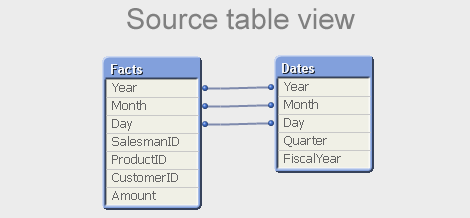
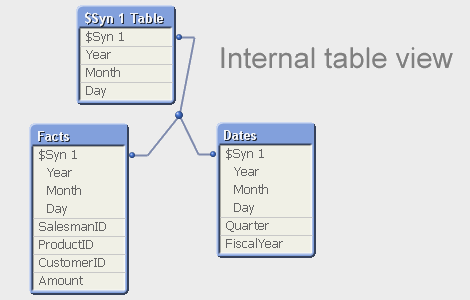
But a composite key is slightly different – there is no single symbol table that contains the relevant combinations of the multiple key fields. So QlikView needs to create such a table for all combinations: the $Syn table. In a way, you can say that the $Syn table is a symbol table for composite keys. In the data tables, the multiple keys are replaced by an identifier that uniquely identifies the combination of the values of the original keys: the $Syn key.
Hence, if you have the same set of multiple keys in two or more tables, the QlikView synthetic keys create a general, correct, compact and efficient solution. Synthetic keys do not per se cause performance and memory problems. They do not use a lot more memory than if you autonumber your own concatenated key. And they treat NULLs correctly, as opposed to an explicit concatenated key.
Hence: The synthetic key is in itself good and we should all love it.
However… still, also I avoid synthetic keys. Why?
- A synthetic key is in my experience often a sign of a poorly designed data model. I say that, given the number of times I have found a synthetic key in the table viewer only to realize that I made a mistake in the script. If you get a synthetic key and didn’t expect it, I can only say: Back to the drawing board! You should most likely change your data model.
- QlikView creates an additional table (the $Syn table) that in many cases is superfluous: An additional table is the best solution if none of the data tables by itself completely spans the set of composite keys. But in real life, there is usually one table that contains all relevant combinations of the keys, and then this table can be used to store the clear text of the individual keys.
- For clarity, I like to create my own concatenated keys. It forces me to think and create a data model that I believe in. Removing the synthetic keys becomes a method to ensure a good data model, rather than a goal in itself.
But in principle, I totally agree with John’s initial conclusion: Any problem around synthetic keys is really a data modeling problem and not a problem with the synthetic key itself.
The short answer to John’s question is Yes and No. Yes, we should love the synthetic key. But, No, we should not stop worrying. We should always be alert and ask ourselves: “Do I want this synthetic key? Is the data model OK?”
And so, because of the automated and irrevocable data-modeling process which rules out human meddling, the Synthetic Keys are scaring. But they are simple to understand. And completely credible and convincing.
Dr HIC
Further reading on Qlik data modelling:
-
Introducing our new Ideation area + other enhancements!
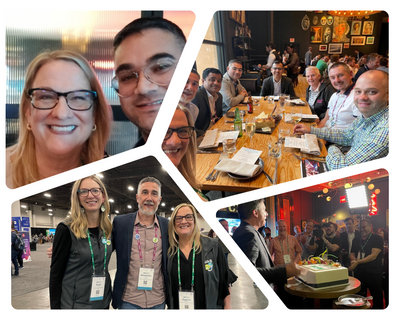
Hello Qlik Community! It was so great to meet so many of you in person at QlikWorld! We were able to put faces to usernames, build relationships with ... Show MoreHello Qlik Community!
It was so great to meet so many of you in person at QlikWorld! We were able to put faces to usernames, build relationships with users all over the world, and gain valuable insight that will shape remainder of the year.
Here are the enhancements for the Month of June:
Introducing a New Ideation area!
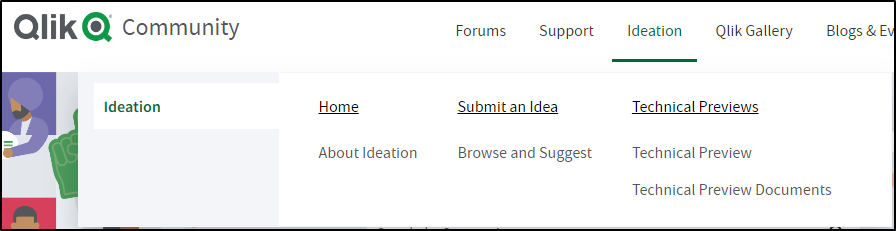
Product Management needed a more efficient way to review Ideas and be able to scale with allowing users to submit ideas in-product. @Meghann_MacDonald led the charge to create a new and improved Ideation area:
About Ideation – a new landing page where you can learn about the program and processes.
Browse and Suggest – use a Qlik Sense app to browse existing ideas. When you’re ready to submit an idea, use the “Suggest Features” link to enter your idea.
Please note that adding ideas is limited to Customers, Partners, Luminaries, and MVPs.
New rankings for our Partner Ambassadors
New rankings were added for Partner Ambassador, Partner Ambassador Alumni, or Partner Ambassador/MVP.
Learn more about the Partner Ambassador program (and others!) on the Greenway
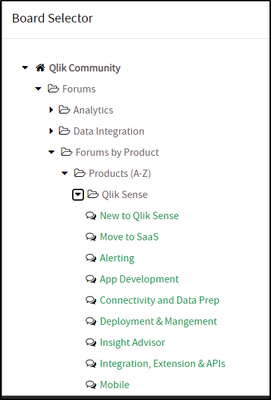
‘Ask a Question' Improvements
We’ve made it easier to see what boards are Qlik Sense related under Products (user requested).
Chatbot added to additional pages
The Chatbot has been added to individual posts under Qlik Fix, Release Notes, Product Lifecycle, and Support Updates Blog. Answers to questions are at your fingertips!
Let us know what you think in the comments below!
Kind regards,
Melissa, Sue, Jamie, and Nicole
-
Interacting with data using Enigma.js PT 3: Evaluate & Monitor Master Measures
In my previous blog posts (part 1, part 2), I explained how we can use enigma.js to communicate with the Qlik Associative Engine and get access to dat... Show MoreIn my previous blog posts (part 1, part 2), I explained how we can use enigma.js to communicate with the Qlik Associative Engine and get access to data. We also went through the concept of Generic Objects and saw how they can be used to do many things including getting raw data and using it to build visualizations.
In this post, we are going to expand on that and take a look at a real world example where enigma.js can be used to get Master Measures data that is rendered as KPIs in a web app, and monitor them for any changes to reflect the latest values.
This post is based on the following tutorial on qlik.dev where you can find the boilerplate code and more resources to help you get started: https://qlik.dev/embed/control-the-experience/dimensions-and-measures/get-master-measures/
You will find the full example code attached at the end of the post, I recommend you download it and open it in your favorite text editor as I will only feature some parts of it to keep this post short.
1- First, let’s take a look at the index.html:
- We include the enigma.js library.
- We define the configuration options to connect to our Qlik Cloud tenant and other needed variables including:
- the tenant URL
- the Web Integration ID (you can learn more about how to create this here)
- The App ID
- and a list containing the names of the Master Measures we wish to access.
const TENANT = '<INSERT YOUR TENANT HERE (example: xxxx.us.qlikcloud.com)>'; const WEB_INTEGRATION_ID = '<INSERT WEB INTEGRATION ID HERE>'; const APP_ID = '<INSERT APP ID HERE>'; const MASTER_MEASURE_NAMES = ['# of Invoices', 'Average Sales per Invoice', 'Sales (LYTD)', 'Sales LY']; const IDENTITY = '1234';- In the main function, we initiate the login process, get the csrf token, and open the Enigma session. Then we get all the Master Measures via the getMeasureList function, and render only the Master Measure data from the "MASTER_MEASURE_NAMES" list we previously defined.
- All the functions are defined in scripts.js
(async function main() {
    const isLoggedIn = await qlikLogin();
    const qcsHeaders = await getQCSHeaders();
    const [session, enigmaApp] = await getEnigmaSessionAndApp(qcsHeaders, APP_ID, IDENTITY);

    handleDisconnect(session);

    const allMasterMeasuresList = await getMeasureList(enigmaApp);
    const masterMeasureValuesDct = await masterMeasureHypercubeValues(enigmaApp, allMasterMeasuresList, MASTER_MEASURE_NAMES);
})();
2- Now, let’s take a look at the different functions that make this happen:
- Login and session handling:
- the qlikLogin function checks to see if you are login by fetching the /api/v1/users/me api endpoint, if not it redirects to the Interactive idp login page.
- getQCSHeaders fetches the CSRF token needed to make the websocket connection to the Qlik Engine.
// LOGIN async function qlikLogin() { const loggedIn = await fetch(`https://${TENANT}/api/v1/users/me`, { mode: 'cors', credentials: 'include', headers: { 'qlik-web-integration-id': WEB_INTEGRATION_ID, }, }) if (loggedIn.status !== 200) { if (sessionStorage.getItem('tryQlikAuth') === null) { sessionStorage.setItem('tryQlikAuth', 1); window.location = `https://${TENANT}/login?qlik-web-integration-id=${WEB_INTEGRATION_ID}&returnto=${location.href}`; return await new Promise(resolve => setTimeout(resolve, 10000)); // prevents further code execution } else { sessionStorage.removeItem('tryQlikAuth'); const message = 'Third-party cookies are not enabled in your browser settings and/or browser mode.'; alert(message); throw new Error(message); } } sessionStorage.removeItem('tryQlikAuth'); console.log('Logged in!'); return true; } // QCS HEADERS async function getQCSHeaders() { const response = await fetch(`https://${TENANT}/api/v1/csrf-token`, { mode: 'cors', credentials: 'include', headers: { 'qlik-web-integration-id': WEB_INTEGRATION_ID }, }) const csrfToken = new Map(response.headers).get('qlik-csrf-token'); return { 'qlik-web-integration-id': WEB_INTEGRATION_ID, 'qlik-csrf-token': csrfToken, }; }- Enigma session connection:
- we use enigma.create() function to establish the websocket connection and create a new QIX session.
- we use openDoc() method of the global object to open our app, and then return it for later use.
// ENIGMA ENGINE CONNECTION async function getEnigmaSessionAndApp(qcsHeaders, appId, identity) { const params = Object.keys(qcsHeaders) .map((key) => `${key}=${qcsHeaders[key]}`) .join('&'); return (async () => { const schema = await (await fetch('https://unpkg.com/enigma.js@2.7.0/schemas/12.612.0.json')).json(); try { return await createEnigmaAppSession(schema, appId, identity, params); } catch { const waitSecond = await new Promise(resolve => setTimeout(resolve, 1500)); try { return await createEnigmaAppSession(schema, appId, identity, params); } catch (e) { throw new Error(e); } } })(); } async function createEnigmaAppSession(schema, appId, identity, params) { const session = enigma.create({ schema, url: `wss://${TENANT}/app/${appId}/identity/${identity}?${params}` }); const enigmaGlobal = await session.open(); const enigmaApp = await enigmaGlobal.openDoc(appId); return [session, enigmaApp]; }- Get a list of all master measures in our app:
Now that we have the enigma app object, we can use the createSessionObject method to create a session object by passing the qMeasureListDef definition with qType “measure”
// GET LIST OF ALL MASTER MEASURES async function getMeasureList(enigmaApp) { const measureListProp = { "qInfo": { "qType": "MeasureList", "qId": "" }, "qMeasureListDef": { "qType": "measure", "qData": { "title": "/qMetaDef/title", "tags": "/qMetaDef/tags" } } } const measureListObj = await enigmaApp.createSessionObject(measureListProp); const measureList = await measureListObj.getLayout(); return measureList.qMeasureList.qItems; }- Get data from our list of Master Measures:
- Now, we loop through the list of all master measures returned from the function above and only grab the ones matching our list of matching measures from the MASTER_MEASURE_NAMES variable defined in index.html.
- We then create a generic object based on the Hypercube definition that includes the matchingMeasures representing the measureObjects’ qIds.
- Finally, we listen to any changes using the .on(”changed” …) event listener and grab the latest layout.
// CREATE HYPERCUBE WITH MULTIPLE MASTER MEASURES (INCLUDE MATCHING NAMES ONLY) async function masterMeasureHypercubeValues(enigmaApp, allMasterMeasuresList, desiredMasterMeasureNamesList) { let matchingMeasures = []; allMasterMeasuresList.forEach(measureObject => { if (desiredMasterMeasureNamesList.includes(measureObject.qMeta.title)) { matchingMeasures.push({ "qLibraryId": measureObject.qInfo.qId }) } }); if (!matchingMeasures.length > 0) { console.log('No matching master measures found! Exiting...'); return } const measureDef = { "qInfo": { "qType": 'hypercube', }, "qHyperCubeDef": { "qDimensions": [], "qMeasures": matchingMeasures, "qInitialDataFetch": [ { "qHeight": 1, "qWidth": matchingMeasures.length, }, ], }, }; const measureObj = await enigmaApp.createSessionObject(measureDef); const measureObjHypercube = (await measureObj.getLayout()).qHyperCube; // LISTEN FOR CHANGES AND GET UPDATED LAYOUT measureObj.on('changed', async () => { const measureObjHypercube = (await measureObj.getLayout()).qHyperCube; processAndPlotMeasureHypercube(measureObjHypercube); }) processAndPlotMeasureHypercube(measureObjHypercube); }- Render the data to the HTML as KPIs:
Lastly, we retrieve the data in “hypercube.qDataPages[0].qMatrix” and loop through it to construct an easy manipulate array of key/value objects which are then injected into the HTML.
//    HELPER FUNCTION TO PROCESS HYPERCUBE INTO USER FRIENDLY DICTIONARY
function processAndPlotMeasureHypercube(hypercube) {

    const masterMeasureValuesDict = Object.create(null);

    hypercube.qMeasureInfo.forEach((measure, i) => {
        masterMeasureValuesDict[measure.qFallbackTitle] = hypercube.qDataPages[0].qMatrix[0][i].qText;
    });

    const masterMeasureKeys = Object.keys(masterMeasureValuesDict);
    masterMeasureKeys.sort();

    const sortedMasterMeasureValuesDict = Object.create(null);
    masterMeasureKeys.forEach(name => {
        sortedMasterMeasureValuesDict[name] = masterMeasureValuesDict[name];
    })

    renderKpis(sortedMasterMeasureValuesDict);
}


// RENDER KPIs
function renderKpis(masterMeasureValuesDict) {

    let kpiData = [];
    Object.entries(masterMeasureValuesDict).forEach(([key, value]) => {
        kpiData.push({
            label: key,
            value: Number(value).toLocaleString()
        });
    });

    const kpisContainer = document.querySelector('#kpis');
    kpisContainer.innerHTML = '';

    kpiData.forEach((kpi) => {
        const kpiCard = document.createElement('div');
        kpiCard.classList.add('kpi-card');

        const labelElement = document.createElement('div');
        labelElement.classList.add('kpi-label');
        labelElement.innerText = kpi.label;

        const valueElement = document.createElement('div');
        valueElement.classList.add('kpi-value');
        valueElement.innerText = kpi.value;

        kpiCard.appendChild(labelElement);
        kpiCard.appendChild(valueElement);

        kpisContainer.appendChild(kpiCard);
    });
}
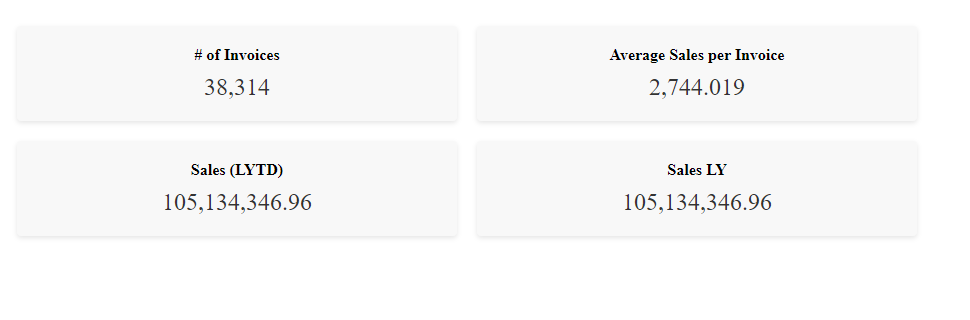
This is how the KPIs are rendered to the page:To show how the on-change event listener works, let's simulate a change by editing the # of Invoices Master Measure in Qlik:
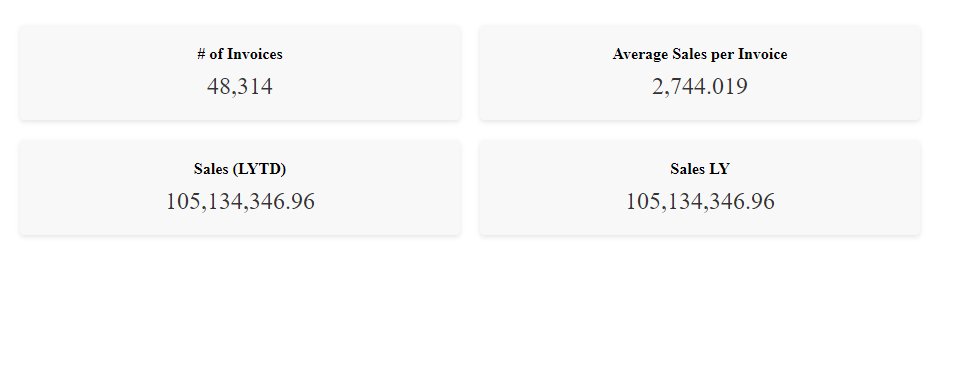
Looking back the web page, the change is instantly reflected on the KPI:
That’s all, I hope you found this post helpful, do not forget to check out more tutorials on qlik.dev that cover other important use cases!
P.S: to make it easier to run the web app, I have included a server.py file to easily serve the files via https://localhost:8000. You can run it with the command: python server.py.
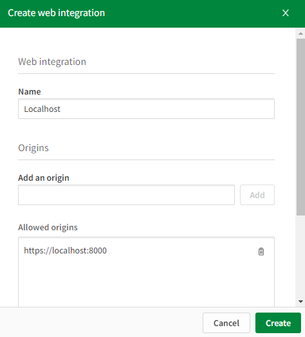
Also, don’t forget to whitelist this localhost domain when generating a new Web Integration ID:
Thanks for reading!
-
Qlik Sense Qualification Exams - 2023 Update
Qlik Education is pleased to announce the Business Analyst and Data Architect Qualification Exams have been updated and are based on the SaaS editions... Show MoreQlik Education is pleased to announce the Business Analyst and Data Architect Qualification Exams have been updated and are based on the SaaS editions* of Qlik Sense. However, you may also use Qlik Sense on Windows editions.
After completing the Business Analyst or Data Architect courses in the Continuous Classroom or taking the Create Visualizations with Qlik Sense or the Data Modeling for Qlik Sense training, consider earning a Qlik Sense Qualification.
What is a Qualification Exam?
Qualification exams enable you to validate your fundamental level of Qlik Sense skills. The Qlik Sense Business Analyst Qualification is earned after developing an application and completing a multiple-choice exam which tests your fundamental and applied knowledge. A Qlik Sense Qualification Certificate and digital badge will be awarded with a minimum passing score of 70%.
How do I access the Qualification Exams?
The exams are accessed on the Qlik Learning Portal, where all the latest Qlik training is available on demand, 24/7. Visit the Qlik Sense Business Analyst or Qlik Sense Data Architect Learning Plans --> Qualification Tab to access exams.
What do I receive after I pass?
After you receive a passing score, you will be awarded a certificate and digital badge for sharing on social sites. You will also receive notification from Credly platform that you have earned a digital badge. Credly allows you to manage your badges from Qlik and other professional organizations so you can easily share your badges on social media sites. You will need to simply accept the badge and click the share button or download the badge and certificate to keep for your records. You can even add their badges to your email signature!
Questions? Feedback?
Contact Education@qlik.com.
-
Qlik Data Gateway -Direct Access, now supports SAP Connectivity
Qlik Data Gateway provides a secure means of accessing or moving firewalled data for use in Qlik Cloud. The gateway is installed behind your organiza... Show MoreQlik Data Gateway provides a secure means of accessing or moving firewalled data for use in Qlik Cloud. The gateway is installed behind your organization's firewall, and then registered with Qlik Management Console. No matter if your protected data is on-premises or in a virtual private cloud, Direct Access gateway provides a secure connection to analyze data in a Qlik Cloud Analytics app.
Qlik Cloud expanding connectivity empowers our customers to centralize disparate data landscapes and simplify data-analytics operations with governed access. With Qlik Data Gateway - Direct Access, you can easily migrate analytics consumption into Qlik Cloud - no matter where the data resides!
!
To learn more, please see the key resources below.
Resources:
- Check out our Overview and Demo video here!
- Try Direct Access today with our guided demo app.
- To set up your Data Gateway, follow these deployment instructions.
- Detailed capabilities shared on our Product Innovation Blog!
- Documentation for the connectors can be found here for SAP SQL and SAP BW
-
Win $100 Amazon Gift Card for 7 minutes of your time!
Congratulations to Stephen Lan, Delani Klein-Lee and May Tang for being randomly selected as the winners! We received a lot of great feedback and wan... Show MoreCongratulations to Stephen Lan, Delani Klein-Lee and May Tang for being randomly selected as the winners! We received a lot of great feedback and want to extend our sincere gratitude to all who participated in the survey!
------------------------------------------------------------------------------------------------------------------------------------
Let your voice be heard! The Qlik Education Team wants to know more about your learning experience with the Qlik Continuous Classroom and your learning preferences. This short survey will take 7 minutes of your time and have a meaningful impact on the roadmap of our self-paced learning curriculum.
Three participants who fully complete the survey and submit their contact information will be eligible to win a $100 Amazon Gift Card after the survey completion date. The survey will run through August 5th at 5:00 PM PDT.
The objective of this brief survey is to better understand:- Your exposure and feedback on the Qlik Continuous Classroom, the self-paced, online learning courses on the Qlik Learning Portal
- Your current learning environment at work and in your job
- Your learning style and preferences
Take a quick moment to give us your feedback and earn some cash!
Note: This survey is not regarding our instructor-led training curriculum, but only our self-paced curriculum.