Unlock a world of possibilities! Login now and discover the exclusive benefits awaiting you.

Featured Content
-
How to contact Qlik Support
Qlik offers a wide range of channels to assist you in troubleshooting, answering frequently asked questions, and getting in touch with our technical e... Show MoreQlik offers a wide range of channels to assist you in troubleshooting, answering frequently asked questions, and getting in touch with our technical experts. In this article, we guide you through all available avenues to secure your best possible experience.
For details on our terms and conditions, review the Qlik Support Policy.
Index:
- Support and Professional Services; who to contact when.
- Qlik Support: How to access the support you need
- 1. Qlik Community, Forums & Knowledge Base
- The Knowledge Base
- Blogs
- Our Support programs:
- The Qlik Forums
- Ideation
- How to create a Qlik ID
- 2. Chat
- 3. Qlik Support Case Portal
- Escalate a Support Case
- Phone Numbers
- Resources
Support and Professional Services; who to contact when.
We're happy to help! Here's a breakdown of resources for each type of need.
Support Professional Services (*) Reactively fixes technical issues as well as answers narrowly defined specific questions. Handles administrative issues to keep the product up-to-date and functioning. Proactively accelerates projects, reduces risk, and achieves optimal configurations. Delivers expert help for training, planning, implementation, and performance improvement. - Error messages
- Task crashes
- Latency issues (due to errors or 1-1 mode)
- Performance degradation without config changes
- Specific questions
- Licensing requests
- Bug Report / Hotfixes
- Not functioning as designed or documented
- Software regression
- Deployment Implementation
- Setting up new endpoints
- Performance Tuning
- Architecture design or optimization
- Automation
- Customization
- Environment Migration
- Health Check
- New functionality walkthrough
- Realtime upgrade assistance
(*) reach out to your Account Manager or Customer Success Manager
Qlik Support: How to access the support you need
1. Qlik Community, Forums & Knowledge Base
Your first line of support: https://community.qlik.com/
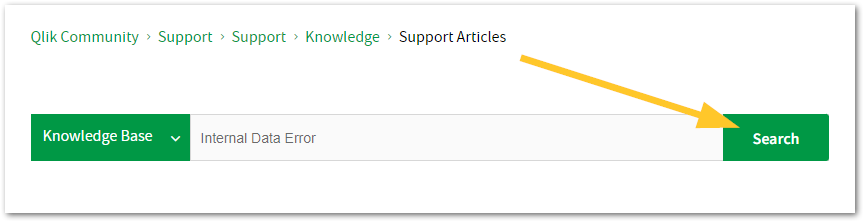
Looking for content? Type your question into our global search bar:
The Knowledge Base
Leverage the enhanced and continuously updated Knowledge Base to find solutions to your questions and best practice guides. Bookmark this page for quick access!
- Go to the Official Support Articles Knowledge base
- Type your question into our Search Engine
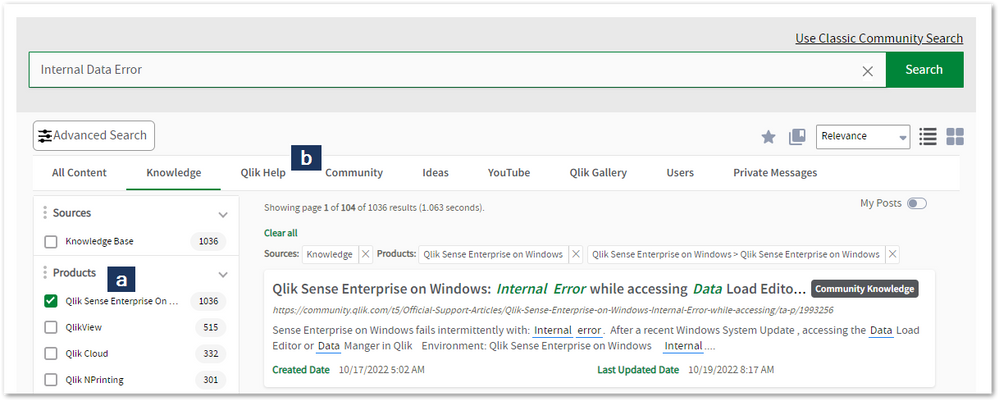
- Need more filters?
- Filter by Product
- Or switch tabs to browse content in the global community, on our Help Site, or even on our Youtube channel
Blogs
Subscribe to maximize your Qlik experience!
The Support Updates Blog
The Support Updates blog delivers important and useful Qlik Support information about end-of-product support, new service releases, and general support topics. (click)The Qlik Design Blog
The Design blog is all about product and Qlik solutions, such as scripting, data modelling, visual design, extensions, best practices, and more! (click)The Product Innovation Blog
By reading the Product Innovation blog, you will learn about what's new across all of the products in our growing Qlik product portfolio. (click)Our Support programs:
Q&A with Qlik
Live sessions with Qlik Experts in which we focus on your questions.Techspert Talks
Techspert Talks is a free webinar to facilitate knowledge sharing held on a monthly basis.Technical Adoption Workshops
Our in depth, hands-on workshops allow new Qlik Cloud Admins to build alongside Qlik Experts.Qlik Fix
Qlik Fix is a series of short video with helpful solutions for Qlik customers and partners.The Qlik Forums
- Quick, convenient, 24/7 availability
- Monitored by Qlik Experts
- New releases publicly announced within Qlik Community forums (click)
- Local language groups available (click)
Ideation
Suggest an idea, and influence the next generation of Qlik features!
Search & Submit Ideas
Ideation GuidelinesHow to create a Qlik ID
Get the full value of the community.
Register a Qlik ID:
- Go to register.myqlik.qlik.com
If you already have an account, please see How To Reset The Password of a Qlik Account for help using your existing account. - You must enter your company name exactly as it appears on your license or there will be significant delays in getting access.
- You will receive a system-generated email with an activation link for your new account. NOTE, this link will expire after 24 hours.
If you need additional details, see: Additional guidance on registering for a Qlik account
If you encounter problems with your Qlik ID, contact us through Live Chat!
2. Chat
Incidents are supported through our Chat, by clicking Chat Now on any Support Page across Qlik Community.
To raise a new issue, all you need to do is chat with us. With this, we can:
- Answer common questions instantly through our chatbot
- Have a live agent troubleshoot in real time
- With items that will take further investigating, we will create a case on your behalf with step-by-step intake questions.
3. Qlik Support Case Portal
Log in to manage and track your active cases in the Case Portal. (click)
Before you can access the Support Portal, please complete your Community account setup. See First time access to the Qlik Customer Support Portal fails with: Unauthorized Access Please try signing out and sign in again.
Please note: to create a new case, it is easiest to do so via our chat (see above). Our chat will log your case through a series of guided intake questions.
Your advantages:
- Self-service access to all incidents so that you can track progress
- Option to upload documentation and troubleshooting files
- Option to include additional stakeholders and watchers to view active cases
- Follow-up conversations
When creating a case, you will be prompted to enter problem type and issue level. Definitions shared below:
Problem Type
Select Account Related for issues with your account, licenses, downloads, or payment.
Select Product Related for technical issues with Qlik products and platforms.
Priority
If your issue is account related, you will be asked to select a Priority level:
Select Medium/Low if the system is accessible, but there are some functional limitations that are not critical in the daily operation.
Select High if there are significant impacts on normal work or performance.
Select Urgent if there are major impacts on business-critical work or performance.
Severity
If your issue is product related, you will be asked to select a Severity level:
Severity 1: Qlik production software is down or not available, but not because of scheduled maintenance and/or upgrades.
Severity 2: Major functionality is not working in accordance with the technical specifications in documentation or significant performance degradation is experienced so that critical business operations cannot be performed.
Severity 3: Any error that is not Severity 1 Error or Severity 2 Issue. For more information, visit our Qlik Support Policy.
Escalate a Support Case
If you require a support case escalation, you have two options:
- Request to escalate within the case, mentioning the business reasons.
To escalate a support incident successfully, mention your intention to escalate in the open support case. This will begin the escalation process. - Contact your Regional Support Manager
If more attention is required, contact your regional support manager. You can find a full list of regional support managers in the How to escalate a support case article.
Phone Numbers
When other Support Channels are down for maintenance, please contact us via phone for high severity production-down concerns.
- Qlik Data Analytics: 1-877-754-5843
- Qlik Data Integration: 1-781-730-4060
- Talend AMER Region: 1-800-810-3065
- Talend UK Region: 44-800-098-8473
- Talend APAC Region: 65-800-492-2269
Resources
A collection of useful links.
Qlik Cloud Status Page
Keep up to date with Qlik Cloud's status.
Support Policy
Review our Service Level Agreements and License Agreements.
Live Chat and Case Portal
Your one stop to contact us.




Recent Documents
-
Qlik Talend Remote Engine 2.13.13 SSL Communication Issue with Talend Studio
After upgrading to Remote Engine 2.13.13, when enabling the option to execute a job from Studio on a remote engine, the process fails due to SSL and P... Show MoreAfter upgrading to Remote Engine 2.13.13, when enabling the option to execute a job from Studio on a remote engine, the process fails due to SSL and PKCS-related errors.
sun.security.validator.ValidatorException: PKIX path building failed: sun.security.provider.certpath.SunCertPathBuilderException: unable to find valid certification path to requested target
Resolution
SSL Configuration for Talend Studio to Connect with Remote Engine
- Retain the Keystore and Truststore Passwords Generated During Installation
During the installation of Talend Remote Engine, SSL credentials are automatically generated. To retrieve the keystore password, execute the following command:
cat /opt/TalendRemoteEngine/bin/sysenv
and locate the line
TMC_ENGINE_JOB_SERVER_SSL_KEY_STORE_PASSWORD=<PASSWORD>
- Required Keystore and Truststore Files
The following files are necessary for secure communication between Talend Studio and the Remote Engine:
/opt/TalendRemoteEngine/etc/keystores/jobserver-client-keystore.p12
/opt/TalendRemoteEngine/etc/keystores/jobserver-client-truststore.p12 (Truststore file added with RE 2.13.13)Transfer these files to your Talend Studio workstation and store them in a dedicated folder.
- Configure Talend Studio to Use SSL
Edit the Studio startup configuration file, depending on your operating system:
- For Linux (x86_64): studio/Talend-Studio-linux-gtk-x86_64.ini
- For ARM architecture: studio/Talend-Studio-gtk-aarch64.ini
- For Windows: Talend-Studio-win-x86_64.ini
- Add the following JVM options to the configuration file, and adjust the file paths and password values accordingly:
    -Dorg.talend.remote.client.ssl.force=true
    -Dorg.talend.remote.client.ssl.keyStore=path_to_keystore/jobserver-client-keystore.p12
    -Dorg.talend.remote.client.ssl.keyStoreType=PKCS12
    -Dorg.talend.remote.client.ssl.keyStorePassword=<password_from_step_1>
    -Dorg.talend.remote.client.ssl.keyPassword=<password_from_step_1><
    -Dorg.talend.remote.client.ssl.trustStore=path_to_truststore/jobserver-client-truststore.p12
    -Dorg.talend.remote.client.ssl.trustStoreType=PKCS12
    -Dorg.talend.remote.client.ssl.trustStorePassword=<password_from_step_1>
    -Dorg.talend.remote.client.ssl.disablePeerTrust=false
    -Dorg.talend.remote.client.ssl.enabled.protocols=TLSv1.2,TLSv1.3
Cause
Talend Remote Engine enforces SSL communication by default, ensuring that all interactions with the engine are encrypted. If Studio does not have the appropriate certificates installed, it will be unable to establish a secure connection with the Remote Engine.
Environment
- Retain the Keystore and Truststore Passwords Generated During Installation
-
Can I restore a previous backup of a Qlik Cloud tenant?
According to the Qlik Cloud Platform document, Qlik leverages our cloud providers for backups to maintain copies of content for 30 days. Can I restore... Show MoreAccording to the Qlik Cloud Platform document, Qlik leverages our cloud providers for backups to maintain copies of content for 30 days.
Can I restore one of those backups?
No, those backups cannot be restored. They are kept for disaster recovery purposes (see Disaster recovery/backup and recovery) and encompass entire regions.
It's therefore not possible to recover a tenant's previous stage.
It's the tenant admin's responsibility to make sure that copies of the content are regularly backed up on any platform of choice for easy restoration. See Qlik Cloud Administration: Backup Responsibilities for details.
Environment
- Qlik Cloud Analytics
-
Restore deleted app in Qlik Sense, Import app in Qlik Sense
A Qlik Sense app has been deleted from the Qlik Sense Management Console and needs to be restored. ! Deleting Qlik Sense application from Qlik Managem... Show MoreA Qlik Sense app has been deleted from the Qlik Sense Management Console and needs to be restored.
! Deleting Qlik Sense application from Qlik Management Console (QMC) is generally an irreversible process. Restoring the applications is only possible if a previous backup exists. The delete process removes all files from the configured file share. See Creating a file share (Help.com).
If a backup of the files exists, proceed with the documented steps.
Note that these steps can also be applied when restoring and importing from one Qlik Sense environment to the other.
Information on server migration has also be posted to Qlik Community: Qlik Sense Migration Part1: Migrating your Entire Qlik Sense Environment. If assistance is needed, Qlik Consulting would need to be engaged. Qlik Support cannot provide walk-through assistance with server migrations outside of a post-installation and migration completion break/fix scenario.
Resolution:
To successfully restore Qlik Sense Application to the Qlik Sense environment, you must ensure backup strategy using your backup software tool for your shared folder, where Qlik Sense Application files are stored.
! If no backups of files are available, no restoration will be possible.
Restore process:
1. Find the App filename
You can find the filename (APP_ID) in the AuditActivity_Engine log.
This log is by default stored in: \\<rootShare>\Log\Engine\Audit\ by default.
An example showing App id followed by App name follows:
492 20.4.2.0 20180521T180500.118+0200 QlikServer1 0ccd5e9f-e020-4b76-a84d-144bdf903765 20180521T180500.112+0200 12.145.3.0 Command=Reload app;Result=0;ResultText=Success 0 0 2290 INTERNAL sa_scheduler d296b870-da06-4311-bacc-038992b1c954 c047d8a7-148c-4ea6-97f2-10290e706cd7 License Monitor Engine Not available Doc::DoReloadEx Reload app 0 Success 0ccd5e9f-e020-4b76-a84d-144bdf903765
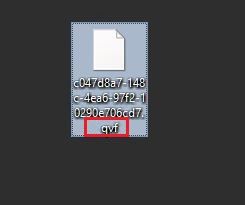
2. Add extension ".qvf" to the app file
This will make the file readable and importable.
- Navigate to the file on disk.
- Right-click and click rename
- Add .qvf as a file extension
- Confirm any warnings that the file may not be accessible any more after renaming
3. Import the App
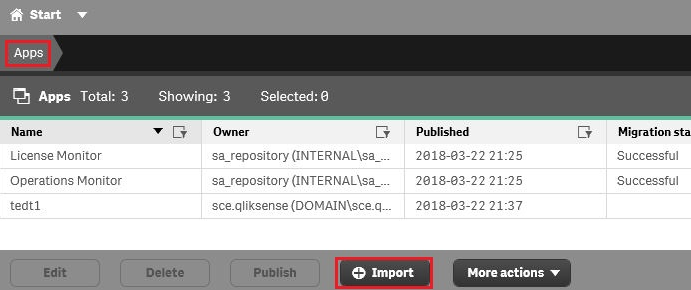
- Open the Qlik Sense Management Console
- Go to Apps
- Locate and click Import
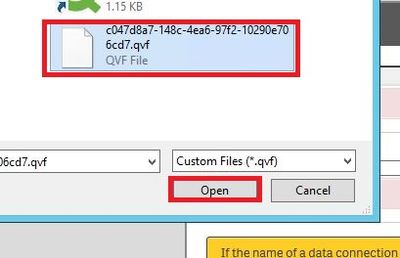
- Locate the file on disk
- Click Open
- Rename the App to the original name
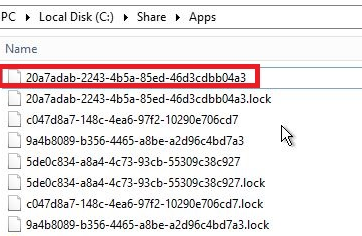
4. App has been imported and received a new APP_ID
You can now locate the app in the shared folder with a new App ID.
5. Find the proper stream where the app resides
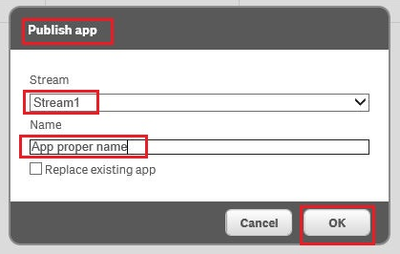
6. Go to section "APPS" select the app, hit "Publish"
Click Publish
The Publishing dialogue:
7. Hit "Ok", the app is being published - IMPORTED back
8. The confirmation message should now print as Successful in the App list.
-
How to configure Qlik Sense to use a dedicated PostgreSQL database
This article is provided as-is and to be used at own discretion. Depending on tool(s) used, customization(s), and/or other factors ongoing support on ... Show MoreThis article is provided as-is and to be used at own discretion. Depending on tool(s) used, customization(s), and/or other factors ongoing support on the solution below may not be provided by Qlik Support.
The Qlik Sense Repository Database (QSR) can be moved to a dedicated standalone PostgreSQL instance not hosted on the same machine as other Qlik Sense Services. It is also possible to move an already existing QSR from a local Sense install, to a dedicated PostgresSQL database.
Content:
- Set up a postgresSQL database
- Simplified checklist of steps:
- Moving the Qlik Sense Share Folders as well?
- Backup
- Restore
- Changing the Connection String to QSR and QSMQ Database
- Changing the Connection Stringto SenseServices Databases.
- Changing the Connection String to Licenses Database ( April 2019 and up )
- Remove Database Service dependency and Postgres Server
- Finalize
Set up a postgresSQL database
Instructions for this might vary slightly. Please refer to the Qlik Online Help for details. We recommend watching this video.
Qlik Sense Enterprise server has a set of five databases. For more details visit Installing and configuring PostgreSQL on help.qlik.com.
1. The Qlik Sense repository database (QSR):
The QSR is the primary database in your Qlik Sense deployment.
2. The Qlik Sense services database (SenseServices):
The SenseServices database contains schemas for each of the Qlik Sense services and allows growth independently of the Qlik Sense Repository Database, while still sharing the same PostgreSQL instance and login role.
3. The Qlik Sense message queue database (QSMQ):
The QSMQ database provides a light-weight method of passing messages internally between services in Qlik Sense Enterprise. The NOTIFY and LISTEN functionality in PostgreSQL allows services to be notified about new messages that have been written to the messaging table.
4. The Qlik Sense logging database (QLogs): No longer supported after May 2021
The QLogs database centralizes logging by collecting log messages from all Qlik Sense nodes in your deployment and stores them in a PostgreSQL database.
5. The Qlik Sense license service database (Licenses):
The Licenses database is used to sync the assignments between the Qlik license backend and the local installation.
Simplified checklist of steps:
- Download a valid version of postgresSQL. For Sense June 2017 and up, 9.6.x is required, from November 2019 version 11.5.x as well. From May 2021 version 12.5 can be used. Review the system requirements of your version before proceeding.
- Install based on instructions found on the Qlik Online Help for Qlik Sense; select the version you are running on then select from Menu , Deploy - Qlik Sense installation - Installing and configuring PostgreSQL.
Moving the Qlik Sense Share Folders as well?
Follow How to change the shared path in Qlik Sense
Backup
Depending on the version, you need to backup different databases, on the current Qlik Sense central node hosting the Qlik Sense Repository Database service, follow the backup instructions to obtain a database copy of each Qlik Sense Database Present .
Example for February 2021 you need to backup the databases reported in section "Installing and configuring PostgreSQL"; referring to the Help site these are :
QSR , QSMQ , SenseServices , Licenses , if configured QLogsRestore
On the dedicated remote postgresSQL host, perform a restore of the backed up Databases of previous point.
Changing the Connection String to QSR and QSMQ Database
- On the Qlik Sense central node, all services but the Qlik Sense Repository Service are shut down.
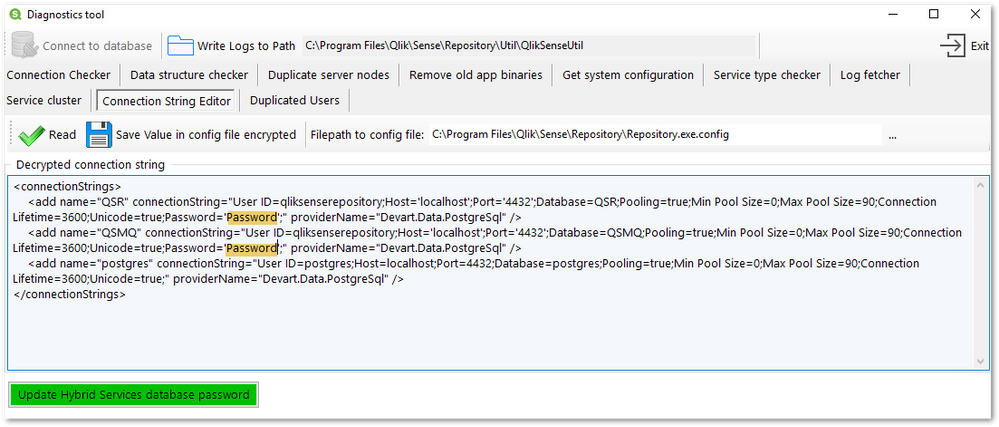
- Open QlikSenseUtil. By default, this will be installed in: C:\Program Files\Qlik\Sense\Repository\Util\QlikSenseUtil\QlikSenseUtil.exe
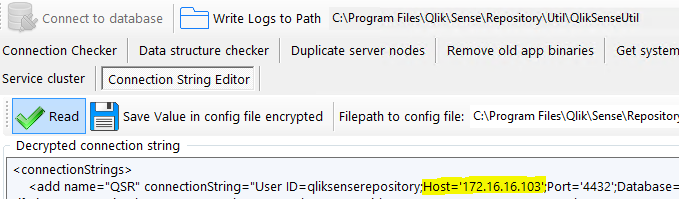
- Open the Connection String Editor and Read the current configuration, decrypting the current data.
- Replace all mentions of the current database hostname. In our example, the new database resides on 172.16.16.103. Instead of an IP you can also use the FQDN of the db server.
- You need to repeat this step for the sections <add name="QSMQ" and <add name="postgres"
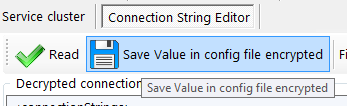
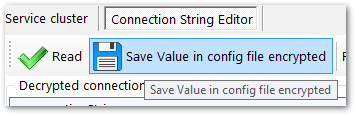
- Hit Save Value in config file encrypted, committing any changes.
Changing the Connection String to SenseServices Databases.
Execute steps in Moved Postgress database to new host, but some qliksense is still accessing the SenseServices old database; check if different version of article are present for different Qlik Sense version .
Changing the Connection String to Licenses Database ( April 2019 and up )
Starting from April 2019 new License Service implementation is using this database.
- Open an elevated Powershell and change directory to C:\Program Files\Qlik\Sense\Licenses
- Run the script .\Configure-Service.ps1 and provide:
- new Hostname or IP
- database port default is 4432
- database user qliksenserepository
- databasepassword is the qliksenserepository password used during configuration of the new database.
- example:
- cd 'C:\Program Files\Qlik\Sense\Licenses'
- .\Configure-Service.ps1 172.16.16.102 4432 qliksenserepository Password123!
It will look like this:
Windows PowerShell
Copyright (C) 2014 Microsoft Corporation. All rights reserved.
PS C:\Windows\system32> cd \
PS C:\> cd 'C:\Program Files\Qlik\Sense\Licenses'
PS C:\Program Files\Qlik\Sense\Licenses> .\Configure-Service.ps1 172.16.16.102 4432 qliksenserepository Password123!
Licenses configuration started.
WARNING: Skipping the database initialization. No superuser or password specified.
Reading the settings file.
Saving the modified settings.
Licenses configuration successful.
PS C:\Program Files\Qlik\Sense\Licenses>
repeat this for:C:\Program Files\Qlik\Sense\NotifierService\install\Configure-Service.ps1
C:\Program Files\Qlik\Sense\AppDistributionService\Configure-Service.ps1
C:\Program Files\Qlik\Sense\HybridDeploymentService\Configure-Service.ps1
C:\Program Files\Qlik\Sense\MobilityRegistrarService\install\Configure-Service.ps1
C:\Program Files\Qlik\Sense\PrecedentsService\install\Configure-Service.ps1
C:\Program Files\Qlik\Sense\NLAppSearch\install\Configure-Service.ps1there might come new services or disappear with new releases, please check in the C:\Program Files\Qlik\Sense\ folder for "Configure-Service.ps1" to find additional one in your version of Qlik Sense.
Note: If you have installed Qlik Sense in a different directory the Configure-Service.ps1 would have to be updated as in this example:
File: Configure-Service.ps1 Folders: Various (9 microservices)
Before:
11 | [string] $senseInstallPath
"$env:ProgramFiles\Qlik Sense",
After:
11
[string] $senseInstallPath = "D:\Qlik",Remove Database Service dependency and Postgres Server
After successfully verifying your new setup, remove the Qlik Sense Repository service dependencies and the old Postgres database. This is done to avoid issues with future Upgrade of Environment.
- In an elevated command prompt, execute the following on prompt:
c:\sc config "QlikSenseRepositoryService" depend= ""
c:\sc config "QlikLoggingService" depend= ""
This will return:
[SC] ChangeServiceConfig SUCCESS - Restart the Qlik Sense Repository Service.
Check that Qlik Sense Repository Database doesn't start (confirms [SC] ChangeServiceConfig SUCCESS ). - Remove the (local) Qlik Sense Repository Database
Find the most recent PostgreSQL.msi in C:\ProgramData\Package Cache\ and remove it. This removes the service but no old local database data. This is needed to prevent issues on future upgrades of Environment.
You can find the precise folder with this command depending on the Postgresql Version you used installing the inital release.
9.6:
c:\cd ProgramData\Package Cache
c:\ProgramData\Package Cache\dir /s PostgreSQL.msi
The folder containing PostgreSQL.msi will be revealed. Right click on the PostgreSQL.msi file and select uninstall from the menu.
12.5:
c:\cd ProgramData\Package Cache
c:\ProgramData\Package Cache\dir /s PostgreSQL125.msi
The folder containing PostgreSQL.msi will be revealed. Right click on the PostgreSQL.msi file and select uninstall from the menu.
Finalize
- Restart the Qlik Sense Repository Service and verify that Qlik Sense Repository Database Service doesn't exist when followed the previous steps.
- Start all remaining Sense Services
- Progress on the startup sequence (including the connection to the new database) can be tracked in the _System_Repository log files located in C:\ProgramData\Qlik\Sense\Log\Repository\Trace
- Verify functionality.
-
In Multi-node scenario you need to repeat steps "Changing the Connection Strings to Databases" on all Rim nodes (QlikSenseUtil for Repository.exe.config and Configure-Service.ps1 for the micro services), and if required configure "Update the Qlik Logging Service Connection String" (note that is EOL with Qlik Sense Enterprise on Windows February 2022) .
Environment
-
Qlik Cloud Data Integration: How to enable Full Load Passthru filter on Landing ...
The purpose of this article is to provide details about enabling Full Load Passthru filter in Qlik Cloud Data Integration (QCDI) and get the selected ... Show MoreThe purpose of this article is to provide details about enabling Full Load Passthru filter in Qlik Cloud Data Integration (QCDI) and get the selected data from the source during the initial load of the Landing or Replication Tasks.
Enable Passthrough filter in the Qlik Data Movement Gateway server configuration
- Navigate to the path /opt/qlik/gateway/movement/bin on the Qlik Data Movement Gateway Linux server
- Edit the file repctl.cfg
- Set the parameter enable_passthrough_filter to true and save the file
- Restart the Gateway server using the service repagent restart command
Build the filter in the Qlik Cloud Data Integration tenant
- Log in to our QCDI tenant
- Open the Landing Task in the project.
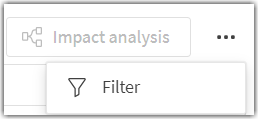
- Click on the filter button (top right corner above the table details)
Syntax:
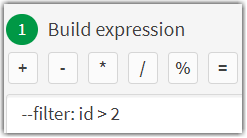
--filter: filter_condition
Example One:
--filter: id > 2
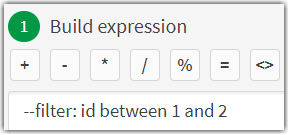
Example Two:
--filter: id between 1 and 2 - We can add any valid condition using the syntax supported by the source Database and the tool internally constructs the select statement using the condition to filter the data from the source.
- Once the filter is added, prepare the landing task and then do a Reload of the table to validate the results
- Please note that the filter is at the table level and every table can have its own filter condition for a column specific to that table.
The information in this article is provided as-is and will be used at your discretion. Depending on the tool(s) used, customization(s), and/or other factors, ongoing support on the solution below may not be provided by Qlik Support.
Environment
- Qlik Cloud Data Integration
-
Qlik Cloud Monitoring Apps Workflow Guide
This template was updated on December 4th, 2025 to replace the original installer and API key rotator with a new, unified deployer automation. Please... Show MoreThis template was updated on December 4th, 2025 to replace the original installer and API key rotator with a new, unified deployer automation. Please disable or delete any existing installers, and create a new automation, picking the Qlik Cloud monitoring app deployer template from the App installers category.
Installing, upgrading, and managing the Qlik Cloud Monitoring Apps has just gotten a whole lot easier! With a single Qlik Automate template, you can now install and update the apps on a schedule with a set-and-forget installer using an out-of-the-box Qlik Automate template. It can also handle API key rotation required for the data connection, ensuring the data connection is always operational.
Some monitoring apps are designed for specific Qlik Cloud subscription types. Refer to the compatibility matrix within the Qlik Cloud Monitoring Apps repository.
'Qlik Cloud Monitoring Apps deployer' template overview
This automation template is a set-and-forget template for managing the Qlik Cloud Monitoring Applications, including but not limited to the App Analyzer, Entitlement Analyzer, Reload Analyzer, and Access Evaluator applications. Leverage this automation template to quickly and easily install and update these or a subset of these applications with all their dependencies. The applications themselves are community-supported; and, they are provided through Qlik's Open-Source Software (OSS) GitHub and thus are subject to Qlik's open-source guidelines and policies.
For more information, refer to the GitHub repository.
Features
- Can install/upgrade all or select apps.
- Can create or leverage existing spaces.
- Programmatically verified prerequisite settings, roles, and entitlements, notifying the user during the process if changes in configuration are required, and why.
- Installs latest versions of specified applications from Qlik’s OSS GitHub.
- Creates required API key.
- Creates required analytics data connection.
- Creates a daily reload schedule.
- Reload applications post-install.
- Tags apps appropriately to track which are installed and their respective versions.
- Supports both user and capacity-based subscriptions.
Configuration:
Update just the configuration area to define how the automation runs, then test run, and set it on a weekly or monthly schedule as desired.
Configure the run mode of the template using 7 variable blocks
Users should review the following variables:
- configuredMonitoringApps: contains the list of the monitoring applications which will be installed and maintained. Delete any applications not required before running (default: all apps listed).
- refreshConnectorCredentials: determines whether the monitoring application REST connection and associated API key will be regenerated every run (default: true).
- reloadNow: determines whether apps are reloaded immediately following updates (default: true).
- reloadScheduleHour: determines at which hour of the day the apps reload at for the daily schedule in UTC timezone (default: 06)
- sharedSpaceName: defines the name of the shared space used to import the apps into prior to publishing. If the space doesn't exist, it'll be created. If the space exists, the user will be added to it with the required permissions (default: Monitoring - staging).
- managedSpaceName: defines the name of the managed space the apps are published into for consumption/ alerts/ subscription use.If the space doesn't exist, it'll be created. If the space exists, the user will be added to it with the required permissions (default: Monitoring).
- versionsToKeep: determines how many versions of each staged app is kept in the shared space. If set to 0, apps are deleted after publishing. If a positive integer value other than 0, that many apps will be kept for each monitoring app deployed (default: 0).
App management:
If the monitoring applications have been installed manually (i.e., not through this automation), then they will not be detected as existing. The automation will install new copies side-by-side. Any subsequent executions of the automation will detect the newly installed monitoring applications and check their versions, etc. This is due to the fact that the applications are tagged with "QCMA - {appName}" and "QCMA - {version}" during the installation process through the automation. Manually installed applications will not have these tags and therefore will not be detected.
FAQ
Q: Can I re-run the installer to check if any of the monitoring applications are able to be upgraded to a later version?
A: Yes. The automation will update any managed apps that don't match the repository's manifest version.
Q: What if multiple people install monitoring applications in different spaces?
A: The template scopes the application's installation process to a managed space. It will scope the API key name to `QCMA – {spaceId}` of that managed space. This allows the template to install/update the monitoring applications across spaces and across users. If one user installs an application to “Space A” and then another user installs a different monitoring application to “Space A”, the template will see that a data connection and associated API key (in this case from another user) exists for that space already. It will install the application leveraging those pre-existing assets.
Q: What if a new monitoring application is released? Will the template provide the ability to install that application as well?
A: Yes, but an update of the template from the template picker will be required, since the applications are hard coded into the template. The automation will begin to fail with a notification an update is needed once a new version is available.
Q:I have updated my application, but I noticed that it did not preserve the history. Why is that?
A: Each upgrade may generate a new set of QVDs if the data models for the applications have changed due to bug fixes, updates, new features, etc. The history is preserved in the prior versions of the application’s QVDs, so the data is never deleted and can be loaded into the older version.
-
How to change the Qlik Sense Enterprise on Windows PostgreSQL password
During installation, Qlik Sense Enterprise on Windows prompts you to choose a password for its PostgreSQL repository. This password can be changed. T... Show More -
Qlik Cloud Analytics and Starburst Galaxy
This article describes how to connect Qlik Cloud Analytics to Starburst Galaxy using a Qlik Data Gateway - Direct Access and the Starburst ODBC driver... Show MoreThis article describes how to connect Qlik Cloud Analytics to Starburst Galaxy using a Qlik Data Gateway - Direct Access and the Starburst ODBC driver. It covers gateway installation and registration, ODBC driver and DSN configuration on the gateway host, and data connection setup in Qlik Cloud. It is intended for Qlik Cloud tenants that need to query Starburst Galaxy catalogs directly from Qlik Cloud apps and scripts.
Content
- Architecture Overview
- Prerequisites
- Qlik Data Gateway - Direct Access Requirement
- Install the Starburst ODBC Driver on the Gateway Host
- Configure an ODBC DSN on the Gateway Host
- Install and Register the Qlik Data Gateway - Direct Access
- Create a Data Connection in Qlik Cloud
- Load Script Patterns
- Trino SQL Compatibility Notes
- Comparison: Qlik Cloud vs. Qlik Sense on Windows
- Troubleshooting
- Related Content and References
Architecture Overview
Qlik Cloud Analytics is a fully managed SaaS platform. Because Starburst Galaxy is not directly accessible from the Qlik Cloud infrastructure without network configuration, a Qlik Data Gateway - Direct Access must be deployed within the same network as, or with routable access to, the Starburst Galaxy cluster endpoint. The gateway acts as a secure proxy, relaying data load requests from Qlik Cloud to Starburst Galaxy over the ODBC connection configured on the gateway host.
The connection flow will look as follows:
Qlik Cloud tenant → Qlik Data Gateway (Direct Access) → Starburst ODBC DSN → Starburst Galaxy cluster
The gateway host is a Windows or Linux server that you manage. It must have outbound HTTPS access to both the Qlik Cloud tenant (port 443) and the Starburst Galaxy cluster endpoint (port 443).
Prerequisites
Before beginning, ensure the following requirements are met:
- A Qlik Cloud tenant with a Qlik Cloud Analytics subscription.
- Tenant Admin or Space Admin rights in Qlik Cloud to create data connections.
- A dedicated Windows or Linux server to host the Qlik Data Gateway - Direct Access (minimum: 4 vCPU, 8 GB RAM, Windows Server 2016+ or RHEL/Ubuntu 20.04+).
A Qlik Data Gateway - Direct Access must be installed and registered to your Qlik Cloud tenant before a Starburst ODBC data connection can be created or used. Attempting to create the connection without a registered gateway will result in an error.
- Network connectivity from the gateway host to the Starburst Galaxy cluster endpoint (port 443, HTTPS/TLS).
- Outbound HTTPS access (port 443) from the gateway host to your Qlik Cloud tenant URL (such as https://<tenant>.us.qlikcloud.com).
- A Starburst Galaxy service account with SELECT privileges on the target catalog and schema.
- Administrator access on the gateway host to install software and configure ODBC System DSNs.
Qlik Data Gateway - Direct Access Requirement
A Qlik Data Gateway - Direct Access is required to connect Qlik Cloud Analytics to Starburst Galaxy. All connections to on-premises or privately hosted data sources are routed through the gateway.
The gateway must be installed on a host that:
- Has network access to the Starburst Galaxy cluster on port 443.
- Has the Starburst ODBC driver installed and a System DSN configured (see Install the Starburst ODBC Driver on the Gateway Host, and Configure an ODBC DSN on the Gateway Host).
- Has outbound HTTPS access to the Qlik Cloud tenant on port 443.
- Runs continuously. The gateway must be active whenever a Qlik Cloud app or script loads data from Starburst.
For high availability, install the gateway on two or more hosts and register all of them to the same Qlik Cloud tenant. Qlik Cloud will distribute data load requests across available gateway instances.
Install the Starburst ODBC Driver on the Gateway Host
The Starburst ODBC driver must be installed on the gateway host. Qlik Cloud reads data through the gateway, so the driver must be present and configured where the gateway is running.
- Download the Driver
- Log in to your Starburst Galaxy account at https://galaxy.starburst.io.
- Navigate to Settings > Clients & Tools > Drivers.
- Download the Windows 64-bit ODBC driver package (.msi or .zip) appropriate for the gateway host operating system.
- Copy the installer to the gateway host.
- Install the Driver
- Run the installer as a local administrator on the gateway host.
- Accept the licence agreement and choose the default installation directory.
- When prompted, select System DSN scope so that the Qlik Data Gateway service account can access the driver.
- Complete the installation. No restart is required.
Install the 64-bit driver on the gateway host. The Qlik Data Gateway - Direct Access runs as a 64-bit process and requires the 64-bit ODBC driver. Use ODBC Data Source Administrator (64-bit) for all DSN configuration.
Configure an ODBC DSN on the Gateway Host
A System DSN must be created on the gateway host. This is the DSN that Qlik Cloud will reference when the data connection is used in a load script or app.
- Open ODBC Data Source Administrator (64-bit) on the gateway host.
- Click the System DSN tab, then click Add.
- Select the Starburst ODBC Driver from the driver list and click Finish.
- Configure the DSN with the following settings:
Setting
Value
DSN Name
StarburstGalaxy (must match the name used when creating the Qlik Cloud data connection)
Host
<your-cluster>.galaxy.starburst.io
Port
443
Catalog
Leave blank (set per query or in the Qlik load script)
Authentication
LDAP (username/password) or OAuth2 (token)
SSL
Enabled (required for Galaxy)
SSL Certificate
Use system certificate store
- Click Test Connection to verify connectivity from the gateway host to Starburst Galaxy. A successful test returns the Starburst Galaxy version.
- Click OK to save the DSN.
Test the DSN connection while logged in as the same Windows service account that will run the Qlik Data Gateway service. DSN access permissions are per-user for User DSNs and per-machine for System DSNs. Always use System DSN for service accounts.
Install and Register the Qlik Data Gateway - Direct Access
The Qlik Data Gateway - Direct Access installer is downloaded from the Qlik Cloud Administration activity center and registers the gateway to your tenant during installation.
- Download the Installer
- In Qlik Cloud, open the Qlik Cloud Administration activity center.
- Navigate to Data Gateways.
- Click Add and select Direct Access Gateway.
- Follow the on-screen instructions to download the installer for the gateway host operating system.
- Install the Gateway
- Copy the installer to the gateway host.
- Run the installer as a local administrator.
- When prompted, enter the Qlik Cloud tenant URL and your API key.
See Generating and managing API keys for instructions on how to generate an API key. - Complete the installation. The gateway service will start automatically and register with the Qlik Cloud tenant.
- Verify the Gateway is registered
- Return to the Qlik Cloud Administration activity center > Data Gateways.
- Confirm the gateway appears in the list with a Connected status.
If the gateway shows a Disconnected status, check outbound HTTPS connectivity from the gateway host to the tenant URL on port 443.
The gateway service runs under a Windows service account (or as a systemd service on Linux). Ensure this account has Read access to the System DSN registry keys and is granted Log on as a service rights on Windows.
Create a Data Connection in Qlik Cloud
Once the gateway is registered and the ODBC DSN is configured on the gateway host, create the ODBC data connection in Qlik Cloud.
- In Qlik Cloud, go to Create
- Choose Data connection from the available actions and choose your Space
- In the connector list, search for and select ODBC.
- In the connection configuration panel, set the following:
Field
Value
Data gateway
Select the Direct Access Gateway registered in Install and Register the Qlik Data Gateway - Direct Access
DSN
StarburstGalaxy (the System DSN configured on the gateway host in Configure an ODBC DSN on the Gateway Host)
Username
Starburst Galaxy service account username
Password
Starburst Galaxy service account password or personal access token
Connection name
Data Nova Conference:Starburst Galaxy
- Click Create.
- Use the Test button to verify the connection. The test runs through the gateway, confirming end-to-end connectivity.
The connection name Data Nova Conference:Starburst Galaxy is the canonical name used in all Qlik load scripts for this integration. Changing it requires updating all dependent scripts. This name is consistent across Qlik Sense Enterprise on Windows and Qlik Cloud (this article).
Load Script Patterns
Load scripts in Qlik Cloud apps use the same patterns as Qlik Sense on Windows. The LIB CONNECT TO connection name must match the data connection created in Create a Data Connection in Qlik Cloud.
Establish the Connection
Always use the following statement at the top of the load script tab that accesses Starburst Galaxy:
LIB CONNECT TO 'Data Nova Conference:Starburst Galaxy';
Basic SQL SELECT
Use three-part table names (catalog.schema.table) in all Trino SQL statements:
Customers:
SQL SELECT
    customer_id,
    customer_name,
    region,
    created_date
FROM hive.sales.customers
WHERE created_date >= DATE '2024-01-01';
Joining Tables
Perform joins in SQL rather than in the Qlik data model to reduce data transfer volume through the gateway:
Orders:
SQL SELECT
    o.order_id,
    o.customer_id,
    o.order_date,
    o.total_amount,
    c.customer_name,
    c.region
FROM hive.sales.orders o
JOIN hive.sales.customers c ON o.customer_id = c.customer_id;
Incremental Load
Use Qlik variables to pass date parameters into the SQL predicate for incremental data loads:
LET vLastLoadDate = Date(Today()-1, 'YYYY-MM-DD');
Transactions:
SQL SELECT *
FROM hive.sales.transactions
WHERE transaction_date >= DATE '$(vLastLoadDate)';
Avoiding Synthetic Keys
Rename non-key fields that share names across tables by prefixing the table name. Island tables should be commented out:
Orders:
SQL SELECT
    order_id,
    customer_id, // Key — keep as-is
    order_date AS Order_order_date, // Renamed to avoid synthetic key
    total_amount AS Order_total_amount
FROM hive.sales.orders;
In Qlik Cloud, scheduled reloads run through the gateway. Ensure the gateway service is running and the gateway host has network access to Starburst Galaxy at the time scheduled reloads are triggered.
Trino SQL Compatibility Notes
Starburst Galaxy uses the Trino query engine. The following SQL conventions differ from standard ANSI SQL and must be observed in all Qlik load script SQL statements:
Feature
Trino Syntax
Avoid
Date literal
DATE '2024-01-01'
TO_DATE(), CONVERT()
String concat
CONCAT(a, b) or a || b
a + b
Top N rows
LIMIT n
TOP n, ROWNUM
Table names
catalog.schema.table
schema.table (ambiguous)
Case sensitivity
Double-quote identifiers if mixed case
Unquoted mixed-case names
Comparison: Qlik Cloud vs. Qlik Sense on Windows
The table below summarises the key differences in the Starburst connection setup between Qlik Cloud Analytics and Qlik Sense Enterprise on Windows (client-managed):
Area
Qlik Cloud Analytics
Qlik Sense on Windows
Deployment
SaaS (Qlik-managed)
Client-managed
ODBC driver location
Gateway host (not Qlik Cloud servers)
Qlik Sense server
Gateway required
Yes — Direct Access Gateway mandatory
No — connects directly via QMC
DSN configuration
On the gateway host, must be System DSN
On the Qlik Sense server, must be System DSN
Connection creation
Qlik Cloud hub or Management Console
Qlik Management Console (QMC)
Connection name
Data Nova Conference:Starburst Galaxy (canonical)
Data Nova Conference:Starburst Galaxy (canonical)
Load script syntax
Identical — LIB CONNECT TO + SQL SELECT
Identical — LIB CONNECT TO + SQL SELECT
Scheduled reloads
Via Qlik Cloud scheduler, executed through gateway
Via QMC task scheduler, executed on Qlik Sense server
Troubleshooting
Gateway shows Disconnected in Qlik Cloud
- Verify outbound HTTPS connectivity from the gateway host to the Qlik Cloud tenant URL on port 443.
- Check that the gateway service is running: in Windows Services, look for Qlik Data Gateway - Direct Access.
- Review the gateway log files at %ProgramData%\Qlik\DataGateway\logs for connection errors.
- Confirm the API key used during registration has not been revoked in Qlik Cloud.
Data connection test fails: DSN not found
- Confirm the DSN name in the Qlik Cloud data connection matches exactly (case-sensitive) the System DSN name on the gateway host.
- Open ODBC Data Source Administrator (64-bit) on the gateway host and verify the DSN exists under the System DSN tab.
- Ensure the Qlik Data Gateway service account has access to the System DSN. Restart the gateway service after creating or modifying the DSN.
Data connection test fails: SSL/TLS error
- Confirm that the Windows certificate store on the gateway host trusts the CA certificate chain for *.galaxy.starburst.io.
- The test connection runs on the gateway host, not in Qlik Cloud. All certificate issues must be resolved on the gateway host.
Load script error: [Starburst][Trino] Error executing query
- Verify the three-part table name is correct. Catalog, schema, and table names are case-sensitive.
- Confirm the Starburst Galaxy service account has SELECT privileges on the target table.
- Test the SQL directly in the Starburst Galaxy Query Editor before embedding it in the Qlik load script.
Scheduled reload fails, but manual reload succeeds
- Scheduled reloads run through the gateway under the service account context. Ensure the gateway service account has the same DSN access as the interactive user.
- Verify the gateway is in a Connected state at the time the reload is scheduled.
- Check the Qlik Cloud reload log for gateway timeout errors and increase the gateway connection timeout if necessary.
Slow reload performance
- Push filtering predicates into the SQL WHERE clause rather than relying on Qlik WHERE clauses. All data passes through the gateway, so minimising row count reduces transfer time.
- Select only required columns rather than using SELECT *.
- Consider co-locating the gateway host in the same network region as the Starburst Galaxy cluster to minimise latency.
Related Content and References
- Qlik Data Gateway - Direct Access documentation
- Starburst Galaxy documentation
- Qlik Cloud Data Sources
Environment
- Qlik Cloud
-
How to find a Qlik Cloud user's user ID
Every Qlik Cloud user is assigned a unique User ID. A tenant admin can locate the User ID in the Administration Center. Log in to Qlik Cloud Click t... Show MoreEvery Qlik Cloud user is assigned a unique User ID. A tenant admin can locate the User ID in the Administration Center.
- Log in to Qlik Cloud
- Click the tile menu (a), select the Administration Center (b), then navigate to Manager Users (c)
Alternatively, go directly to the allusers URL: https:// tenant-name .xx.qlikcloud.com/admin/users/allusers - Hover over the user's profile icon (a); a pop-up will show the user's information, including the User ID. All data can be easily copied (b) to your clipboard.
Related Content
-
How to create NPrinting GET and POST REST connections
NPrinting has a library of APIs that can be used to customize many native NPrinting functions outside the NPrinting Web Console. Environment: Qlik N... Show MoreNPrinting has a library of APIs that can be used to customize many native NPrinting functions outside the NPrinting Web Console.
Environment:
An example of two of the more common capabilities available via NPrinting APIs are as follows
- Connection reloads
- Publish Task executions
These and many other public NPrinting APIs can be found here: Qlik NPrinting API
In the Qlik Sense data load editor of your Qlik Sense app, two REST connections are required (These two REST Connectors must also be configured in the QlikView Desktop application>load where the API's are used. See Nprinting Rest API Connection through QlikView desktop)
- GET
- POST
Requirements of REST user account:
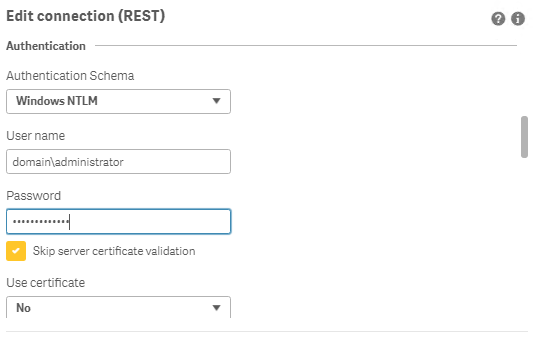
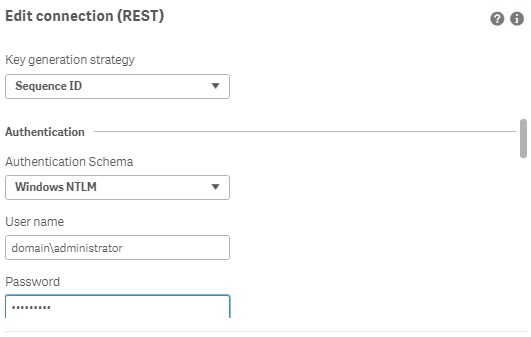
- Windows Authentication is required in both these connectors. The required user account is the NPrinting service account (which is also ROOTADMIN on the Qlik Sense server)
- This user account must also be a member of the NPrinting 'Administrators' Security Role on the NPrinting Server.
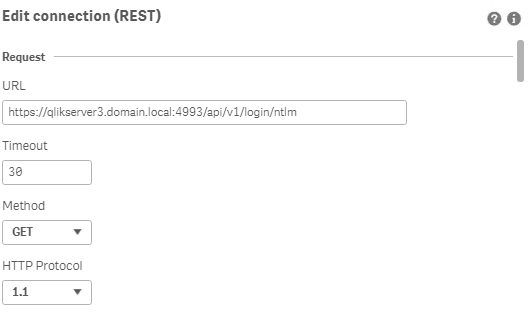
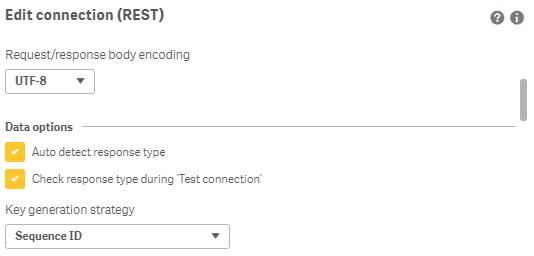
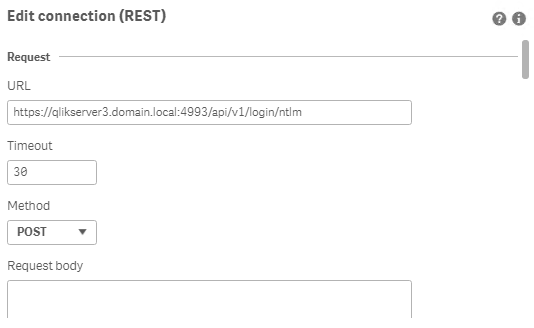
Creating REST "GET" connections
Note: Replace QlikServer3.domain.local with the name and port of your NPrinting Server
NOTE: replace domain\administrator with the domain and user name of your NPrinting service user account
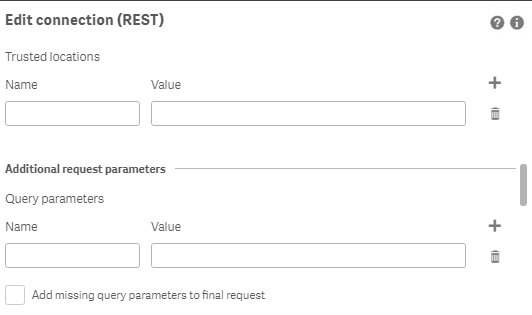
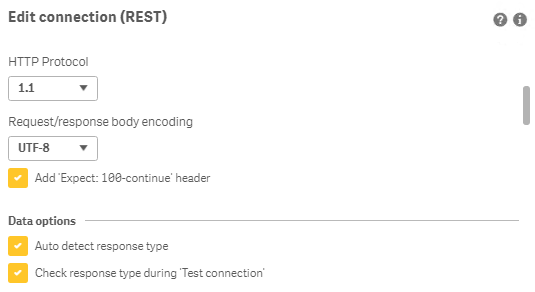
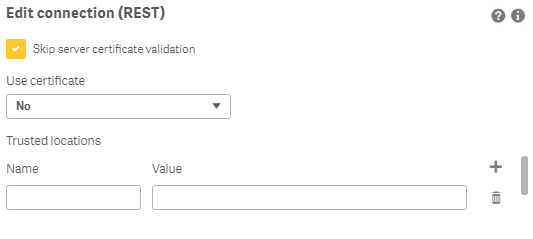
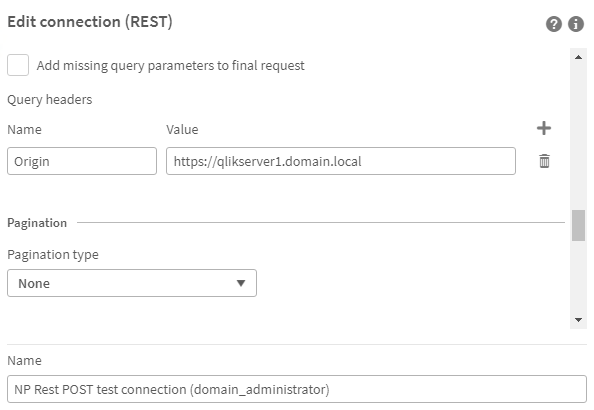
Creating REST "POST" connections
Note: Replace QlikServer3.domain.local with the name and port of your NPrinting Server
NOTE: replace domain\administrator with the domain and user name of your NPrinting service user account
Ensure to enter the 'Name' Origin and 'Value' of the Qlik Sense (or QlikView) server address in your POST REST connection only.
Replace https://qlikserver1.domain.local with your Qlik sense (or QlikView) server address.
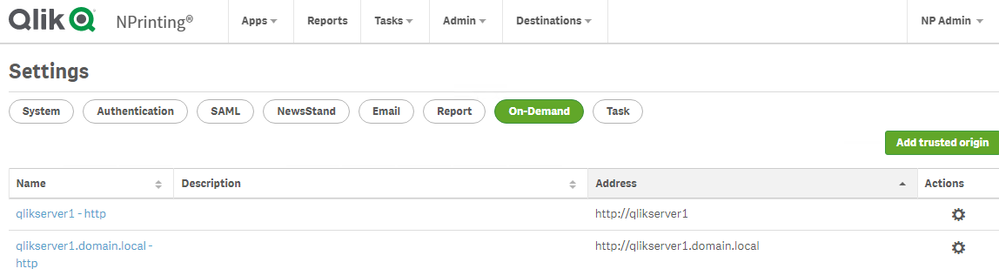
Ensure that the 'Origin' Qlik Sense or QlikView server is added as a 'Trusted Origin' on the NPrinting Server computer
Related Content
- Distribute NPrinting reports after reloading a Qlik App
- Extending Qlik NPrinting
- Run a Qlik NPrinting API POST command via QlikView reload script
- Troubleshooting Common NPrinting API Errors
NOTE: The information in this article is provided as-is and to be used at own discretion. NPrinting API usage requires developer expertise and usage therein is significant customization outside the turnkey NPrinting Web Console functionality. Depending on tool(s) used, customization(s), and/or other factors ongoing, support on the solution below may not be provided by Qlik Support.
-
How to audit how a Talend Remote Engines was unassigned from a cluster
Can a Talend Remote Engine be automatically unassigned from a cluster after a license change to convert it to a standalone Remote Engine? No. Licensin... Show MoreCan a Talend Remote Engine be automatically unassigned from a cluster after a license change to convert it to a standalone Remote Engine?
No. Licensing and engine configurations operate on separate layers within Qlik Talend Cloud. A change in licensing terms, conditions, or token balances will not automatically convert or modify a Talend Remote Engine Cluster into a single standalone Remote Engine.
The Remote Engine may have been removed following a user's action, which can be audited using the Talend Cloud Audit Logs.
Review the logs for the EventCategory - Remote Engine Cluster and the removeRemoteEngine operator. See Talend Cloud audit log contents | EventCategory - Remote Engine Cluster for details.
Environment
- Qlik Talend Cloud
-
Qlik Talend Studio SnowFlake JDBC URL for PrivateLink Connections
When connecting to Snowflake through PrivateLink, use the PrivateLink hostname returned by SYSTEM$GET_PRIVATELINK_COFIG() instead of the public Snowfl... Show MoreWhen connecting to Snowflake through PrivateLink, use the PrivateLink hostname returned by SYSTEM$GET_PRIVATELINK_COFIG() instead of the public Snowflake hostname.
If the Snowflake account was configured for PrivateLink with a different hostname, the following error will be logged:
Snowflake connection failed:-(java.lang.RuntimeException) net.snowflake.client.jdbc.SnowflakeSQLException: JDBC driver encountered communication error. Message: HTTP status=404.
The error is observed specifically after upgrading Qlik Talend Studio to patch R2026-01/02/03.
Cause
This is due to Enforcement of privatelink-only access, as documented in Enforcement of privatelink-only access | docs.snowflake.com.
Snowflake JDBC URLs require the region and privatelink components when connecting to a Snowflake account configured with PrivateLink (a private connectivity feature across AWS, Azure, or GCP), as this setup routes traffic through a secure, private endpoint through a proxy instead of the public internet.
Example:
jdbc:snowflake://<account>,<region>.privatelink.snowflakecomputing.com/?warehouse=WH1&db=DB1&role=ROLE1
Talend Studio Metadata connection:
The PrivateLink URL: https://<account>.<region>.privatelink.snowflakecomputing.com resolved to a private endpoint IP via VPC DNS.
Snowflake changed PrivateLink endpoint-discovery behaviour in the 2023_04 behaviour change release by expanding the SYSTEM$GET_PRIVATELINK_CONFIG and SYSTEM$ALLOWLIST_PRIVATELINK output, and later highlighted simplified DNS management for AWS PrivateLink in the 8.3 release notes.
Refer to January 22-23, 2024 — 8.3 Release Notes | docs.snowflake.com for details.
Environment
- Qlik Talend Studio
-
Qlik Sense Desktop custom installation shows only three connectors in the Novemb...
Qlik Sense Desktop version November 2025 does not list all expected connectors when installed using the custom installation option. Only ODBC, OLE DB,... Show MoreQlik Sense Desktop version November 2025 does not list all expected connectors when installed using the custom installation option.
Only ODBC, OLE DB, and Web file are listed:
Resolution
This is caused by SUPPORT-8669. Upgrade to Qlik Sense Desktop May 2026.
Workaround
Use the standard install option.
Internal Investigation ID(s)
- SUPPORT-8669
Environment
- Qlik Sense Desktop
-
Customizing Qlik Sense Enterprise on Windows Forms Login Page
Ever wanted to brand or customize the default Qlik Sense Login page? The functionality exists, and it's really as simple as just designing your HTML p... Show MoreEver wanted to brand or customize the default Qlik Sense Login page?
The functionality exists, and it's really as simple as just designing your HTML page and 'POSTing' it into your environment.
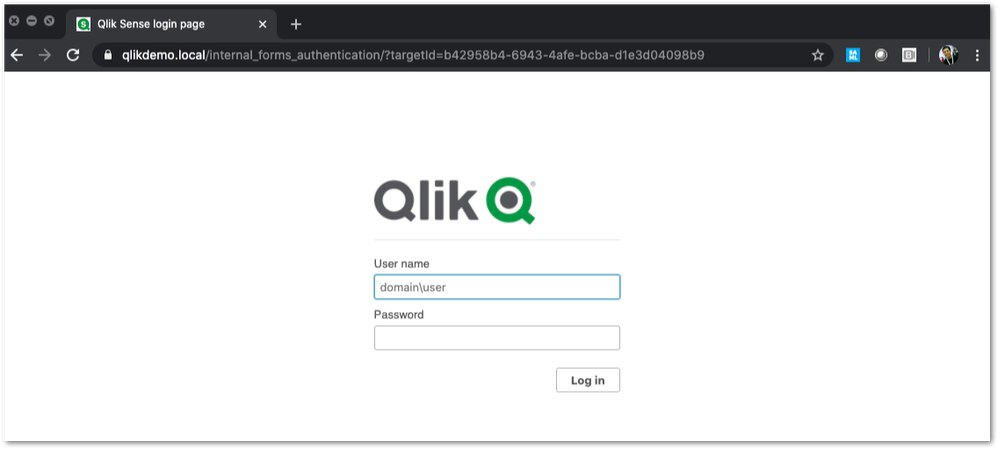
We've all seen the standard Qlik Sense Login page, this article is all about customizing this page.
This customization is provided as is. Qlik Support cannot provide continued support of the solution. For assistance, reach out to our Professional Services or engage in our active Integrations forum.
To customize the page:
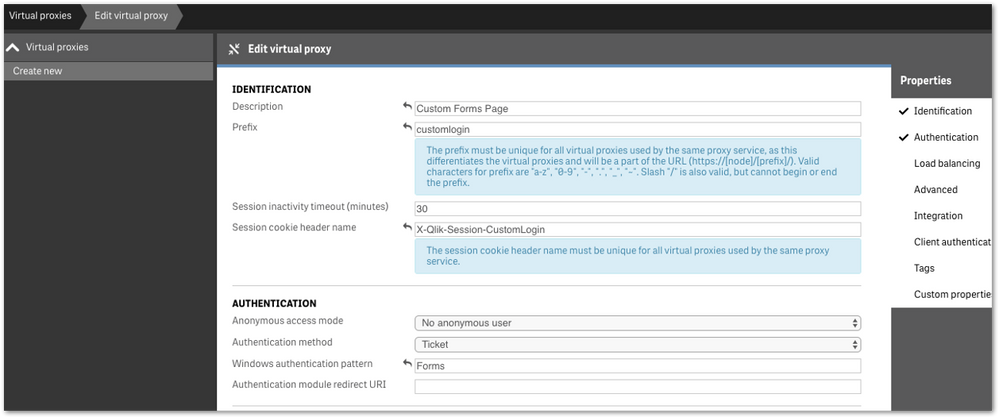
- We highly recommend setting up a new virtual proxy with Forms so you don't impact any users that are using auto-login Windows auth.
Example setup:
Description: Custom Forms Page
Prefix: customlogin
Session cookie header-name: X-Qlik-Session-CustomLogin
Windows authentication pattern: Forms - Once this is done, a good starting point is to download the default login page.
You can open up your web developer tool of choice, go to the login page, and download the HTML response from the GET http://<server>/customlogin/internal_forms_authentication request. It should be roughly a 273 line .html file. - Once you have this file, you can more or less customize it as much as you'd like.
Image files can be inlined as you'll see in the qlik default file, or can be referenced as long as they are publicly accessible. The only thing that needs to exist are the input boxes with appropriate classes and attributes, and the 'Log In' button. - After building out your custom HTML page and it looks great, it needs to be converted to Base64. There are online tools to do this, openssl also has this functionality.
Once you have your Base64 encoded HTML file, then you will want to PUT it into your sense environment. - First, do a GET request on /qrs/proxyservice and find the ID of the proxy service you want this login page to be shown for.
- You will then do a GET request on /qrs/proxyservice/<id> and copy the body of that response. Below is an example of that response.
{ "id": "8817d7ab-e9b2-4816-8332-f8cb869b27c2", "createdDate": "2020-03-23T15:39:33.540Z", "modifiedDate": "2020-05-20T18:46:13.995Z", "modifiedByUserName": "INTERNAL\\sa_api", "customProperties": [], "settings": { "id": "8817d7ab-e9b2-4816-8332-f8cb869b27c2", "createdDate": "2020-03-23T15:39:33.540Z", "modifiedDate": "2020-05-20T18:46:13.995Z", "modifiedByUserName": "INTERNAL\\sa_api", "listenPort": 443, "allowHttp": true, "unencryptedListenPort": 80, "authenticationListenPort": 4244, "kerberosAuthentication": false, "unencryptedAuthenticationListenPort": 4248, "sslBrowserCertificateThumbprint": "e6ee6df78f9afb22db8252cbeb8ad1646fa14142", "keepAliveTimeoutSeconds": 10, "maxHeaderSizeBytes": 16384, "maxHeaderLines": 100, "logVerbosity": { "id": "8817d7ab-e9b2-4816-8332-f8cb869b27c2", "createdDate": "2020-03-23T15:39:33.540Z", "modifiedDate": "2020-05-20T18:46:13.995Z", "modifiedByUserName": "INTERNAL\\sa_api", "logVerbosityAuditActivity": 4, "logVerbosityAuditSecurity": 4, "logVerbosityService": 4, "logVerbosityAudit": 4, "logVerbosityPerformance": 4, "logVerbositySecurity": 4, "logVerbositySystem": 4, "schemaPath": "ProxyService.Settings.LogVerbosity" }, "useWsTrace": false, "performanceLoggingInterval": 5, "restListenPort": 4243, "virtualProxies": [ { "id": "58d03102-656f-4075-a436-056d81144c1f", "prefix": "", "description": "Central Proxy (Default)", "authenticationModuleRedirectUri": "", "sessionModuleBaseUri": "", "loadBalancingModuleBaseUri": "", "useStickyLoadBalancing": false, "loadBalancingServerNodes": [ { "id": "f1d26a45-b0dd-4be1-91d0-34c698e18047", "name": "Central", "hostName": "qlikdemo", "temporaryfilepath": "C:\\Users\\qservice\\AppData\\Local\\Temp\\", "roles": [ { "id": "2a6a0d52-9bb4-4e74-b2b2-b597fa4e4470", "definition": 0, "privileges": null }, { "id": "d2c56b7b-43fd-44ad-a12f-59e778ce575a", "definition": 1, "privileges": null }, { "id": "37244424-96ae-4fe5-9522-088a0e9679e3", "definition": 2, "privileges": null }, { "id": "b770516e-fe8a-43a8-a7a4-318984ee4bd6", "definition": 3, "privileges": null }, { "id": "998b7df8-195f-4382-af18-4e0c023e7f1c", "definition": 4, "privileges": null }, { "id": "2a5325f4-649b-4147-b0b1-f568be1988aa", "definition": 5, "privileges": null } ], "serviceCluster": { "id": "b07fc5f2-f09e-4676-9de6-7d73f637b962", "name": "ServiceCluster", "privileges": null }, "privileges": null } ], "authenticationMethod": 0, "headerAuthenticationMode": 0, "headerAuthenticationHeaderName": "", "headerAuthenticationStaticUserDirectory": "", "headerAuthenticationDynamicUserDirectory": "", "anonymousAccessMode": 0, "windowsAuthenticationEnabledDevicePattern": "Windows", "sessionCookieHeaderName": "X-Qlik-Session", "sessionCookieDomain": "", "additionalResponseHeaders": "", "sessionInactivityTimeout": 30, "extendedSecurityEnvironment": false, "websocketCrossOriginWhiteList": [ "qlikdemo", "qlikdemo.local", "qlikdemo.paris.lan" ], "defaultVirtualProxy": true, "tags": [], "samlMetadataIdP": "", "samlHostUri": "", "samlEntityId": "", "samlAttributeUserId": "", "samlAttributeUserDirectory": "", "samlAttributeSigningAlgorithm": 0, "samlAttributeMap": [], "jwtAttributeUserId": "", "jwtAttributeUserDirectory": "", "jwtAudience": "", "jwtPublicKeyCertificate": "", "jwtAttributeMap": [], "magicLinkHostUri": "", "magicLinkFriendlyName": "", "samlSlo": false, "privileges": null }, { "id": "a8b561ec-f4dc-48a1-8bf1-94772d9aa6cc", "prefix": "header", "description": "header", "authenticationModuleRedirectUri": "", "sessionModuleBaseUri": "", "loadBalancingModuleBaseUri": "", "useStickyLoadBalancing": false, "loadBalancingServerNodes": [ { "id": "f1d26a45-b0dd-4be1-91d0-34c698e18047", "name": "Central", "hostName": "qlikdemo", "temporaryfilepath": "C:\\Users\\qservice\\AppData\\Local\\Temp\\", "roles": [ { "id": "2a6a0d52-9bb4-4e74-b2b2-b597fa4e4470", "definition": 0, "privileges": null }, { "id": "d2c56b7b-43fd-44ad-a12f-59e778ce575a", "definition": 1, "privileges": null }, { "id": "37244424-96ae-4fe5-9522-088a0e9679e3", "definition": 2, "privileges": null }, { "id": "b770516e-fe8a-43a8-a7a4-318984ee4bd6", "definition": 3, "privileges": null }, { "id": "998b7df8-195f-4382-af18-4e0c023e7f1c", "definition": 4, "privileges": null }, { "id": "2a5325f4-649b-4147-b0b1-f568be1988aa", "definition": 5, "privileges": null } ], "serviceCluster": { "id": "b07fc5f2-f09e-4676-9de6-7d73f637b962", "name": "ServiceCluster", "privileges": null }, "privileges": null } ], "authenticationMethod": 1, "headerAuthenticationMode": 1, "headerAuthenticationHeaderName": "userid", "headerAuthenticationStaticUserDirectory": "QLIKDEMO", "headerAuthenticationDynamicUserDirectory": "", "anonymousAccessMode": 0, "windowsAuthenticationEnabledDevicePattern": "Windows", "sessionCookieHeaderName": "X-Qlik-Session-Header", "sessionCookieDomain": "", "additionalResponseHeaders": "", "sessionInactivityTimeout": 30, "extendedSecurityEnvironment": false, "websocketCrossOriginWhiteList": [ "qlikdemo", "qlikdemo.local" ], "defaultVirtualProxy": false, "tags": [], "samlMetadataIdP": "", "samlHostUri": "", "samlEntityId": "", "samlAttributeUserId": "", "samlAttributeUserDirectory": "", "samlAttributeSigningAlgorithm": 0, "samlAttributeMap": [], "jwtAttributeUserId": "", "jwtAttributeUserDirectory": "", "jwtAudience": "", "jwtPublicKeyCertificate": "", "jwtAttributeMap": [], "magicLinkHostUri": "", "magicLinkFriendlyName": "", "samlSlo": false, "privileges": null } ], "formAuthenticationPageTemplate": "", "loggedOutPageTemplate": "", "errorPageTemplate": "", "schemaPath": "ProxyService.Settings" }, "serverNodeConfiguration": { "id": "f1d26a45-b0dd-4be1-91d0-34c698e18047", "name": "Central", "hostName": "qlikdemo", "temporaryfilepath": "C:\\Users\\qservice\\AppData\\Local\\Temp\\", "roles": [ { "id": "2a6a0d52-9bb4-4e74-b2b2-b597fa4e4470", "definition": 0, "privileges": null }, { "id": "d2c56b7b-43fd-44ad-a12f-59e778ce575a", "definition": 1, "privileges": null }, { "id": "37244424-96ae-4fe5-9522-088a0e9679e3", "definition": 2, "privileges": null }, { "id": "b770516e-fe8a-43a8-a7a4-318984ee4bd6", "definition": 3, "privileges": null }, { "id": "998b7df8-195f-4382-af18-4e0c023e7f1c", "definition": 4, "privileges": null }, { "id": "2a5325f4-649b-4147-b0b1-f568be1988aa", "definition": 5, "privileges": null } ], "serviceCluster": { "id": "b07fc5f2-f09e-4676-9de6-7d73f637b962", "name": "ServiceCluster", "privileges": null }, "privileges": null }, "tags": [], "privileges": null, "schemaPath": "ProxyService" } - In the response, locate the formAuthenticationPageTemplate field
- You can then take your base64 encoded HTML file, paste the value into the formAuthenticationPageTemplate field.
Example:
"formAuthenticationPageTemplate": "BASE 64 ENCODED HTML HERE",
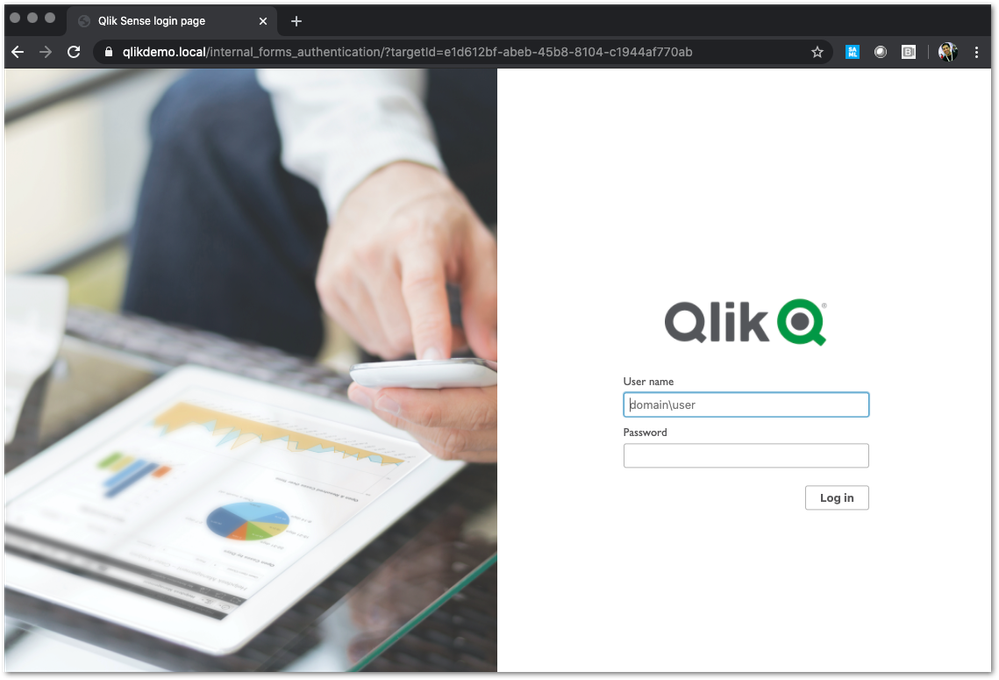
Once you have an updated body, you can use the PUT verb (with an updated modifiedDate) to PUT this body back into the repository. Once this is done, you should be able to goto your virtual proxy and you should see your new login page (very Qlik branded in this example):
If your login page does not work and you need to revert back to the default, simply do a GET call on your proxy service, and set formAuthenticationPageTemplate back to an empty string:
formAuthenticationPageTemplate": ""Environment:
- We highly recommend setting up a new virtual proxy with Forms so you don't impact any users that are using auto-login Windows auth.
-
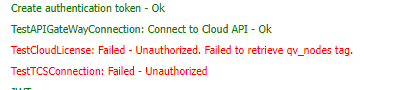
QlikView distribution to Qlik Cloud fails with "TestCloudLicense: Failed - Unaut...
The distribution of QlikView apps from QlikView Distribution Service to Qlik Cloud fails with the error "TestCloudLicense: Failed - Unauthorized. Fail... Show MoreThe distribution of QlikView apps from QlikView Distribution Service to Qlik Cloud fails with the error "TestCloudLicense: Failed - Unauthorized. Failed to retrieve qv_nodes tag."
Environment
Resolution
- The license used in Qlik Cloud is missing the QV_NODES tag, which allows the access to QlikView apps from Sense Deployments. For QlikView to distribute to a Qlik Cloud tenant, the tag must be present in the tenant license.
Please, reach out to your account manager to have that fixed.
- This issue could also occur if there are missing configuration entries in he QVDistributionService.exe.config file, refer to the following article QlikView Distribute to cloud fails: The type initializer for System.IdentityModel.Tokens.Jwt.JsonExtensions threw an exception.
-
Diagnose failed app reloads with AI and notify your team on Slack using Qlik Aut...
This article gives an overview of how to analyse failed app reloads with OpenAI using Qlik Automate, which is now available as a template. This templ... Show MoreThis article gives an overview of how to analyse failed app reloads with OpenAI using Qlik Automate, which is now available as a template.
This template is triggered when a Qlik Cloud app reload fails. It then analyzes the reload error with OpenAI and sends a Slack message with the app, space, reload details, and AI diagnosis. Session app and data preparation reloads are filtered out to focus on user-created script issues, keeping your alerts relevant and actionable.
This template is a good starting point if you want to:
- Automatically detect when an analytics app reload fails
- Get an instant AI-powered analysis of the likely root cause
- Notify your team in Slack with all the context they need
- Keep noise low by filtering out session app and data preparation reloads
- Maintain a clear automation run history through readable run titles
The template is available on the template picker. You can find it by navigating to Add new -> New automation -> Search templates, searching for Diagnose failed app reloads with AI and notify your team on Slack in the search bar, and clicking the Use template option.
You will find a version of this automation attached to this article: "Diagnose-failed-app-reloads-with -AI-and-notify-your-team-on-Slack.json".
Content
- What this template does
- Before you start
- Step-by-step walkthrough
- Step 1: App Reload Finished (Webhook event)
- Step 2: Condition: skip session apps
- Step 3: Get Current Tenant Info
- Step 4: Condition: check if a space exists
- Step 5: Get User
- Step 6: OpenAI: Chat Completion Message (prompt builder)
- Step 7: Variable: chatList (message formatter)
- Step 8: OpenAI Chat Completion (AI call)
- Step 9: Condition 3, check if the AI response is too long
- Step 10: Send the Slack Message
- Step 11: Output 3 (run output display)
- Step 12: Update Run Title and Update Run Title 2
- Customization ideas
- Tips for new users
- Troubleshooting
- Summary
What this template does
When an analytics app reload fails, the automation:
- Triggers on the App Reload Finished webhook event, filtered to analytics app reload errors only
- Ignores session app reloads
- Looks up tenant, user, and space details
- Sends the reload error details to OpenAI for analysis
- Posts the result to Slack
- Updates the run title so the automation run history is easier to scan
The Slack message includes:
- The app name with a direct link to the app
- The app reload ID for reference
- Space name and space type
- The time the reload failed
- Reload duration
- An Error code or codes
- The AI-generated diagnosis and suggested next steps
Before you start
Before using this template, make sure you have access to:
- Qlik Cloud Tenant with permission to create and run automations
- The OpenAI connection configured in your tenant
- The Slack connection configured in your tenant
Step-by-step walkthrough
Step 1: App Reload Finished (Webhook event)
This is the first block in the automation. It acts as the listener that starts the entire workflow.
How it works:
The block runs in webhook mode and listens for the App Reload Finished webhook event from the Qlik Cloud Services connector. The template uses an App ID guard in the event filter to prevent unnecessary webhook triggers: (App Ids eq "Specify_Your_App_Id_Here")
What you need to configure:
Event Filter: Pre-set to Reload status (A) as Failed (error) and Usage (B) as Analytics. Replace Specify_Your_App_Id_Here in the App Ids (C) parameter with your actual app Id during development.
When moving to production, either:
- Keep the App Ids filter to monitor only selected critical app(s)
- Keep the Space Ids filter to monitor apps that reside in specific space(s)
- Remove the App Ids and Space Ids clause to monitor all analytics apps in scope
Step 2: Condition: skip session apps
This block provides a second layer of filtering, specifically for session apps.
How it works:
Even though the App Reload Finished webhook event filter only includes analytics app reloads, session apps can still slip through because they share the Analytics usage type. This condition checks the app ID for the SessionApp_ prefix.
Session apps are temporary apps, primarily used by background system processes rather than front-end user consumption, so including them usually adds noise and low-value alerts.
Only include session app events if you intentionally create session apps through Qlik Cloud APIs. In that case, you should filter on the actor so that only your own generated events are processed.
Yes branch:
If the app is a session app, the automation stops early. The run title is updated to Analysis skipped (SessionApp) so the automation history clearly shows why no alert was sent.
No branch:
If the app is not a session app, the automation continues to the next blocks, where it gathers tenant, space, and user details before sending the failure analysis to OpenAI and posting the result to Slack.
What you need to configure:
- Nothing. This condition is pre-configured and requires no changes.
- Optional: If your use case depends on API-generated session apps, remove this exclusion and add an actor-based filter to avoid unrelated system events.
Step 3: Get Current Tenant Info
This block retrieves the hostname and other details about your Qlik Cloud tenant.
How it works:
The tenant hostname is later used to build a direct link to the failed app in the Slack message. Without this step, the link would be incomplete.
Step 4: Condition: check if a space exists
This block checks whether the failed analytics app reload came from an app that belongs to a space.
How it works:
It checks whether the space ID in the event payload is empty.
Yes branch:
If a space exists, the automation continues to the Get Space block. This block retrieves the name and type of the space where the analytics app lives. It uses the space ID from the App Reload Finished webhook event to look up the full space details, and it's stored in an object variable. The space name and type are included in the Slack message so your team immediately knows where the failed app is located.
No branch:
If no space exists, which means the app resides in the user's personal space, the automation creates a default object with the name Personal and type personal. This ensures the Slack message still has a space value to display, even when the app is in the user’s personal space.
What you need to configure:
Nothing. This condition is pre-configured and requires no changes.
Step 5: Get User
This block retrieves details about the user whose app reload failed.
How it works:
It uses the user ID from the App Reload Finished webhook event to look up user details. This information can be referenced in the Slack message and is useful if you want to escalate directly to the app owner or expand the notification with owner's contact information later.
Step 6: OpenAI: Chat Completion Message (prompt builder)
This block constructs the prompt that is sent to OpenAI.
How it works:
It formats the app reload error details from the App Reload Finished webhook event payload into a structured message and passes it to the OpenAI Chat Completion block.
The pre-written prompt instructs OpenAI to act as a senior Qlik Cloud Analytics engineer, identify the root cause of the app load script error, explain why it happened, and suggest the exact changes needed to fix it. Responses are capped at 800 characters and formatted as plain numbered paragraphs so they fit cleanly into a Slack message.
What you need to configure:
- Connection: Connect this block to your OpenAI connection.
- Content: The prompt is pre-written and ready to use. You can edit it if you want a different tone, more or less detail, or a different response format.
- Role (required parameter): Set the role value (for example, assistant). This is required for a valid chat message payload.
The role field is empty by default. The automation will fail at this step if you do not provide a role before running.
- Other optional parameters: Leave the optional fields (Name, Functional Call Arguments, Function Call Name) empty unless you have a specific advanced use case.
Step 7: Variable: chatList (message formatter)
This block bridges the prompt builder and the OpenAI Chat Completion block.
How it works:
The OpenAI Chat Completion block expects messages to be passed as a list, not a single object. This block first empties the chatList variable to make sure there is no leftover data from a previous run, then adds the response from the Chat Completion Message block as a new item in the list. The result is a properly formatted list that can be sent directly to the Chat Completion block.
What you need to configure:
Nothing. This block is pre-configured and works automatically based on the output of the previous step.
Step 8: OpenAI Chat Completion (AI call)
This block sends the prompt to OpenAI and receives the analysis response.
How it works:
It calls the OpenAI Chat Completion API using the message built in the previous step.
The token limit is pre-set to 300 to keep responses concise. It prevents the model from rambling, helps cap output length to reduce cost, and remains bounded by the selected model's own architectural limits. The model field is intentionally left blank so you can choose the model that suits your subscription.
We tested this template with the gpt-5.4-mini model, and it performed very well for reload-failure diagnosis. In most cases, lower-cost models are generally very effective at diagnosing.
What you need to configure:
- Connection: Make sure this block is connected to your OpenAI connection.
- Model (required parameter): Use the do lookup functionality to select the model from the options available for you, or enter the name of the model you want to use.
The model field is empty by default. The automation will fail at this step if you do not provide a model name before running.
- Other optional parameters: Keep defaults unless you need specific tuning.
Step 9: Condition 3, check if the AI response is too long
This block checks whether the AI response fits within the Slack message size limit before sending.
How it works:
It measures the character length of the OpenAI response. If the response is 2800 characters or more, the message is too long to be posted cleanly in Slack, so the automation takes a fallback path.
Yes branch, response is too long (≥ 2800 characters):
The output variable is set to a fallback message: "Generated message was too long. Refer to [link] for full response."
The link points directly to this automation run in the history page so the team can still access the full AI diagnosis.
No branch, response fits (< 2800 characters):
The output variable is set to the full AI response from OpenAI. This value is then used in the Slack message in the next step.
What you need to configure:
Nothing. This condition is pre-configured. You can adjust the 2800-character threshold if needed.
Step 10: Send the Slack Message
This block posts the App Reload failure notification along with AI diagnosis to your Slack channel.
How it works:
It formats all collected details into a single Slack message. The message contains:
- A red circle emoji as a visual alert indicator
- The app name as a clickable link to the app in Qlik Cloud
- The app reload ID
- The space name, space type, and space ID
- The time the reload failed
- The reload duration in seconds
- The error code or codes
- The AI diagnosis from the output variable — either the full response or the fallback link, depending on which branch was taken in Step 9
What you need to configure:
- Connection: Connect this block to your Slack connection.
- Channel (required parameter): Use the do lookup functionality to find the ID of the Slack channel or directly enter the ID of the Slack channel where alerts should be posted.
The channel field is empty by default. The automation will fail at this step if you do not provide a channel before running.
Step 11: Output 3 (run output display)
This block writes the full Slack message content to the automation run output so it is visible directly in the Output section of the automation run history.
How it works:
It captures and displays the exact same formatted message that was sent to Slack — including the app link, reload ID, space details, error code, and AI diagnosis. This means you can review what was sent without opening Slack, which is useful when debugging or auditing past runs.
Step 12: Update Run Title and Update Run Title 2
These two blocks make automation run history easy to scan without opening every run.
How it works:
- Update Run Title is used on the main processing path (non-session apps). It sets a clear run title like:
Assessed {app name} ({app id})
This tells you the reload failure was analyzed and an alert flow was executed. - Update Run Title 2 is used on the session-app skip path. It sets:
Analysis skipped (SessionApp)
This tells you the run intentionally exited early and did not send the full analysis flow.
Why this matters:
- Improves observability in run history
- Makes triage faster for support teams
- Distinguishes successful analysis runs from intentionally skipped runs
What you need to configure:
- Nothing. Both blocks are pre-configured.
- Optional: You can customize the title text to include the app owner or severity labels.
Customization ideas
You can modify this automation to match your specific requirement:
- Change the destination channel: send alerts to a different communication channel, like Microsoft Teams
- Add escalation steps: end email or Microsoft Teams alerts for critical apps or production spaces
- Adjust the AI prompt: make the response shorter, more technical, or tailored to your load script conventions
- Filter by app or space: extend the App Reload Finished webhook event filter to only alert for specific production apps or managed spaces
- Connect to a ticketing system: automatically create incidents in ServiceNow or Jira for severe app reload failures
Tips for new users
- Test the automation on a non-production analytics app first.
- Keep the AI prompt concise and specific so responses stay focused.
- Make sure all connectors are authenticated before running the template.
- Check the automation run history if the Slack message is missing or incomplete.
- Review the AI response for accuracy. It is designed to start the investigation, not replace your own validation.
Troubleshooting
The automation does not send a Slack message:
- Confirm the reload event had Reload status eq "Failed (error)" and Usage eq "Analytics".
- Verify the Slack and OpenAI connections are authenticated and valid.
- Check that the user running the automation has access to the app and space.
The AI response is too long:
- The template falls back to a run history link, which is expected behavior and avoids message truncation.
A reload you expected to see was not processed:
- Check whether the app is a session app. It will be skipped.
- Verify the reload was an analytics app reload and not a data preparation reload. Data preparation reloads are excluded at the webhook level.
- Confirm the event filter on the webhook block is correct.
Summary
This template gives you a focused, low-noise starting point for AI-assisted analytics app reload failure handling in Qlik Cloud. By filtering to analytics app errors only and excluding both session apps and data preparation reloads, it keeps alerts relevant and actionable. Teams can respond faster to app load script issues by receiving a clear Slack notification with context and an AI diagnosis the moment something goes wrong. You can modify the automation by adjusting the AI prompt, changing the destination channel, or adding escalation steps such as email or Microsoft Teams alerts.
-
Talend Remote Engine logs filled with message: org.apache.karaf.main.lock.Simple...
After the Talend Remote Engine goes down, the Remote Engine logs repeatedly show the same message in TalendRemoteEngine/data/log/karaf.log: org.apache... Show MoreAfter the Talend Remote Engine goes down, the Remote Engine logs repeatedly show the same message in TalendRemoteEngine/data/log/karaf.log:
org.apache.karaf.main.lock.SimpleFileLock lock INFO: Lock failed
Resolution
To resolve this, verify ownership and permissions of the application files, remove stale lock files, and restart the Talend Remote Engine:
- Ensure that the dedicated Talend user and group have full recursive ownership over the application files to prevent any permission-related runtime errors:
sudo chown talenduser:talendgroup /opt/talend/TalendRemoteEngine -R
Adjust the absolute path `/opt/talend/` if your installation directory differs. - Stop the Talend Remote Engine Service:
sudo systemctl stop talend-remote-engine.service
- Manually purge the stale or unsynced lock file that is blocking the engine startup:
rm /opt/talend/TalendRemoteEngine/lock
- Restart the Talend Remote Engine Service. The engine will automatically generate a fresh, synced lock file upon a successful boot.
sudo systemctl start talend-remote-engine.service
Cause
An unexpected downtime or sudden disconnection of the Talend Remote Engine (RE) left the application's file lock (TalendRemoteEngine/lock) in an unsynced or stale state. Because the container detected this pre-existing lock file upon recovery, it assumed another process was already running, subsequently blocking all other dependent modules and services from initializing.
Environment
- Talend Remote Engine
- Ensure that the dedicated Talend user and group have full recursive ownership over the application files to prevent any permission-related runtime errors:
-
High Security fix for Qlik NPrinting (CVE-pending)
Executive Summary A security issue has been identified in Qlik NPrinting, and patches have been made available. If the vulnerability is successfully ... Show MoreExecutive Summary
A security issue has been identified in Qlik NPrinting, and patches have been made available. If the vulnerability is successfully exploited, the issue could lead to a compromise of the server running the Qlik NPrinting software, including unauthenticated remote code execution (RCE).
Affected Software
All versions of Qlik NPrinting prior to and including these releases are impacted:
- Qlik NPrinting February 2025 SR5
Severity Rating
Using the CVSS V3.1 scoring system (https://nvd.nist.gov/vuln-metrics/cvss), these issues are rated HIGH.
Vulnerability Details
(CVE-pending) OP-1018, Remote Code Execution (RCE) via Insecure Deserialization (TypeNameHandling.Auto)
Severity: CVSS:3.1/AV:N/AC:H/PR:H/UI:N/S:C/C:H/I:H/A:N 7.7(High)
Authenticated developers and administrators with network access may be able to execute arbitrary OS commands in Qlik NPrinting.
Resolution
Recommendation
Customers should upgrade Qlik NPrintings to a version containing the necessary fix. The fix is available for the following versions:
- Qlik NPrinting May 2026 IR
- Qlik NPrinting February 2025 SR 6
All Qlik software can be downloaded from our official Qlik Download page (customer login required).
-
Qlik Talend Studio: Resolve Git Lock File Conflict GitBaseRepositoryFactory.upda...
Qlik Talend Studio was successfully set up on a virtual machine (VM). After cloning the VM, opening Qlik Talend Studio fails to open projects, instead... Show MoreQlik Talend Studio was successfully set up on a virtual machine (VM). After cloning the VM, opening Qlik Talend Studio fails to open projects, instead erroring out with:
An error occured:
'void org.talend.repository.gitprovider.core.GitBaseRepositoryFactory.updateLockStatus()'
Resolution
To fix the error, shut down Qlik Talend Studio first, then delete all .lock files found inside the .git directories.
The git lock files are found in the workspace for Qlik Talend Studio:
- <talend_workspace>/.git/index.lock
- <talend_workspace>/.git/refs/heads/<branch>.lock
- <talend_workspace>/.git/HEAD.lock
- <talend_workspace>/.git/config.lock
- Check nested project repositories for additional files
Cause
The GitBaseRepositoryFactory.updateLockStatus() error commonly occurs due to stale Git lock files that were copied along with the VM snapshot.
When the VM was snapshotted or copied, Qlik Talend (or its embedded Git) was likely mid-operation or simply had lock files present. These .lock Files are now orphaned on the cloned VM, and Git thinks a process is holding a lock, but no such process exists.
Related Content [can be removed if not necessary]
[Paragraph format. Link to related content, such as articles, community posts, Help articles, etc...]
Internal Investigation ID(s) [can be removed if not necessary]
[Paragraph format with internal investigation IDs (e.g Jira case ID(s)) ]
Environment
- Qlik Talend Studio
-
Qlik Replicate Endpoint Server fails to start with Curl Status 3 Error due to /t...
The Qlik Replicate Endpoint Server fails to start. The error may occur after an upgrade or initial installation and presents with the following error:... Show MoreThe Qlik Replicate Endpoint Server fails to start. The error may occur after an upgrade or initial installation and presents with the following error:
Failed to curl_easy_perform: curl status = 3, URL using bad/illegal format or missing URL ()
Resolution
To resolve this issue, redirect the Java temporary directory to an alternative location that allows execution:
- Create a new temporary directory and ensure the Qlik Replicate user has full read/write/execute permissions:
-
mkdir -p /att_tmp
-
chmod 755 /att_tmp
-
chown attunity:attunity /att_tmp
-
- Navigate to the Qlik Replicate bin directory:
cd /opt/attunity/replicate/endpoint_srv/bin
- Back up the original script before editing:
cp rependctl.sh rependctl.sh.bak
- Open the script with a text editor:
vi rependctl.sh
- Locate the Java execution line at the end of the file (starts with "${AT_JAVA}").
- Add the -Djava.io.tmpdir=/<your_new_tmp_directory> parameter into the statement.
Example after modification:
"${AT_JAVA}" -XX:+UseG1GC -Djava.io.tmpdir=/att_tmp -Dfile.encoding=UTF-8 ${AT_JVM_OPT} -cp "${AT_CP}" "${AT_MAIN}" -d "${AT_DATA}" -plugins "${AT_PLUGIN_LIST}" "${@:1}" - Save the changes, exit the editor, and restart the Qlik Replicate services.
Cause
The Qlik Replicate Endpoint Server utilizes the default system /tmp directory to unpack and execute temporary binary files or scripts during startup. If the /tmp filesystem is mounted with the noexec parameter (typically for security hardening in /etc/fstab), or if there are restrictive permissions on the /tmp folder, the application will be blocked from executing these files, causing the initialization to fail.
Internal Investigation ID(s)
00397473
Environment
- Qlik Replicate
- Create a new temporary directory and ensure the Qlik Replicate user has full read/write/execute permissions: