Unlock a world of possibilities! Login now and discover the exclusive benefits awaiting you.

- Qlik Community
- :
- Search the Community
- :
- Re: Need to color code cells based on Year Range
Options
- Subscribe to RSS Feed
- Mark Topic as New
- Mark Topic as Read
- Float this Topic for Current User
- Bookmark
- Subscribe
- Mute
- Printer Friendly Page
Turn on suggestions
Auto-suggest helps you quickly narrow down your search results by suggesting possible matches as you type.
Showing results for

 sdmech81
Specialist
2021-11-08
05:04 AM
- Mark as New
- Bookmark
- Subscribe
- Mute
- Subscribe to RSS Feed
- Permalink
- Report Inappropriate Content
Need to color code cells based on Year Range
HI,
We have data like below (sample data )
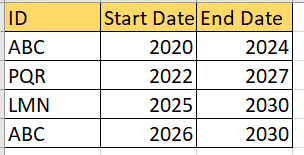
The expected results is as below: (We need to color fill based on condition the background in Table using above data.)

looking for working solutions. Thanks
988 Views
2 Replies

 AshutoshBhumkar
Partner - Specialist
2021-11-08
05:59 AM
- Mark as New
- Bookmark
- Subscribe
- Mute
- Subscribe to RSS Feed
- Permalink
- Report Inappropriate Content
Hello,
Maybe below sample will help.
Table:
Load * Inline [
ID, Start, End
ABC,2020,2024
PQR,2022,2027
LMN,2025,2030
ABC,2026,2030
];
NoConcatenate
Table2:
Load
ID,
Start + IterNo() - 1 as StartEnd
Resident Table
While IterNo() <= End - Start + 1 ;
DROP Table Table;
Exit Script;
Output:
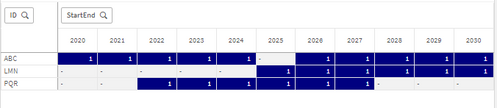
Row : ID
Column : StartEnd
Values : Count(StartEnd)
Background Color of Values : If(Count(StartEnd)>0,Blue())
Thanks,
Ashutosh
sdmech81
Specialist
2021-11-09
03:52 AM
Author
- Mark as New
- Bookmark
- Subscribe
- Mute
- Subscribe to RSS Feed
- Permalink
- Report Inappropriate Content
Thanks ..its works
938 Views

Community Browser
-
Qlik Community
- Agentic AI Hub
- Forums
- Support
- Blogs
- Discover
- Events
- Blogs & Events
- Community Sitemap
- All Forums
- Qlik Connect 2026
- Subprocessors List